

Getting Started
Welcome to Composer
Composer pairs naturally with the Vindral Live CDN to deliver an end-to-end, ultra-low-latency streaming workflow — the use case it was originally built for in iGaming, live dealer games, and live events, but the same architecture suits any 24/7 live production.
Composer at a glance
- Real-time compositing of unlimited video layers, GPU-accelerated.
- Professional chroma key — HSV Keyer, IBK 3D Keyer, Spill Suppression, Difference Matte.
- Color correction and grading — color curves, LUTs, white balance, regional contrast, plus 50+ image-enhancement operators.
- Visual effects (operators) — blurs, glows, edge detection, and more.
- AI features — Crystal Speech, LLM (Ollama), Roulette Wheel Tracker (V-Track Roulette), Object Detection, Image Classification, Text To Speech (ElevenLabs), Speech To Text, and more.
- Camera capture over SDI (Blackmagic Decklink), HDMI, ST 2110, NDI, plus virtual sources (web pages, generators).
- Media playback of files in modern codecs — H.264/265, ProRes, DNxHD, CAV, AV1, and more.
- Multiple output formats — RTMP, SRT, MoQ (Media over QUIC), NDI, SDI, file recorders, ASIO audio.
- Template-based composition — duplicate a base scene as branded variants with their own targets, using nested scenes.
- Built for 24/7 reliability — designed to stay up under continuous live production load.
- Audio mixer — built-in console with built-in DSP per channel strip: trim, channel mapping, EQ, gating, dynamics, sidechain ducking, limiting, and more.
- Script Engine — JavaScript runtime for in-project automation and event handlers, giving you fine-grained control with per-frame logic and animations.
- Monitoring — for production-grade observability and alerting, with a Prometheus metrics endpoint and Loki log shipping for Grafana dashboards.
- Cloud, on-premises, and hybrid deployment — the headless Composer Runtime runs on bare metal, Docker, AWS g5 instances, and more.
- Integration — extensive APIs and WebSocket support for external automation, control surfaces, and live event streams.
Two ways to run Composer
Composer ships in two complementary forms:
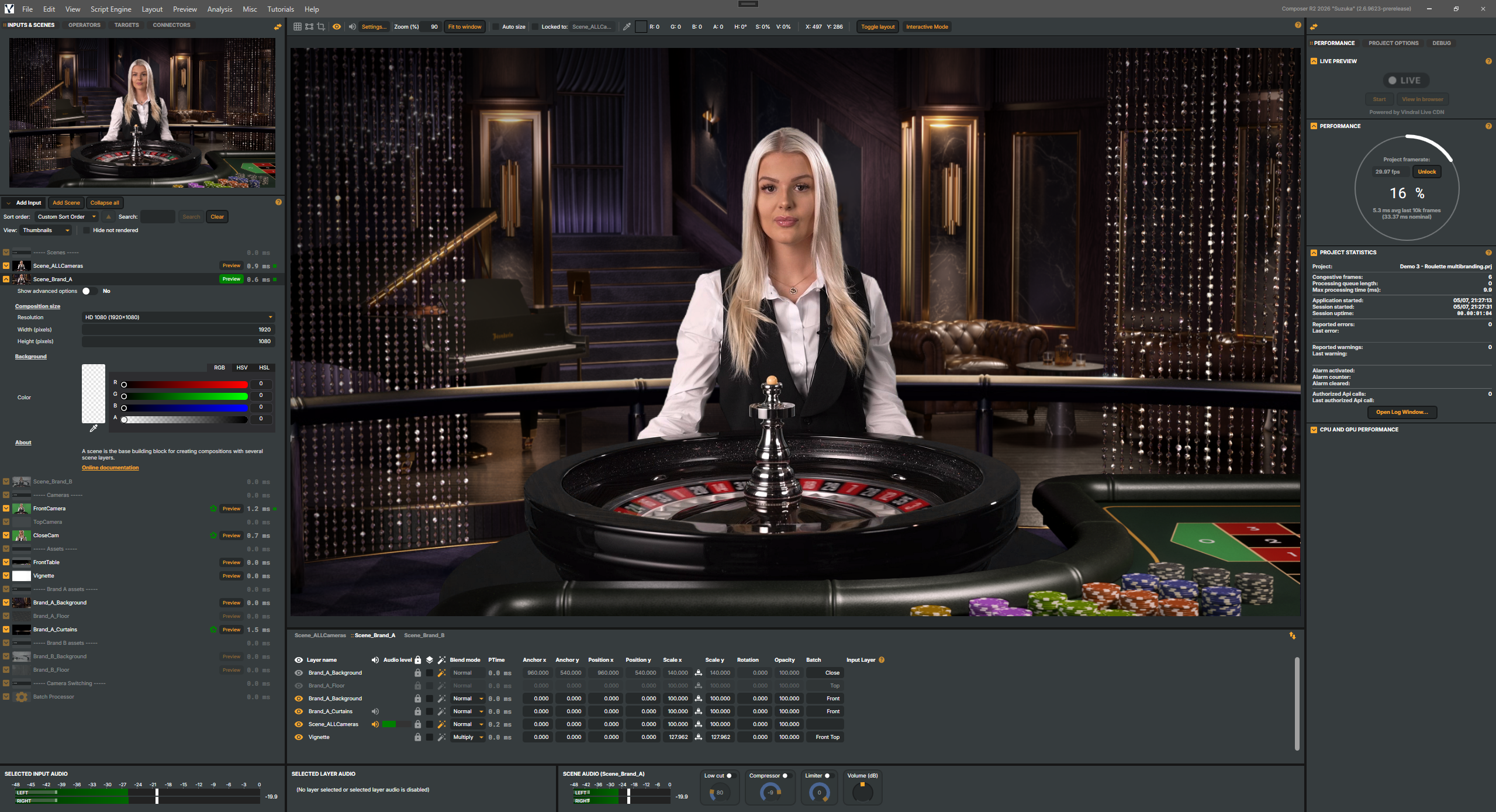
- Composer Desktop — the Windows authoring application. You build projects here: lay out scenes, place layers, choose inputs and targets, configure operators, write scripts. Desktop is also a fully-featured live operator console: once a project is open, Desktop can drive a live show by itself.
- Composer Runtime — the headless playback engine. Runtime opens a Desktop-authored project and runs it from the command line with no UI. Runtime is what most production deployments actually run; it's available on Windows and Linux. Control happens over the HTTP API, Runtime API, and WebSocket event stream. For installation, command-line arguments, configuration, and licensing details see the Composer Runtime manual.
Licensing
Composer is licensed software, available to registered customers and evaluators. Two no-cost options are available alongside the paid tiers:
- Core — a free, capped tier intended for getting to know Composer and for small/personal productions. It still requires a (free) signed license file from RealSprint. Most features are available, but with hard limits on the number of scenes, inputs, targets, connectors and Decklink inputs, and the integration surface (HTTP/Runtime APIs, Prometheus, WebSockets, plugin loading) is disabled. The optional VTrack and Crystal Speech addons run in 2-hour demo bursts per session.
- Trial — runs without any license file, but the output is watermarked, the runtime expires after a random short period (2–24 hours), and a startup dialog reminds you you're in trial mode. Trial is not licensed for commercial use.
To request access to a paid tier, contact RealSprint via support.realsprint.com. See Activating a license below for the activation flow and a full restrictions table.
What's in this manual
This manual is the on-ramp for new users — what Composer is, what hardware it needs, how to install it on Windows or Linux, how to activate a licence, how Composer manages your media, and how to find and download the tutorial projects from RealSprint. Once you're up and running, the User Guide walks through the Desktop UI and common workflows in depth, and the Tutorials and How-to videos give you guided, worked examples to learn from.
The rest of the documentation is organised by what you're trying to do:
- Build a project. The component reference covers every building block: Inputs (sources), Operators (video/audio processing), and Targets (outputs). The User Guide ties them together with workflow guidance.
- Automate and integrate. The Integration & Runtime manual is the starting point — it explains when to reach for the HTTP API, Runtime API, WebSockets, Connectors, or the Script Engine. The Script Engine Objects and Datatypes catalogues are the type-level reference behind the scripting and API surfaces.
- Deploy and operate. Composer Runtime covers headless playback (install, command-line arguments, containers); Operations & Tuning covers hardware sizing and live-production tuning; Composer Monitor covers Grafana / Loki / Prometheus observability; and Settings documents every configuration option.
- Stay current and unblocked. The Release Notes track what changed in each release, and FAQ & Troubleshooting collects symptom → cause → fix runbooks.
If you already know Composer and just want a feature reference, jump straight to the Inputs, Operators, Targets, or Script Engine manuals.