

Starglow
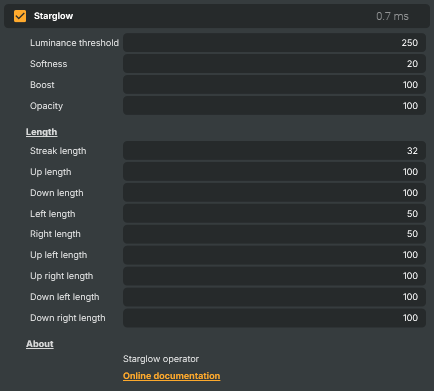
Turns bright highlights in the picture into star-shaped or cross-shaped glints with streaks radiating outward. Useful for adding sparkle to chrome, jewellery, or stage lights, giving candle and Christmas-light footage a magical look, faking a diffusion or starburst lens filter, dressing up product shots, and adding atmosphere to night scenes or musical performances. Each of the eight streak directions can be tuned independently for asymmetric effects (e.g. only horizontal streaks for an anamorphic vibe).
Starglow - Settings
| Property | Description |
|---|---|
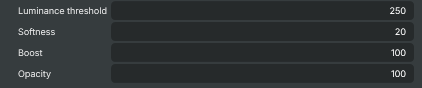
Luminance threshold |
Brightness level above which a pixel becomes a star source. [min=128, max=255, default=250]. Lower values let dimmer highlights produce streaks (more stars, busier picture). Higher values restrict streaks to only the brightest pixels for a cleaner look. |
Softness |
Softness of the brightness threshold. [min=0, max=64, default=20]. 0 gives a hard cut-off — pixels are either star sources or not. Higher values fade the effect in around the threshold so streaks ramp up smoothly with brightness. |
Boost |
Overall streak intensity. [min=0, max=100, default=100]. 0 produces no streaks. Higher values brighten and intensify the star streaks. |
Opacity |
Opacity of the underlying image, percent. [min=0, max=100, default=100]. 100 keeps the original picture fully visible underneath the streaks. Lower values fade the source so only the streaks remain prominent — useful for stylised glow-only looks. |
Length
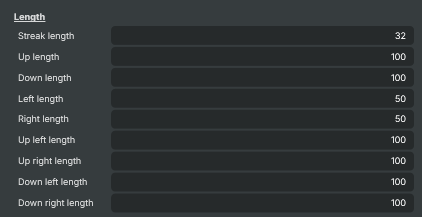
Length — overall streak length plus per-direction trims for shaping the star.
| Property | Description |
|---|---|
Streak length |
Maximum streak length in pixels. [min=4, max=128, default=32]. Acts as the master length for all eight directions. Higher values give long, dramatic star rays; lower values produce short, sparkle-like glints. |
Up length |
Length of the upward streak as a percentage of StreakLength. [min=0, max=100, default=100]. 0 disables the upward ray. 100 uses the full streak length. |
Down length |
Length of the downward streak as a percentage of StreakLength. [min=0, max=100, default=100]. 0 disables the downward ray. 100 uses the full streak length. |
Left length |
Length of the left-pointing streak as a percentage of StreakLength. [min=0, max=100, default=50]. 0 removes the left ray. Set the four cardinal directions equal for a classic plus-shape. |
Right length |
Length of the right-pointing streak as a percentage of StreakLength. [min=0, max=100, default=50]. |
Up left length |
Length of the diagonal up-left streak. [min=0, max=100, default=100]. Adjust the four diagonals (up-left, up-right, down-left, down-right) to switch between a 4-point cross and an 8-point starburst look. |
Up right length |
Length of the diagonal up-right streak. [min=0, max=100, default=100]. |
Down left length |
Length of the diagonal down-left streak. [min=0, max=100, default=100]. |
Down right length |
Length of the diagonal down-right streak. [min=0, max=100, default=100]. |
Inherits from: AbstractOperator, AbstractAudioMetering.
See also: Starglow in Script Engine Objects.