

SRT Target
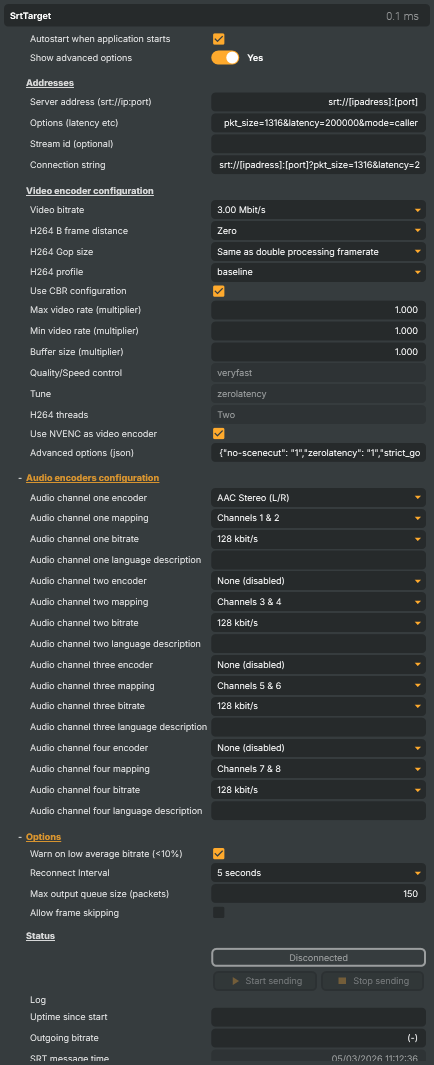
Introduction
The SRT Target streams the composed scene out over SRT (Secure Reliable Transport) — the broadcast-industry standard for delivering live video and audio over unmanaged IP networks. SRT layers packet-loss recovery, retransmission, and accurate timestamping on top of UDP, so a feed survives the kind of packet drop and jitter that would simply collapse an RTMP stream. It's the right pick for any link that crosses the public internet, a 4G / 5G uplink, or any other network you don't fully control.
The target supports both connection directions, multi-program audio for multi-language broadcasts, the same x264 / NVENC encoder paths as the RTMP Target, and a deep set of resilience and diagnostic controls. To consume an SRT stream produced by another Composer (or any third party), pair this target with the SRT Input.
Why SRT (and when to reach for it)
SRT is purpose-built for live contribution over networks Composer doesn't own. Pick it over RTMP when any of these apply:
- The link crosses the public internet — bonded mobile modems, hotel WiFi, distant VPN tunnels. SRT's loss recovery keeps the feed up where RTMP would drop within seconds.
- You need low, bounded latency. SRT lets you configure a fixed end-to-end latency budget (typically 120–500 ms); the receiver waits exactly that long for retransmits before delivering the frame, so the glass-to-glass delay stays predictable even when the network gets noisy.
- Encryption is required. SRT supports AES-128 / AES-256 encryption out of the box via a
passphraseURL parameter — no TLS terminator or VPN required. - You need multiple language programs in one stream. SRT carries up to four parallel AAC audio programs in a single MPEG-TS payload; downstream players pick the program by language tag.
For a stable studio-LAN delivery to a CDN ingest, RTMP is still simpler. For everything else outside the studio, SRT is the safer bet.
Common use cases
- Studio-to-cloud contribution — push a composed programme feed from a production facility into a cloud encoder / decoder for further distribution.
- Remote venue uplinks — a stand at a sports venue, conference, or outside-broadcast truck pushing back to base over a public network or 4G/5G bond.
- Point-to-point links between facilities — two Composer instances (or a Composer and a hardware decoder) glued together over the open internet without provisioning dedicated lines.
- Multi-language broadcasts — encode the source plus multiple commentary tracks as separate AAC programs so a single SRT stream covers every audience.
- Resilient backup feeds — run the SRT Target in parallel with an RTMP Target so a network blip doesn't take the whole programme off air.
What you can control
Connection — caller, listener, and encryption
- Server address — base SRT URL in
srt://host:portform. The host is the remote endpoint when running in caller mode, or the local listening interface when running in listener mode. - Connection options — query string appended after
?. Common keys:mode=caller(Composer dials the receiver) ormode=listener(Composer waits for the receiver to dial in).latency=200000(microseconds — typical 120–500 ms; raise on noisy links).pkt_size=1316(default; aligns with the standard MPEG-TS-over-UDP MTU).passphrase=...(turns on AES encryption).streamid=...(stream identifier — many cloud SRT ingests require this).
- Stream id — the same streamid value can be entered in its own field for ingest endpoints that prefer a separate parameter.
- Connection string — read-only readout of the fully resolved SRT URL Composer is dialling, useful for verifying that base + options + stream id assembled into the URL the receiver expects.
- Autostart — when enabled, the target connects (or starts listening) automatically when the project loads.
Video encoding
The SRT Target shares its video-encoder pipeline with the RTMP Target — two paths, mix-and-match across multiple instances:
- x264 (CPU) — software H.264 with the standard set of speed/quality presets, tuning profiles, and thread-count control.
zerolatencytune is the right default for SRT contribution. - NVENC (GPU) — hardware H.264 on dedicated NVIDIA encoder silicon. Doesn't compete with the GPU's general compute (so the rest of the pipeline keeps its budget) and substantially lowers CPU load. The full advanced NVENC parameter block is editable as a JSON object for power users.
- Bitrate, GOP, B-frames, profile — every standard H.264 knob is exposed, with sensible SRT-friendly defaults (CBR, baseline profile, GOP at 2× framerate, no B-frames).
- CBR rate-control with min/max multipliers — SRT receivers prefer constant bitrate; the multipliers let you cap how far above or below the target the encoder is allowed to wander when pure CBR is too restrictive.
Multi-program audio (up to four AAC programs)
This is where the SRT Target goes beyond RTMP. The target encodes up to four parallel AAC programs into a single SRT stream, each independently configured:
- Encoder mode per program — Mono, Stereo, or Unused. Set the slot to Unused to disable that program entirely.
- Channel mapping per program — pick which pair of the 8-channel scene audio bus feeds this program (channels 1/2, 3/4, 5/6, or 7/8). Lets you carry, e.g., the international feed on channels 1/2 and a per-language commentary mix on each remaining pair.
- AAC bitrate per program — typical 128 kbit/s for stereo, 64 kbit/s for mono.
- Language tag per program — ISO 639 language code (e.g.
eng,spa,fra,deu) embedded in the MPEG-TS so a downstream player can offer language selection.
The result is a single SRT contribution stream that carries the programme video plus a multi-language audio bouquet, ready for separate downstream distribution.
Resilience and diagnostics
- Auto-reconnect — configurable retry interval after a dropped connection. Keeps the target trying through transient outages without operator intervention.
- Output queue size cap — bounds how many encoded packets are queued for the network. A persistently full queue indicates the uplink can't keep up with the encoder.
- Frame-skipping policy — when on, lets Composer drop frames when the queue overflows rather than letting end-to-end latency grow unbounded.
- Per-second bitrate logging — optional CSV trace of outgoing bitrate samples for after-the-fact analysis of network behaviour.
- Live diagnostics — outgoing bitrate, video encode time (last/avg/max), network write time, video frame size statistics, output queue depth, reconnect count, error/warning counters with timestamps. All surfaced as readable properties; useful in both the property panel and over the HTTP API / WebSockets.
- Low-bitrate warning — fires automatically if the actual outgoing bitrate falls below 10% of the configured target, catching a network collapse before the operator notices visually.
Listener-mode workflow
When mode=listener is set, Composer binds to the configured port and waits for an SRT receiver to dial in (the inverse of the more common caller-mode pattern). Useful when:
- The receiver lives behind a firewall that doesn't allow inbound connections from Composer's network, but Composer's network does allow inbound connections.
- A floating set of receivers needs to pull from a single Composer source on demand.
- You want to validate a stream locally with
ffplayorsrt-live-transmitbefore hooking up the real receiver.
SRT Target - Settings

| Property | Description |
|---|---|
Autostart when application starts |
When On, the SRT target connects automatically when the project loads. |
Show advanced options |
Reveals advanced/expert properties in the panel (encoder tuning, reconnect tuning, debug counters). Off by default. |
Addresses
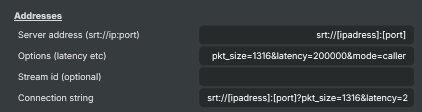
Addresses — SRT URL components (server, options, stream id) and the assembled connection string.
| Property | Description |
|---|---|
Server address (srt://ip:port) |
Base SRT URL in srt://host:port form. The host can be an IP, a DNS name, or a macro: @@LocalIP() resolves to this machine's local IP, @@HostName() to the machine name. For listener mode (receiver dials in to us) typically point to 0.0.0.0. Treat as sensitive when targeting private cloud ingest. |
Options (latency etc) |
SRT URL query parameters appended after ?. Common keys: mode=caller\|listener, latency=200000 (microseconds — typical 120–500 ms), pkt_size=1316, passphrase=..., streamid=.... Tune latency higher for noisy links, lower for low-glass-to-glass delivery. |
Stream id (optional) |
Optional SRT stream id (also called streamid). Many cloud ingests (Haivision Hub, Wowza, Cloudflare, AWS Elemental) require this for routing — receivers identify the publisher by this string. Treat as sensitive. |
Connection string |
The full SRT URL Composer will dial, assembled from SrtBaseAddress, SrtOptions, and SrtStreamKey (read-only). Useful for verifying the resolved URL before connecting. |
Video encoder configuration
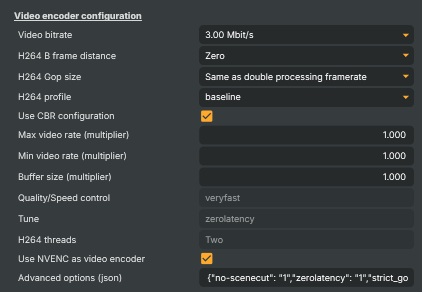
Video encoder configuration — bitrate, codec settings, NVENC vs CPU H.264.
| Property | Description |
|---|---|
Video bitrate |
Target video bitrate. Match this to the available uplink bandwidth and the receiver's configured input. Typical values: 3 Mbit/s for 1080p contribution, 1.5 Mbit/s for 720p, 6+ Mbit/s for high-quality contribution feeds. |
H264 B frame distance |
(advanced) Number of B-frames between reference frames in each GOP. Higher values improve compression efficiency at the cost of latency and decoder compatibility — set to Zero for low-latency contribution and live broadcast. |
H264 Gop size |
(advanced) GOP (Group of Pictures) length in frames — controls keyframe spacing. Typical values: 1x or 2x framerate (e.g. 30 or 60 frames at 30 fps). Shorter GOPs recover faster from packet loss but cost compression efficiency. |
H264 profile |
(advanced) H.264 profile (baseline, main, high). baseline is most universally compatible; main/high deliver better compression at the cost of decoder support on legacy devices. |
Use CBR configuration |
(advanced) When On, sends with constant bitrate (CBR) — preferred for SRT contribution because most receivers and decoder appliances expect a steady rate. When Off, the encoder uses VBR which can starve under-provisioned links. |
Max video rate (multiplier) |
(advanced) Multiplier on the configured bitrate that limits how high the encoder is allowed to swing. Default 1.0 — increase only if your network can absorb peaks. |
Min video rate (multiplier) |
(advanced) Multiplier on the configured bitrate that sets the floor (minimum). Default 1.0 — keep at 1.0 for true CBR; lower for more freedom on simple scenes. |
Buffer size (multiplier) |
(advanced) Multiplier on the encoder's rate-control buffer size. Default 1.0 — larger buffers smooth out bitrate at the cost of latency. |
Quality/Speed control |
(advanced) x264 speed/quality preset. veryfast/superfast are the right pick for live encoding — slower presets give better quality but won't keep up in real time. |
Tune |
(advanced) x264 tuning preset. Use zerolatency for live contribution to remove any look-ahead delay from the encoder. |
H264 threads |
(advanced) Number of CPU threads used by the software H.264 encoder. More threads = lower per-frame latency but higher CPU. Ignored when NVENC is enabled. |
Use NVENC as video encoder |
(advanced) When On, encode using the NVIDIA hardware encoder (NVENC) — much lower CPU load and recommended for any machine with a recent NVIDIA card. When Off, fall back to the software (x264) encoder. |
Advanced options (json) |
(advanced) NVENC encoder parameters as a JSON object. Tweak only when you know what you're doing — defaults are tuned for low-latency live contribution. Keys map directly to NVENC options (preset, rc, gpu, delay, etc.). |
Audio encoders configuration
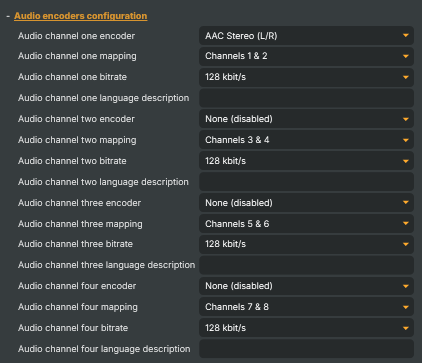
Audio encoders configuration — up to four AAC programs (e.g. multi-language audio).
| Property | Description |
|---|---|
Audio channel one encoder |
AAC encoder mode for audio program 1 (mono, stereo, or unused). Set to Unused to skip this audio program. Program 1 is normally the main mix. |
Audio channel one mapping |
Selects which scene audio channel pair is encoded into program 1 (e.g. OneTwo, ThreeFour). Use this to route specific scene channels to specific SRT programs — typically 1+2 for the main mix. |
Audio channel one bitrate |
AAC bitrate for audio program 1. Typical values: 128 kbit/s for stereo broadcast, 64 kbit/s for mono commentary. |
Audio channel one language description |
ISO 639 language tag (e.g. eng, spa, fra) embedded in program 1's metadata. Player UIs use this to label the audio track in language pickers. |
Audio channel two encoder |
AAC encoder mode for audio program 2. Set to Unused if you only need a single audio program. Otherwise pick mono/stereo to suit the source mix. |
Audio channel two mapping |
Scene audio channel pair routed to program 2. Often used for an alternate-language commentary feed (e.g. channels 3+4). |
Audio channel two bitrate |
AAC bitrate for audio program 2. |
Audio channel two language description |
ISO 639 language tag for program 2 (e.g. spa for Spanish). |
Audio channel three encoder |
AAC encoder mode for audio program 3. Set to Unused if not needed. |
Audio channel three mapping |
Scene audio channel pair routed to program 3 (e.g. channels 5+6). |
Audio channel three bitrate |
AAC bitrate for audio program 3. |
Audio channel three language description |
ISO 639 language tag for program 3. |
Audio channel four encoder |
AAC encoder mode for audio program 4. Set to Unused if not needed. |
Audio channel four mapping |
Scene audio channel pair routed to program 4 (e.g. channels 7+8). |
Audio channel four bitrate |
AAC bitrate for audio program 4. |
Audio channel four language description |
ISO 639 language tag for program 4. |
Options
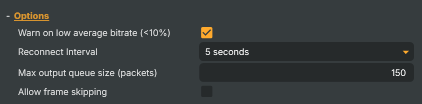
Options — output buffering, reconnect tuning, alternate connection mode.
| Property | Description |
|---|---|
Warn on low average bitrate (<10%) |
(advanced) When On, raise a warning if the outgoing bitrate falls below 10% of the configured target — usually a sign the encoder is starving or the network is congested. |
Reconnect Interval |
(advanced) How long to wait between reconnect attempts after a dropped SRT connection. Five seconds is a sensible default. |
Max output queue size (packets) |
(advanced) Maximum number of encoded packets queued for the network before back-pressure triggers. [min=150, max=500, default=150]. Larger queues hide brief network slowdowns at the cost of added latency. |
Allow frame skipping |
(advanced) When On, allow Composer to drop frames if the output queue fills up — preserves stream continuity on a slow link at the cost of brief visual stutter. |
Status
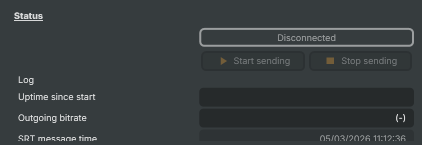
Status — connection state, start/stop, log feed, error/warning counters.
| Property | Description |
|---|---|
ConnectionStatus |
Current SRT connection status (Disconnected, Connecting, Connected, Reconnecting). Read-only. Useful in scripts to gate downstream actions on a live link. |
Start |
Connects to the SRT receiver (or starts listening for a caller in listener mode) and begins streaming. |
Stop |
Stops the encoder and tears down the SRT connection. |
Reconnect |
Forces an immediate reconnect of the live SRT connection without stopping the target. API-only and hidden from the UI; invoke via /api/invokecommand with command ReconnectCommand. Only executable while connected. |
Log |
In-panel mini-log of recent connection events, warnings, and errors. Quick way to see what the SRT writer last reported without opening the full log file. |
Uptime since start |
How long this target has been streaming, formatted as HH:MM:SS (read-only). |
Outgoing bitrate |
Current outgoing bitrate as a human-readable string (e.g. "3.0 Mbit/s"). Read-only. Use to verify the stream is actually pushing data over the wire. |
SRT message time |
Timestamp of the most recent log entry (read-only). |
Number of audio channels used |
Summary of how many audio programs the encoder has bound (read-only). Useful in scripts to confirm the multi-language setup is active. |
Performance and properties
Performance and properties — bitrate stats, queue sizes, encoder/network timings.
| Property | Description |
|---|---|
Number of reconnects |
Number of automatic reconnects since the target started (read-only). A growing number means the link is unstable — check network or receiver logs. |
Current SRT endpoint |
The fully resolved SRT URL Composer is currently dialling, with all macros (@@LocalIP(), @@HostName()) expanded (read-only). |
Error counter |
Cumulative count of errors logged since the target started (read-only). Pair with LastErrorDateTime in scripts to flag fresh errors. |
Last Error DateTime |
Timestamp of the most recent error (read-only). |
Warning counter |
Cumulative count of warnings since the target started (read-only). |
Last Warning DateTime |
Timestamp of the most recent warning (read-only). |
Inherits from: AbstractTarget.
See also: SRT Target in Script Engine Objects.
Related components
- SRT input — the receiver-side counterpart. Use it when Composer consumes an SRT stream rather than producing one.
- SRT Target — 16 channel audio — variant for projects whose audio bus is wider than 8 channels; same protocol surface, extended channel mapping.
- RTMP Target — pick this when the destination is a managed-network ingest (CDN, RTMP origin, third-party live platform); simpler protocol, less robust on bumpy links.
- RTMP input — the RTMP receiver-side for ingesting an RTMP stream.
- MoQ Target — pick this for publishing into the Vindral CDN over MoQ for sub-second latency, in place of an SRT receiver.
- MoQ input — the MoQ receiver-side for ingesting from a Vindral CDN channel.
- NDI Target — pick this for studio-LAN publishing; mDNS auto-discovery and lower latency than SRT, but not designed to traverse the public internet.
- NDI input — the NDI receiver-side for studio-LAN contribution.