

Activating a license
Composer requires one valid licence per running instance. Trial mode runs without a licence but has restrictions:
- A random session length between 2 and 24 hours, after which the runtime stops.
- A watermark on every output target.
- A startup dialog reminding you you're in trial mode.
- Not licensed for commercial use.
Once you have a licence key from RealSprint, paste it into the licence dialog the first time Composer starts:
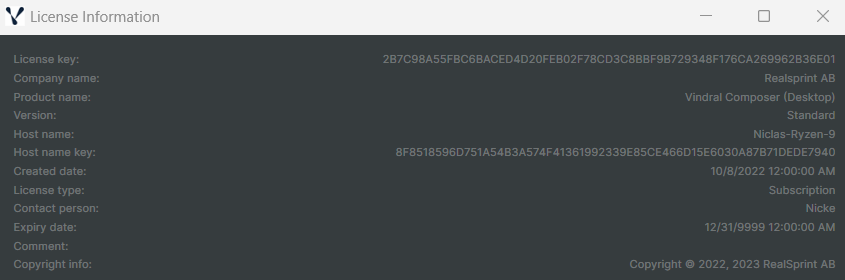
Composer activates by posting the key to https://license.vindral.com. The activation server records the activation against your account and returns a signed token Composer caches locally. As long as the token is valid, Composer will run; it re-validates with the licence server periodically.
Licence types
| Type | Restrictions | Output |
|---|---|---|
| Trial | 2–24h sessions, watermarked, not for commercial use | Watermarked |
| Core | Hard caps on scenes / inputs / targets / connectors / Decklinks; integration APIs disabled; VTrack and Crystal Speech run for 2 h per session; Desktop only (no Runtime executable) | Clean |
| Evaluation | Customer-specific expiry, full features | Clean, but not for commercial use |
| Subscription | 12-month term | Clean, full commercial use |
Core licence (free)
Core is a no-cost tier aimed at users who want to learn Composer or run small/personal productions, and as a starting point for evaluating an upgrade. Activation requires registering for a Core licence file (free, but you must request it; online registration and email confirmation are required).
A Core licence imposes the following hard caps on a project:
| Resource | Core limit |
|---|---|
| Targets (outputs) | 1 |
| Inputs (assets) | 40 |
| Scenes | 4 |
| Connectors | 2 |
| Decklink (Blackmagic) capture inputs | 2 |
In addition, on a Core licence:
- The integration surface is disabled. The HTTP API, Runtime API, Prometheus metrics endpoint, WebSocket server, and plugin loading from the plugins folder are all turned off at startup.
- VTrack (Roulette / Wheel) operators and Crystal Speech run for 2 hours per Composer session. After the budget is spent the affected operators are automatically bypassed and a notice is logged. Restarting Composer resets the budget.
- The headless Composer Runtime is not available.
VindralComposerRuntime.exerefuses to start under a Core licence; use Composer Desktop instead. - MoQ output and the Script Engine remain fully available so you can still build and drive non-trivial projects.
Loading a project that exceeds any Core cap is refused with a dialog explaining which limit was hit. New scenes / inputs / targets / connectors that would exceed a cap are blocked at the UI and the API with a clear message; nothing fails silently.
To remove these restrictions, contact RealSprint to upgrade to an Evaluation, Subscription, or full licence.
Offline activation
Composer can run on an air-gapped host with an offline-activation flow — RealSprint can issue a token that doesn't require periodic check-ins to license.vindral.com. Configure offline mode through settings.xml; see the settings.xml reference for the relevant properties. Trial mode also works offline (subject to its other restrictions).
For licence-related failures (activation rejected, key expired, moving a licence between hosts) see Licence or activation problems in the Troubleshooting manual.