

NDI Target
Introduction
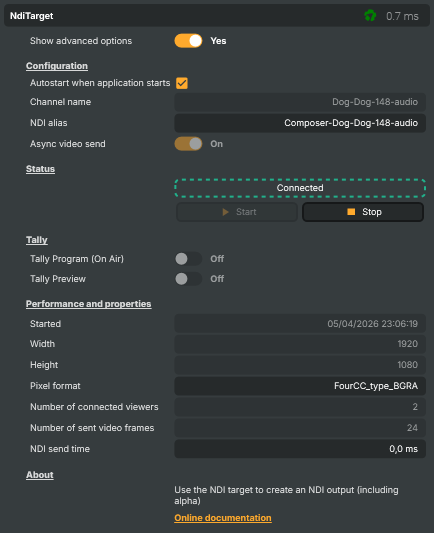
The NDI Target sends the composed video and audio out as an NDI source on the local network. Other NDI-aware tools — vision mixers, hardware switchers, monitoring stations, replay systems, downstream Composer instances — discover the source automatically and consume it like any other camera or feed on the studio LAN. It's the inverse of the NDI input: same protocol, same discovery, data flowing the other way.
Reach for NDI Target whenever the receiver is on the same network. For internet-bound delivery, use the SRT Target or RTMP Target instead — NDI's low-latency advantage is built around LAN-class connectivity and isn't intended to traverse the public internet.
What is NDI?
For the protocol-level overview — what NDI is, why it dominates broadcast LAN transport, the NDI / NDI HX bandwidth modes, and the free NDI Tools bundle — see the NDI input introduction. All of it applies to the sender side too. The short version:
- Designed by NewTek, now maintained by Vizrt. Universal IP-video transport for broadcast and live production.
- Automatic discovery via mDNS — receivers find your Composer source without manual IP / port entry, identifying it by its Channel name.
- Bidirectional metadata + tally — downstream NDI receivers can flip your Composer source's tally light when the source goes on Program / Preview.
- Standard tooling — every modern broadcast tool (vMix, OBS, Wirecast, TriCaster, hardware switchers) speaks NDI; pointing them at a Composer NDI Target is plug-and-play.
Common use cases
- Production switcher hand-off — Composer renders the graphics + composited program; an NDI-capable vision switcher (vMix, OBS, TriCaster, hardware) consumes the result on the studio LAN.
- Multi-machine workflows — one Composer renders, another encodes / streams; one renders for production, another for confidence monitoring; etc. NDI is the cheap glue between them.
- Monitoring on remote workstations — drop a Studio Monitor instance on any LAN-connected machine to watch the Composer feed without provisioning an SDI return path.
- Alpha-channel hand-off to downstream compositors — NDI carries 4-channel BGRA, so animated graphics with transparency can flow as keys to a downstream chroma-keyer / mixer without bake-in.
- Composer-to-Composer — one Composer authors graphics, a second composites them on top of a live programme; both see the same source the same way over NDI.
- Local recording — pair the NDI Target with a tool like NDI Tools' Recorder or any NDI-aware DVR to capture a high-quality LAN copy of the composed output.
Driving from outside
Every command (Start, Stop) is invokable from the property panel, the HTTP API (/api/invokecommand?targetname=NDI+Target&command=StartCommand), a Connector, or the Script Engine via ExecuteCommand / ExecuteCommandById. The connection status, current Channel name, and full NDI alias (the network identifier downstream receivers see) are surfaced as readable properties so dashboards and scripts can confirm the source is live without watching the network directly.
NDI Target - Settings

| Property | Description |
|---|---|
Show advanced options |
Reveals advanced/expert properties in the panel. Off by default — flip to On to see fields like async send and detailed performance counters. |
Configuration
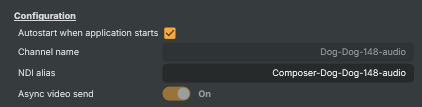
Configuration — channel name and start-up behaviour for the NDI sender.
| Property | Description |
|---|---|
Autostart when application starts |
When On, the NDI target connects automatically when the project loads. Useful for unattended studio machines or automation rigs. |
Channel name |
Channel name advertised on the network. Receivers see the source as Composer-[ChannelName] (or with the machine name prefixed by their NDI client). A random name is generated for each new target so multiple instances don't clash. Pick something descriptive (e.g. studio-a-pgm) so operators can identify the feed at a glance. Can only be changed before the target has been started. |
NDI alias |
The full NDI source identifier as it appears on the network — read-only, derived from the channel name. Use this when configuring an NDI receiver that needs the exact source string. |
Async video send |
(advanced) Sends video frames asynchronously when On (default). The NDI SDK handles color conversion and network transmission in the background, returning immediately so the pipeline keeps moving. Especially helpful for BGRA (alpha) output. Switch to Off only for debugging or when a downstream tool requires strict synchronous timing. Can only be changed while the target is disconnected. |
Status
Status — current connection state and the start/stop controls.

| Property | Description |
|---|---|
ConnectionStatus |
Current connection status (Disconnected, Connecting, Connected). Read-only; useful in scripts to gate logic on whether the NDI source is live. |
Start |
Begins advertising the source on the network so receivers can pick it up. |
Stop |
Stops the NDI sender and removes the source from the network. |
Tally
Tally — read-only on-air / preview indicators set by downstream NDI receivers.

| Property | Description |
|---|---|
Tally Program (On Air) |
(advanced) On when a downstream NDI receiver currently has this source on Program (on-air). Read-only — the value is set by the receiver, not by Composer. Useful in scripts to drive on-air indicator lights, switch input states, or guard against destructive edits while live. |
Tally Preview |
(advanced) On when a downstream NDI receiver currently has this source cued on Preview. Read-only — set by the receiver. Useful for soft preview indicators in operator UIs. |
Performance and properties
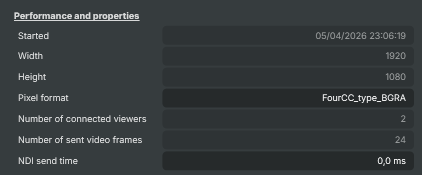
Performance and properties — runtime stats: viewer count, frame size, send timing.
| Property | Description |
|---|---|
Started |
Timestamp of when the target last started broadcasting (read-only). Useful in scripts for computing uptime or stamping logs. |
Width |
Output frame width in pixels (read-only). Matches the scene resolution. |
Height |
Output frame height in pixels (read-only). Matches the scene resolution. |
Pixel format |
(advanced) Pixel format used on the wire (read-only, debug). Typically BGRA so alpha is preserved for downstream keyers. |
Number of connected viewers |
Number of NDI receivers currently subscribed to this source (read-only). Use in scripts to confirm at least one downstream tool is actually consuming the feed. |
Number of sent video frames |
(advanced) Total number of video frames sent since the target was started (read-only, debug). Combined with uptime this gives an effective FPS. |
NDI send time |
(advanced) Time spent on the most recent frame send call, in milliseconds (read-only, debug). Spikes here usually mean a slow receiver or saturated network. |
Inherits from: AbstractTarget.
See also: NDI Target in Script Engine Objects.
Related components
- NDI input — the receiver-side counterpart. Use it when Composer consumes an NDI feed rather than publishing one.
- SRT Target — pick this when the receiver is off the studio LAN; SRT survives the kind of packet loss that breaks NDI, with bounded latency and optional encryption.
- SRT input — the SRT receiver-side for incoming contribution over unmanaged networks.
- RTMP Target — the RTMP sender-side for pushing to a CDN, RTMP origin, or third-party live platform.
- RTMP input — the RTMP receiver-side for ingesting an RTMP stream.
- MoQ Target — the MoQ sender-side. Use it to publish a Composer scene into the Vindral CDN over MoQ.
- MoQ input — the MoQ receiver-side for ingesting from a Vindral CDN channel.