

MoQ Target
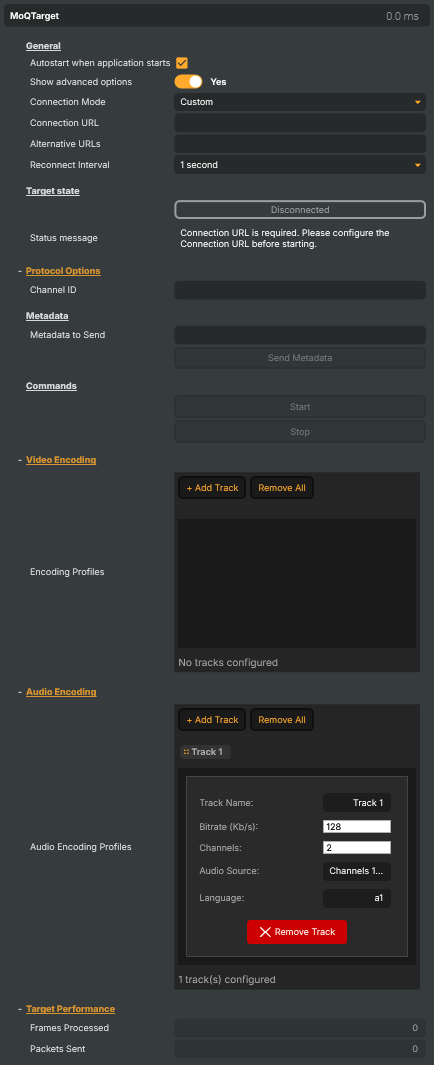
Introduction
The MoQ Target is Composer's publishing endpoint for the Vindral CDN over MoQ (Media over QUIC) — the IETF's emerging real-time streaming protocol that replaces the round-trip latency and connection-fragility quirks of RTMP with a QUIC-native publish-subscribe model. The target encodes the rendered scene into one or more configurable video and audio profiles, multiplexes them into a MoQ track, and publishes to a Vindral channel addressed by a Channel ID + Stream Key pair.
Why MoQ
- Sub-second glass-to-glass latency in the right network conditions — the protocol's QUIC backbone removes the buffering that RTMP / HLS chains accumulate.
- Native multi-track publishing — video + audio + alternate-language audio all ride on the same MoQ session as separate tracks the player can subscribe to independently. No remuxing, no separate parallel streams.
- Graceful recovery on lossy or changing networks — when a connection drops, the target reconnects automatically on a configurable interval instead of requiring the manual restart RTMP relies on.
- Authenticated publish via Stream Key — the same credential model used by every other Vindral CDN tool, so the publish side fits the rest of the workflow.
When to Use MoQ Target
Multi-bitrate streaming:
Configure multiple video tracks at different resolutions and bitrates for adaptive playback.Multi-language audio:
Add multiple audio tracks with different language codes and channel configurations. Video, audio, and alternate-language audio all ride the same MoQ session as separate tracks the player can subscribe to independently. No remuxing, no separate parallel streams.Vindral LiveCloud delivery:
Stream content to the Vindral Live CDN for global distribution with ultra-low latency.Advanced audio routing:
Combine main audio bus channels with Audio Channel Strip sources across tracks.Publishing over unstable networks:
On a connection drop the target re-establishes the session automatically on a configurable interval — combined with Alternative-URL failover, the publish chain self-heals through transient outages instead of waiting for a manual restart.
Setup
Add MoQ Target to your project outputs.
Select connection mode:
Choose Auto (Vindral CDN) to have the target build the publish URL automatically from the Channel ID and Stream Key, pointing at the standard Vindral ingest — the right choice for most deployments. Choose Custom to enter the full Connection URL yourself.Configure credentials:
Enter your Stream Key (Auto mode), or the Connection URL and Channel ID (Custom mode). For high availability, add Alternative URLs (semicolon-separated) that the target cycles through on a connection failure, with a configurable Reconnect Interval between attempts.Add video encoding tracks:
Configure one or more video tracks with bitrate, resolution, and codec settings.Configure audio encoding tracks:
Set up audio tracks with channel mapping, bitrate, and language metadata.Start streaming:
Use the Start command to begin streaming.
MoQ Target - Settings
General
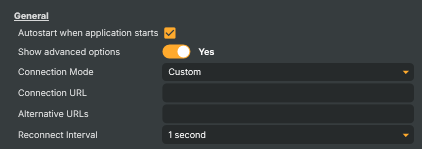
General — autostart, advanced visibility, debug logging, connection mode and URL.
| Property | Description |
|---|---|
Autostart when application starts |
When true, the target connects automatically as soon as the project loads. [default=true]. The recommended setting for most live workflows — the stream comes up the moment Composer is running. Disable for targets that should be triggered manually (e.g. only during specific show segments) or that need to wait for an external readiness signal before connecting. |
Show advanced options |
Show or hide the target's advanced settings in the editor UI. [default=false]. |
Connection Mode |
How the ingest URL is determined. [default=Custom]. Auto resolves the URL automatically from MoqStreamKey against the Vindral CDN's traffic router — the simplest setup for Vindral customers. Custom lets you point at any compatible MoQ relay by setting SinkUrl directly (and optionally a list of AlternativeIngestUrls for failover). |
Connection URL |
Destination URL for the stream — the MoQ relay endpoint to publish to. In Auto connection mode this is filled in automatically from MoqStreamKey and is effectively read-only. In Custom mode set this manually to point at a specific MoQ relay (for example a privately hosted relay or a non-default Vindral region). Treat the URL as sensitive — it can encode the publishing credentials and shouldn't be committed to public project files. Macros like @@LocalIP() and @@HostName() may be used inside the URL. |
Alternative URLs |
(advanced) Semicolon-separated list of fallback ingest URLs to cycle through on connection failure. On a connection drop the target rotates through these URLs (after the primary SinkUrl) before retrying the primary, giving you redundancy across multiple relays or regions. Format example: https://relay-a.example.com/path;https://relay-b.example.com/path. Only used in Custom connection mode. |
Reconnect Interval |
How long to wait between reconnect attempts after a connection failure. [default=OneSecond]. Shorter intervals recover faster from transient network blips but hammer the relay if the issue is persistent. Longer intervals are gentler on the network but mean more black/silent time on air. One second is a sensible default for live broadcasts. |
Target state
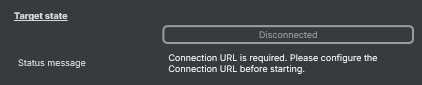
Target state — live readouts of the connection status and any error message.
| Property | Description |
|---|---|
ConnectionStatus |
Current connection status of the MoQ session (read-only). Disconnected — not currently connected. Connecting — handshake in progress. Connected — actively publishing. Reconnecting — connection dropped, retrying. Useful from a script for triggering UI indicators, alerts, or fallback routes when the stream goes off-air. |
Status message |
Most recent status or error message from the target (read-only). Reflects what the target is currently doing or what went wrong on the last connection attempt. Error-typed messages also drive the on-screen warning indicator. Read this from a script to surface detailed reasons for a stream failure instead of just the boolean ConnectionStatus. |
Protocol Options
Protocol Options — Channel ID and Stream Key used by the MoQ sink for publishing.

| Property | Description |
|---|---|
Channel ID |
Vindral CDN channel ID (also called the namespace) under which this stream is published. Required for the MoQ sink. In ConnectionMode.Auto this is filled in automatically from the traffic router's response to MoqStreamKey. In Custom mode it must be set manually to match the channel registered with the CDN. Receivers tune to the stream by referencing this same Channel ID. |
Stream Key |
Authentication key used by the MoQ sink to authorise publishing to the configured channel. Required for the MoQ sink. In ConnectionMode.Auto setting this also kicks off automatic resolution of MoqChannelId and the ingest URL via the Vindral traffic router. Treat the Stream Key as a secret — do not commit project files containing real keys to public repositories. |
Metadata
Metadata — inject side-channel data (text, JSON, cue points, ad markers) alongside the stream.

| Property | Description |
|---|---|
Metadata to Send |
Free-form text or JSON payload to inject into the stream the next time SendMetadataCommand runs. Useful for sending cue points, ad-break markers, scoring updates, or any structured side-channel data that downstream players can read. Delivery is one-shot per SendMetadataCommand invocation — the same value is not resent automatically. Set from a script for automation-driven cues. |
Send Metadata |
Transmit the current MetadataToSend value as a side-channel packet on the active MoQ session. Increments MetadataSentCounter on success. Only enabled while the target is connected and MetadataToSend is non-empty. |
Commands
Commands — start and stop the MoQ session.

| Property | Description |
|---|---|
Start |
Connect to the MoQ relay and begin publishing the encoded scene to the configured channel. Disabled while the target is already connecting, running, or in a misconfigured state (missing Channel ID / Stream Key / valid encoding profiles). |
Stop |
Cleanly close the MoQ session and stop publishing. Disabled while the target is already stopped. |
Video Encoding
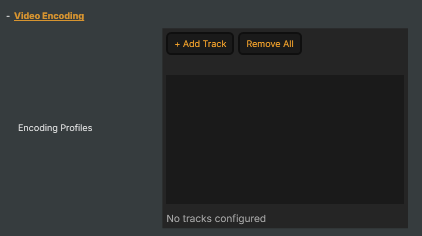
Video Encoding — list of video tracks (resolution, bitrate, codec) that will be multiplexed into the MoQ session.
| Property | Description |
|---|---|
Encoding Profiles |
Collection of video encoding tracks to publish in the MoQ session. Each track has its own resolution, bitrate, and codec configuration — useful for delivering adaptive-bitrate ladders (e.g. 1080p / 720p / 480p) so receivers can pick the variant that matches their bandwidth. The track list is editable from the property panel and from a script. |
Audio Encoding
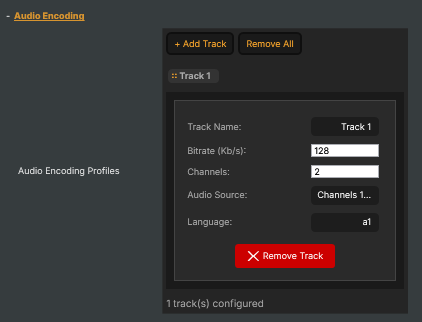
Audio Encoding — list of audio tracks (bitrate, sample rate, channels, language) to multiplex into the MoQ session.
| Property | Description |
|---|---|
Audio Encoding Profiles |
Collection of audio encoding tracks to publish in the MoQ session. Each track has its own bitrate, sample rate, channel count, channel mapping, and language tag — useful for delivering multi-language programmes (e.g. one track per language) or alternate audio versions (announcer vs natural sound). At least one track is required to publish; a default stereo track is created automatically when a new target is added. |
Target Performance
Target Performance — live readouts of throughput, frame counters, bitrate stats, and the active ingest URL.

| Property | Description |
|---|---|
Frames Processed |
Total number of frames the target has handed to the encoder since starting (read-only). Useful from a script for sanity checks ("did frames actually start flowing?") and for computing average frame rate over time. |
Packets Sent |
Total number of encoded packets the target has handed to the MoQ sink since starting (read-only). Climbs steadily while the stream is healthy; if it stops growing while ConnectionStatus is still Connected, something is jammed in the encoder or output queue. |
Reconnections |
Number of automatic reconnection attempts performed since the target was started (read-only). Healthy streams sit at 0. A small number (1–2) over a long session usually reflects transient network glitches; a steadily growing count indicates a persistent problem with the network or the relay. Useful from a script for raising alerts when the count climbs unexpectedly. |
Inherits from: AbstractTarget.
See also: MoQ Target in Script Engine Objects.
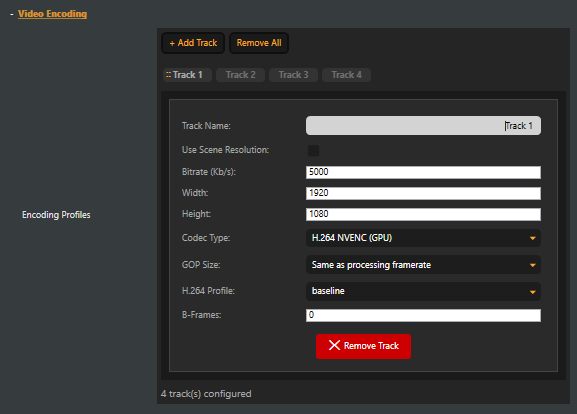
Video Track Parameters
| Parameter | Default | Description |
|---|---|---|
| Track Name | Track 1, Track 2, ... | Display name for the track |
| Use Scene Resolution | Disabled | When enabled, automatically uses the scene's resolution instead of fixed width/height values |
| Bitrate (Kb/s) | 5000 | Video bitrate in kilobits per second. Valid range: 1 – 50,000 Kb/s |
| Width | 1920 | Video width in pixels. Disabled when Use Scene Resolution is enabled |
| Height | 1080 | Video height in pixels. Disabled when Use Scene Resolution is enabled |
| Codec Type | H.264 NVENC (GPU) | Video codec to use for encoding |
| GOP Size (Advanced) | Same as processing framerate | GOP (Group of Pictures) length. Controls the keyframe interval |
| H.264 Profile (Advanced) | baseline | H.264 encoding profile. Only visible when using an H.264 codec |
| AV1 Profile (Advanced) | Main | AV1 encoding profile. Only visible when using the AV1 NVENC codec |
| B-Frames (Advanced) | 0 | Maximum number of B-frames between reference frames. 0 disables B-frames for lowest latency |
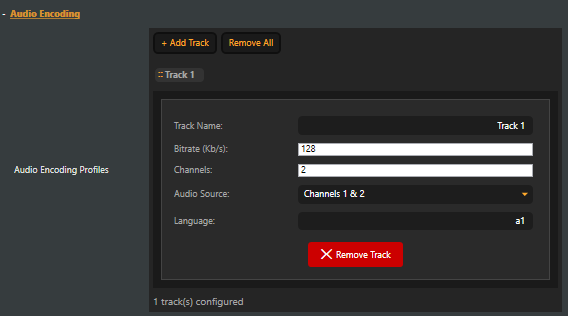
Audio Track Parameters
| Parameter | Default | Description |
|---|---|---|
| Track Name | Track 1, Track 2, ... | Display name for the track |
| Bitrate (Kb/s) | 128 | Audio bitrate in kilobits per second. Valid range: 1 – 10,000 Kb/s |
| Channels | 2 | Number of audio channels. 1 = mono, 2 = stereo |
| Audio Source | Channels 1 & 2 | Which input channels to encode from the main audio bus, or an Audio Channel Strip component |
| Language | a1 | Language metadata tag for the track (e.g., "eng", "spa", "fra") |
Encoder Performance (Advanced)
This section is only visible when Show advanced options is enabled. All fields are read-only.
| Field | Description |
|---|---|
| Avg Video Processing (ms) | Average time spent preparing video frames for encoding |
| Avg Encoding Time (ms) | Average time spent encoding frames |
| Avg Total Time (ms) | Average total frame processing time |
| Peak Video Processing (ms) | Peak video preparation time |
| Peak Encoding Time (ms) | Peak encoding time |
| Video Input Queue | Number of frames waiting to be processed. High values indicate a processing bottleneck |
| Encoding Input Queue | Number of frames waiting to be encoded. High values indicate an encoder bottleneck |
| Output Queue | Number of encoded packets waiting to be sent. High values indicate a network or sink bottleneck |
Workflow Tips
Quick Start with Vindral CDN
- Add a MoQ Target to your project
- Set Connection Mode to Auto (Vindral CDN)
- Enter your Stream Key in Protocol Options
- Add at least one video encoding track (default settings work for most cases)
- The default audio track (128 Kb/s stereo, channels 1 & 2) is created automatically
- Click Start to begin streaming
Multi-Bitrate Streaming
- Add multiple video tracks with different resolutions and bitrates for adaptive delivery
- For example: Track 1 at 1920x1080 / 5000 Kb/s, Track 2 at 1280x720 / 2500 Kb/s, Track 3 at 640x360 / 800 Kb/s
- Use H.264 NVENC (GPU) for hardware-accelerated encoding across all tracks
- Consider AV1 NVENC (GPU) for better compression at lower bitrates (requires compatible NVIDIA GPU)
Multi-Language Audio
- Configure the first audio track with your primary language and set the Language tag (e.g., "eng")
- Add additional audio tracks for each language
- Map each track to different main bus channels, or use Audio Channel Strip components as sources for flexible routing
- Set appropriate Language metadata for each track
Using Audio Channel Strips
Audio Channel Strips act as auxiliary audio buses. To use them:
- Add Audio Channel Strip components to your project
- Route audio sources to the strips using send controls
- In the MoQ Target audio encoding section, select the appropriate strip as the Audio Source for the track
Low Latency Streaming
- Use H.264 NVENC (GPU) or AV1 NVENC (GPU) for hardware-accelerated encoding
- Set B-Frames to 0 (default)
- Keep GOP Size at Same as processing framerate (default)
- Use baseline H.264 profile for widest compatibility
URL Failover
- Set your primary URL in Connection URL
- Enter additional URLs in Alternative URLs (semicolon-separated)
- On connection failure, the target automatically cycles through all URLs
- Set Reconnect Interval to control the delay between reconnection attempts
Troubleshooting
"Stream Key is required":
- In Auto mode, enter a valid Stream Key in Protocol Options
- In Custom mode, enter a Connection URL and Channel ID instead
Stream fails to connect:
- Verify the Connection URL is correct and reachable
- In Auto mode, ensure the Stream Key is valid
- In Custom mode, verify the Channel ID is set
Frequent disconnections:
- Increase the Reconnect Interval for automatic recovery
- Add Alternative URLs for failover redundancy
- Check network connectivity and bandwidth
- Monitor the Reconnections counter for patterns
Video quality issues:
- Increase the video track Bitrate
- Try a higher H.264 Profile (e.g., high) for better compression
- Consider AV1 NVENC (GPU) for improved quality at the same bitrate
High encoder queue depths:
- Video Input Queue high: GPU or CPU is bottlenecked on frame preparation. Reduce the number of video tracks or lower resolutions
- Encoding Input Queue high: Encoder is overloaded. Reduce bitrate, number of tracks, or switch to GPU encoding
- Output Queue high: Network bandwidth is insufficient. Reduce total bitrate or check network conditions
Audio not working:
- Ensure at least one audio track is configured
- Verify the Audio Source channel mapping matches your input audio configuration
- If using Audio Channel Strips, ensure the strip has audio routed to it
- Check that source audio is present in the Composer scene
NVENC encoder not available:
- Verify an NVIDIA GPU is installed with up-to-date drivers
- Switch to H.264 (CPU) as a fallback
- Check that the GPU is not overloaded by other applications
- AV1 NVENC requires an Ada Lovelace generation GPU or newer
Related components
- MoQ input — the receiver-side counterpart. Use it when Composer consumes a MoQ stream rather than producing one.
- SRT Target — pick this for sending out over unmanaged networks when MoQ isn't the right fit at the destination; SRT layers retransmission and bounded latency on top of UDP.
- SRT input — the SRT receiver-side for incoming contribution over unmanaged networks.
- RTMP Target — pick this for pushing to a CDN, RTMP origin, or third-party live platform that doesn't speak MoQ.
- RTMP input — the RTMP receiver-side for ingesting an RTMP stream.
- NDI Target — for publishing a Composer scene to other NDI-aware tools on the same studio LAN; mDNS auto-discovery, very low latency, not internet-traversable.
- NDI input — the NDI receiver-side for studio-LAN contribution.
- FFmpeg Target — power-user target for any container / protocol the dedicated targets don't expose; useful as an escape hatch when MoQ / RTMP / SRT / NDI don't fit.