

ASIO Target
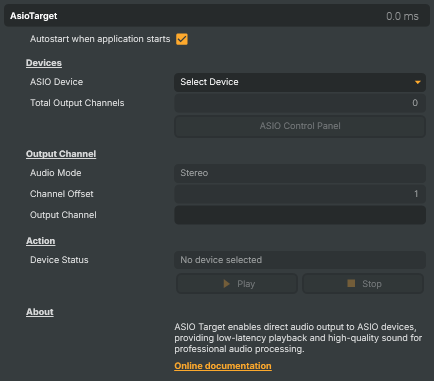
Streams the project's mixed audio out to a connected ASIO sound device for low-latency professional playback. Useful for routing program audio to studio monitors, sending the mix into a hardware audio mixer or interface, feeding broadcast playout chains, or monitoring a stream's audio on dedicated speakers without going through the Windows audio stack. Available devices come from ASIO drivers installed on the host; pick a device, choose a channel offset and audio mode (mono or stereo), and start the target to begin playback.
ASIO Target - Settings

| Property | Description |
|---|---|
Autostart when application starts |
Devices
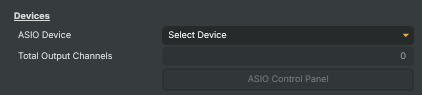
Devices — pick which ASIO device receives audio and check how many output channels it has.
| Property | Description |
|---|---|
ASIO Device |
Drop-down listing every ASIO driver detected on the host. The list is populated by the operating system; if a device is missing, install or repair its ASIO driver and reload the project. Selecting a device initializes it and reports its channel count via TotalOutputChannels. |
Total Output Channels |
Number of physical output channels reported by the selected ASIO device (read-only, debug). Used as the upper bound for OutputChannelOffset. |
ASIO Control Panel |
Opens the selected device's native ASIO control panel where buffer size, sample rate and routing can be configured. Provided by the device driver, not by Composer. |
Output Channel
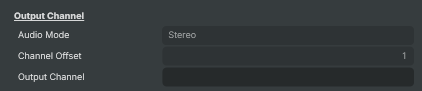
Output Channel — pick which channels on the ASIO device receive audio.
| Property | Description |
|---|---|
Audio Mode |
Whether to send a single-channel (mono) downmix or a two-channel (stereo) signal to the device. Stereo uses OutputChannelOffset plus the next channel, while Mono uses just OutputChannelOffset. |
Channel Offset |
1-based index of the first ASIO output channel that receives audio. [min=1, max=512 — clamped to TotalOutputChannels]. For example, set to 3 on an 8-channel device in Stereo mode to send the left/right pair to channels 3 and 4. |
Output Channel |
Human-readable description of where audio is currently being routed (read-only, debug). Reflects OutputChannelOffset and AudioOutputMode. |
Action
Action — start and stop audio playback to the selected ASIO device.

| Property | Description |
|---|---|
Device Status |
Current device state — selected, initialized, playing, stopped or error (read-only, debug). Drives the enabled state of the Start/Stop and ASIO Control Panel buttons. |
Play |
Begins sending the project's mixed audio to the selected ASIO device. Initializes the device first if needed. |
Stop |
Stops audio playback to the ASIO device. The device stays selected and can be restarted with StartCommand without re-picking it. |
Inherits from: AbstractTarget.
See also: ASIO Target in Script Engine Objects.