

Edge Detection
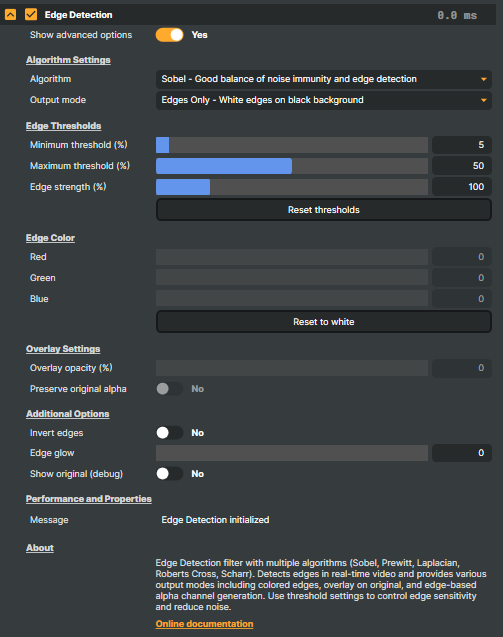
The Edge Detection operator is a real-time image-processing filter that highlights the boundaries between objects, textures, and shapes in a video frame. It works by looking at how quickly pixel intensity changes from one neighbour to the next — the steeper the change, the more likely the pixel sits on an edge — and renders those edges as bright lines on a dark background.
Because the analysis happens per pixel on the GPU, the operator runs at full broadcast frame rates and can be applied to live sources, file playback, or the output of an upstream operator chain.
How it works
Edge detection uses a gradient kernel that samples each pixel together with its immediate neighbours and asks "how different are they?" Where the answer is "very different" (a face against a sky, a high-contrast caption, the silhouette of a building), the operator outputs a bright pixel; where neighbours are similar (a flat wall, a single-tone background), it outputs a dark one.
The operator offers several classic algorithms, each with its own tradeoff between noise immunity, edge sharpness, and processing cost:
- Sobel — the default; a balanced choice with good noise immunity and clean edges on most footage.
- Prewitt — similar in spirit to Sobel with simpler weighting; slightly softer edges.
- Laplacian — a single-kernel operator that responds to edges in all directions at once. Faster, but more sensitive to noise.
- Roberts Cross — a small, fast 2×2 kernel that excels on clean, high-contrast material; can look noisier on flatter footage.
- Scharr — an enhanced Sobel with better rotational symmetry; useful when fine edge orientation matters.
If you don't know which one to pick, start with Sobel and only switch if the result looks too soft (try Roberts Cross or Scharr) or too noisy (stay with Sobel and tighten the thresholds described below).
Output modes
Detecting the edges is half the operator; the other half is choosing how to show them. The Output mode setting offers five styles:
- Edges Only — pure white edges on a black background. The classic look, and the right starting point for stylised effects or for piping the result into a downstream operator.
- Edges Coloured — the same edges drawn in a chosen colour rather than white. Lets you tint outlines to match a brand palette or scene mood without an extra colour-correction pass.
- Overlay — edges drawn directly on top of the original picture, leaving the rest of the frame untouched. Good for blueprint-style technical visualisations or reveal effects where the source content stays visible underneath.
- Edge Alpha — the original RGB image with the edge strength used as the alpha channel. Hands the matte directly to compositing, with the source colours preserved.
- Edges as Alpha — the original RGB image where the edges define transparency. Useful for cut-out style effects where the outlined regions punch through to a background.
Tuning the result
Three controls fine-tune which differences register as edges and how strongly they show:
- Minimum threshold — drops anything weaker than this. Raise it to suppress sensor noise and only keep strong outlines; lower it to reveal fine detail at the cost of more graininess.
- Maximum threshold — pixels above this register at full intensity. Edges between the minimum and maximum fade smoothly, giving anti-aliased outlines instead of hard on/off lines.
- Edge strength — a sensitivity multiplier. Use values above 100% when edges are subtle (low-contrast footage); below 100% when the picture is already very edgy.
A Reset command in the panel returns these three to their defaults (5 %, 50 %, 100 %) — handy when you've tuned yourself into a corner and want a clean starting point.
When to use Edge Detection
- Stylised video effects — sketch-like, neon-outline, technical-blueprint, or comic-book looks for creator workflows.
- Mask generation — feed the edge map into a downstream keyer or compositor to build alpha channels driven by image structure rather than colour.
- Motion graphics — overlay dynamic edge tracings on top of footage for music videos, broadcast IDs, or sting transitions.
- Technical analysis — visualise object boundaries when reviewing footage for QC, machine-vision pre-work, or scientific capture.
- Rotoscoping assistance — surface the edges that a manual rotoscope artist would otherwise have to find by eye, speeding up frame-by-frame masking.
Edge Detection - Settings

| Property | Description |
|---|---|
Show advanced options |
Algorithm Settings
Algorithm Settings — pick the edge detection method and how the result is presented.

| Property | Description |
|---|---|
Algorithm |
Edge detection method. [default=Sobel]. Sobel: balanced noise immunity (good general default). Prewitt: similar with simpler weights. Laplacian: detects edges in all directions, more sensitive to noise. Roberts Cross: fast, best on high-contrast edges. Scharr: enhanced Sobel with better rotational symmetry. |
Output mode |
How the detected edges are displayed. [default=Edges Only]. Edges Only = white edges on black. Edges Coloured = edges in your chosen colour on black. Overlay = edges drawn over the original picture. Edge Alpha = original RGB with edge strength as alpha. Edges as Alpha = original RGB, edges define transparency. |
Edge Thresholds
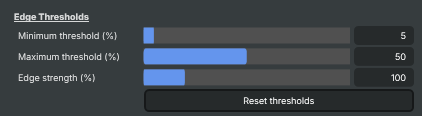
Edge Thresholds — control which differences register as edges and how strongly they show.
| Property | Description |
|---|---|
Minimum threshold (%) |
Lower edge cut-off, percent. [min=0, max=100, default=5]. Edges weaker than this are dropped completely. Raise to suppress noise and only keep strong outlines; lower to reveal fine detail at the cost of more graininess. |
Maximum threshold (%) |
Upper edge cut-off, percent. [min=0, max=100, default=50]. Edges stronger than this show at full intensity. Edges between minimum and maximum fade smoothly, giving anti-aliased outlines instead of harsh on/off lines. |
Edge strength (%) |
Sensitivity multiplier for edge strength, percent. [min=0, max=500, default=100]. 100 is normal. Below 100 dampens edges; above 100 amplifies them. Use higher values when edges are subtle (low-contrast footage); lower when the picture is already very edgy. |
Reset thresholds |
Reset thresholds and edge strength back to defaults (5%, 50%, 100%). |
Edge Color
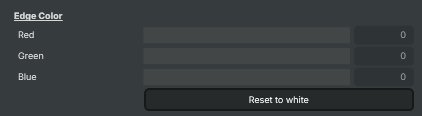
Edge Color — colour of edges when using a coloured-edges or overlay output mode.
| Property | Description |
|---|---|
Red |
Red component of the edge colour. [min=0, max=255, default=255]. Combine with green and blue for any tint. Default white = edges drawn in pure white. |
Green |
Green component of the edge colour. [min=0, max=255, default=255]. |
Blue |
Blue component of the edge colour. [min=0, max=255, default=255]. |
Reset to white |
Reset the edge colour back to white. |
Overlay Settings
Overlay Settings — controls used only when OutputMode is set to Overlay.

| Property | Description |
|---|---|
Overlay opacity (%) |
(advanced) Opacity of the edges drawn over the original picture, percent. [min=0, max=100, default=100]. 100 = solid edge lines. Lower values let the underlying image bleed through for a subtler stylised look. Only applies when OutputMode is Overlay. |
Preserve original alpha |
(advanced) Keep the original layer's transparency in overlay mode. [default=Yes]. On = transparent areas of the source stay transparent in the result. Off = the overlay fills the full frame regardless of the source's alpha. |
Additional Options
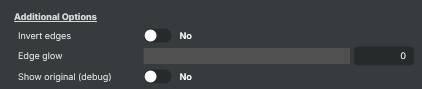
Additional Options — extra creative controls for edge appearance.
| Property | Description |
|---|---|
Invert edges |
(advanced) Invert the edge result. [default=No]. On = swap edges and non-edges (e.g. dark edges on a white background instead of the usual white-on-black). Useful for chalkboard or blueprint looks. |
Edge glow |
(advanced) Glow/thickness around detected edges. [min=0, max=100, default=0]. 0 keeps edges thin and crisp. Higher values bloom the edges outward for a softer, neon-like look — handy for sci-fi or motion-graphic styling. |
Show original (debug) |
(advanced) Bypass edge detection and show the original picture (read-only, debug). Quick A/B comparison without disabling the operator. |
Performance and Properties
Performance and Properties — status messages from the operator.

| Property | Description |
|---|---|
Message |
Most recent status message from the operator (read-only, debug). |
Inherits from: AbstractOperator, AbstractAudioMetering.
See also: Edge Detection in Script Engine Objects.