

SRT input 16 channel audio
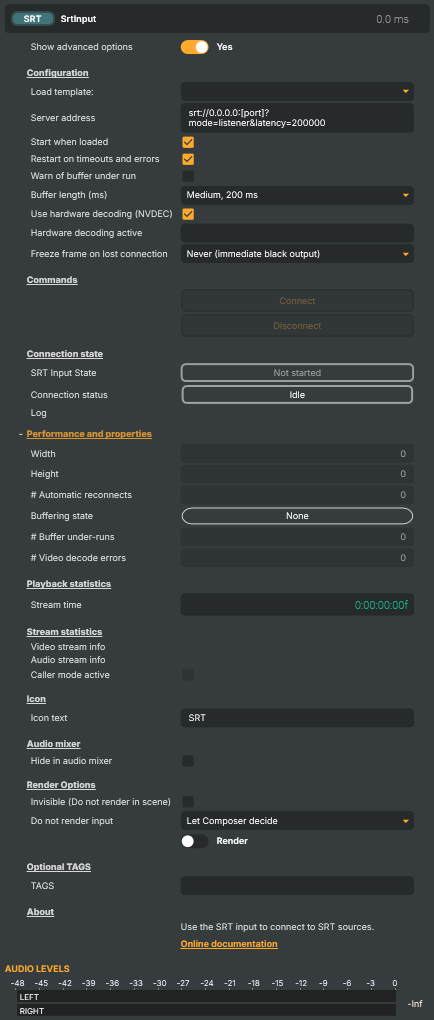
Introduction
The SRT input receives a live video and audio stream over SRT (Secure Reliable Transport) — the broadcast-industry standard for delivering live contribution feeds over IP networks Composer doesn't own. SRT layers packet-loss recovery, retransmission, and accurate timestamping on top of UDP, so a feed survives the kind of packet drop and jitter that would simply collapse an RTMP stream. Reach for SRT whenever the link crosses the public internet, a 4G / 5G uplink, a hotel or venue network, or any other path you can't fully control.
Both connection directions are supported:
- Listener mode (
mode=listener) — Composer binds locally and waits for a remote encoder to dial in. The most common deployment when a contribution encoder is on the road and Composer is the destination. - Caller mode (
mode=caller) — Composer dials a remote SRT source and pulls the stream. Useful when the source lives behind a firewall that doesn't accept inbound, or when pulling from a managed SRT relay.
For the inverse direction — pushing a Composer-rendered scene out over SRT — see the SRT Target. For studio-LAN-only contribution where mDNS auto-discovery and absolute minimum latency matter, the NDI input is a better fit; for managed-network ingestion from legacy encoders, the RTMP input is simpler.
Why SRT for contribution
SRT is purpose-built for live contribution over networks Composer doesn't own. Compared to RTMP it delivers:
- Bounded, configurable latency — the receiver waits a fixed
latencybudget (typically 120–500 ms) for retransmits before delivering the frame, so glass-to-glass delay stays predictable even when the network gets noisy. - Loss recovery that actually works on bumpy links — retransmission and forward-error-correction keep the feed up where RTMP would drop within seconds.
- Native AES-128 / AES-256 encryption via a
passphraseURL parameter — no TLS terminator or VPN required. - Stream identifiers for multi-tenant / managed-ingest scenarios via the
streamidparameter — many cloud SRT ingests require it.
For a stable studio-LAN delivery from a known encoder, RTMP is still simpler. For everything else outside the studio, SRT is the safer bet.
Codec support and hardware decoding
The input handles H.264, HEVC, and AV1 video alongside AAC audio — the codecs SRT contribution chains carry in practice. With a supported NVIDIA GPU, NVDEC (hardware decoding) takes the per-frame cost off the CPU; for codecs the card can't accelerate (or hosts without an NVDEC GPU), the input transparently falls back to multi-threaded software decoding. AV1 NVDEC requires a card with the right silicon — Ada Lovelace / RTX 40-series and newer.
The exact codec / resolution combinations a card can accelerate are documented in NVIDIA's compatibility matrix.
Common use cases
- Remote venue uplinks — a stand at a sports venue, a conference, or an outside-broadcast truck pushing a programme feed back to base over a public network or a 4G/5G bond.
- Cross-facility point-to-point links — two facilities (or a Composer and a hardware encoder) glued together over the open internet without provisioning dedicated lines.
- Cloud-to-studio contribution — pull a feed from a cloud encoder / SRT relay back into Composer for compositing, monitoring, or recompositing into a downstream chain.
- Multi-language broadcasts — when the contribution stream carries multiple AAC programs (international + commentary mixes), the audio bus exposes each stream for routing in the Channel Strip Inspector.
- Encrypted contribution — when the source side requires AES encryption (rights-managed feeds, sensitive content), the same
passphraseis configured here to decrypt incoming traffic. - Backup / dual-uplink ingest — run a primary and a backup SRT input pointing at the same encoder via different paths; the freeze-frame handling keeps the picture live during a brief switchover.
Resilience
Connection management is built in: AutoStart brings the input live when the project loads; AutoRestart re-establishes the listener / caller after errors; SrtBufferLength (Short / Medium / Long) trades latency against jitter tolerance. On signal loss the input optionally holds the last good frame rather than going to black, giving an operator time to react before viewers see the drop. Connection-state, reconnect counter, packet statistics, and a per-input log are surfaced as readable properties for dashboards and the HTTP API.
A small set of configuration templates ships with the input — pick a known-good baseline (typical listener, typical caller, encrypted listener) from the dropdown and the relevant fields populate so you can edit from a working starting point rather than building the URL from scratch.
SRT input 16 channel audio - Settings
Properties marked (
Components) or (AudioMixer) broadcast a livePropertyChangedevent to clients subscribed to that WebSocket channel.

| Property | Description |
|---|---|
Show advanced options |
Show advanced options |
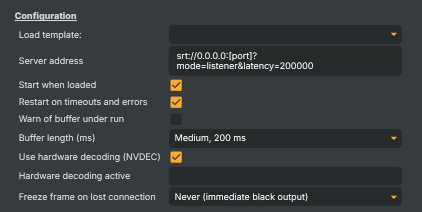
Configuration
| Property | Description |
|---|---|
Load template: |
Select a template |
Listener address (Components) |
Remote server address |
Start listener when loaded |
Start listener when loaded |
Restart listener on timeouts and errors |
Restart listener on timeouts and errors |
Warn of buffer under run |
Warn when buffer under run occurs (Video or audio buffer length reaches zero) |
Buffer length (ms) |
(advanced) Buffer length (ms). |
Use hardware decoding (NVDEC) |
Use hardware decoding (nvdec). |
Hardware decoding active |
Hardware decoding active |
Use secondary audio (channels 5-8) |
(advanced) Use secondary audio (channels 5-8) |
Freeze frame on lost connection: |
Freeze frame handling when connection is lost |
Commands

| Property | Description |
|---|---|
Connect |
Start Srt listener |
Disconnect |
Stop Srt listener |
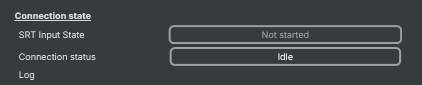
Connection state
| Property | Description |
|---|---|
SRT Input State (Components) |
SRT Input State |
Listener status |
(advanced) Current state of listener (listener/caller) |
Log |
Multiline component log |
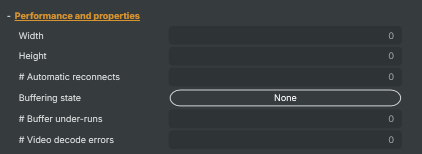
Performance and properties
| Property | Description |
|---|---|
Width |
|
Height |
|
# Automatic reconnects |
Automatic reconnects performed |
Buffering state |
(advanced) Current buffering state |
# Buffer under-runs |
Number of buffer under-runs (any stream) |
# Video decode errors |
(advanced) Number of video decode errors |
Playback statistics

| Property | Description |
|---|---|
Stream time |
Stream time |
Stream statistics

| Property | Description |
|---|---|
Video stream info |
(advanced) Video stream info |
Audio stream info |
(advanced) Audio stream info |
Caller mode active |
(advanced) |
Inherits from: AbstractInput, AbstractAudioProcessing, AbstractAudioMetering.
See also: SRT input 16 channel audio in Script Engine Objects.
Shared input properties
Every input — regardless of source type — exposes the following property groups. They are surfaced in the property panel only when Show advanced options is enabled on the input.
Icon
Icon text— short text shown on the input's icon in the Inputs list. Useful as a quick visual label (channel number, mic name, camera position) to tell otherwise-similar inputs apart at a glance. Empty by default; has no effect on rendering or routing.
Audio mixer
Hide in audio mixer— when on, hides the input from the audio mixer view without disabling its audio. Useful for de-cluttering the mixer while keeping the audio routed (e.g. fixed background music, ambient beds, pre-aligned playout). [default=false]
Render Options
Invisible (Do not render in scene)— when on, the input is skipped during rendering and produces no picture on any layer or scene. Audio routing is unaffected. Toggle from a script for cued-in / cued-out behaviour during a show. [default=false]Do not render input— disables the input's internal render entirely (no decode or capture work is done). Stronger than Invisible: that one renders but doesn't display; this one stops the input from doing any work at all. Useful for reducing CPU / network load on heavy sources (e.g. high-bitrate RTMP / SRT streams, large media files) when the input is temporarily not needed. Audio meters are cleared while disabled. [default=false]Do not render inputcontroller — chooses what drives the Do not render input flag.Let Composer decide(the default) hands control to the project-level Render Tuning optimiser, which automatically pauses inputs that aren't used by any active scene.Manual Configurationignores Render Tuning and lets the Do not render input toggle control the flag directly — use this to keep a network source warm even when it's currently off-air, or to take a heavy input down by hand regardless of scene activity. [default=Let Composer decide]
Optional TAGS
TAGS— one or more free-form tag words used to classify this input (typically space- or comma-separated). Picked up by Composer's Smart Search to filter or find inputs by category — e.g.camera,music,interview,sponsor. Has no effect on rendering.
Audio configuration and processing options
For inputs capable of processing audio, additional audio configuration and processing options are available through the audio mixer and the Channel Strip Inspector.
- Audio mixer — monitor levels, adjust gain and pan, mute / solo inputs, and configure auxiliary sends to
Audio Channel Stripsubmix buses, all from a centralised mixer-style interface. - Channel Strip Inspector — advanced per-strip audio processing for the selected input:
- Input trim, stereo remapping, and audio delay
- Channel mapping (8-channel mode unlocks the full MAPPING tab)
- Gate
- Low-cut filter
- Equaliser (5-band parametric)
- Compressor
- Sidechain ducking (a second compressor whose gain reduction is driven by another input's level — e.g. dipping music under a voice-over)
- Limiter
For the full audio signal flow, see Audio processing workflow.
Related components
- SRT Target — the sender-side counterpart. Use it when Composer is the source of an SRT stream rather than the receiver.
- SRT input — 16 channel audio — variant for projects whose audio bus is wider than 8 channels; same protocol surface, extended channel mapping.
- MoQ input — pick this for sub-second-latency contribution from a Vindral CDN channel or other MoQ-native source; QUIC-based and connection-migration-tolerant where SRT's UDP path isn't.
- MoQ Target — the MoQ sender-side. Use it when publishing a Composer scene into the Vindral CDN over MoQ rather than to an SRT receiver.
- RTMP input — pick this for managed-network ingestion from RTMP-only encoders; simpler protocol, less robust on bumpy links.
- RTMP Target — the RTMP sender-side. Use it to push a Composer scene out to a CDN, RTMP origin, or third-party live platform.
- NDI input — pick this for studio-LAN contribution; mDNS auto-discovery and lower latency than SRT, but not designed to traverse the public internet.
- NDI Target — the NDI sender-side. Use it to publish a Composer scene to other NDI-aware tools on the same studio LAN.