

MoQ input
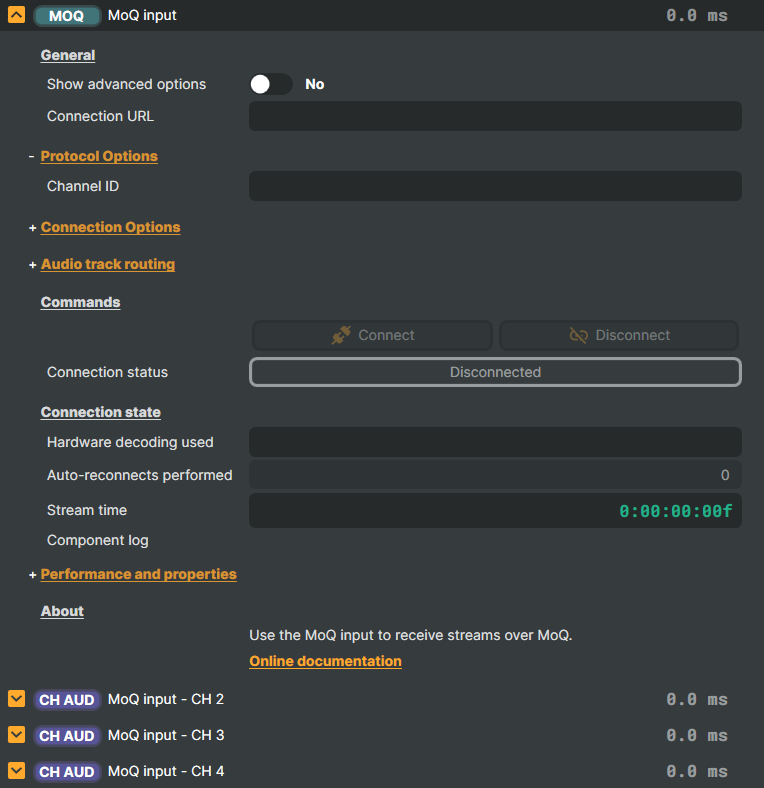
Introduction
The MoQ Input is Composer's ingest endpoint for the Vindral CDN over MoQ (Media over QUIC) — the IETF's emerging real-time streaming protocol that replaces the round-trip latency and connection-fragility quirks of RTMP with a QUIC-native publish-subscribe model. The input subscribes to a Vindral channel, demultiplexes the incoming MoQ tracks, decodes the selected video and audio, and presents the result to the scene as a live source — the receiver-side counterpart to the MoQ Target.
Why MoQ
- Sub-second glass-to-glass latency in the right network conditions — the protocol's QUIC backbone removes the buffering that RTMP / HLS chains accumulate.
- Native multi-track subscription — a single MoQ session carries video, audio, and alternate-language audio as separate tracks the input can subscribe to independently. No separate parallel connections to manage.
- Graceful recovery on lossy or changing networks — when a connection drops, the input reconnects automatically on a configurable interval instead of requiring the manual restart RTMP relies on.
- Channel-addressed subscribe — tune to a stream by the same Channel ID model used across the Vindral CDN, so the ingest side fits the rest of the workflow.
When to Use MoQ Input
Return feeds and contribution:
Pull a live MoQ stream from the Vindral CDN back into a Composer scene — for monitoring, re-composition, or routing to another output.Multi-language audio:
A MoQ stream can carry several audio tracks.Vindral LiveCloud ingest:
Subscribe to content distributed over the Vindral Live CDN with ultra-low latency.Receiving over unstable networks:
Pair Auto-reconnect with Freeze frame to ride through transient drops — the input re-establishes the session automatically on a configurable interval while holding the last good frame, instead of cutting to black and waiting for a manual restart.
Setup
Add MoQ Input to your project sources.
Set the Connection URL:
Point this at the MoQ relay endpoint to receive from — for most deployments the standard Vindral ingest, or a specific relay when needed.Set the Channel ID:
Enter the Vindral channel ID the stream is published under — the same Channel ID the publisher streams to. The input tunes to the stream by referencing this Channel ID.Configure connection behavior:
Enable Auto-connect to come up the moment the project loads, Auto-reconnect to self-heal through drops, and a Reconnect Interval to control the wait between attempts. Set Freeze frame on lost connection to hold the last good frame instead of cutting to black while reconnecting.Route audio tracks (optional):
Map each of the four stereo output pairs to a discovered source track to pick languages or alternate mixes from a multi-track stream.Connect:
Use the Connect command to begin receiving.
MoQ input - Settings
General
| Property | Description |
|---|---|
Show advanced options |
Show or hide the input's advanced settings in the editor UI. [default=false]. |
Connection URL |
Source URL to connect to — the MoQ relay endpoint to receive the stream from. Point this at a specific MoQ relay (for example a privately hosted relay or a non-default Vindral region). Treat the URL as sensitive — it can encode connection credentials and shouldn't be committed to public project files. Macros like @@LocalIP() and @@HostName() may be used inside the URL. |
Protocol Options
| Property | Description |
|---|---|
Channel ID |
Vindral CDN channel ID (also called the namespace) the stream is published under. Required for the MoQ source. Set this to match the channel registered with the CDN — the same Channel ID the publisher streams to. The input tunes to the stream by referencing this Channel ID. |
Connection Options
| Property | Description |
|---|---|
Use hardware decoding |
Use GPU-accelerated (NVDEC) video decoding when available. [default=false]. Hardware decoding offloads decode from the CPU and is recommended for high-resolution or high-framerate streams. |
Auto-connect when loaded |
When true, the input connects automatically as soon as the project loads. [default=false]. Convenient for return feeds and contribution inputs that should come up the moment Composer is running. |
Auto-reconnect on disconnect |
When true, the input automatically reconnects if the connection is lost. [default=false]. Each reconnect attempt increments NumAutoReconnectsPerformed; the wait between attempts is set by ReconnectInterval. |
Reconnect Interval |
How long to wait between reconnect attempts after a connection failure. [default=OneSecond]. Shorter intervals recover faster from transient network blips but hammer the relay if the issue is persistent. Longer intervals are gentler on the network but mean more frozen/black time on screen. Only used when AutoReconnect is enabled. |
Freeze frame on lost connection |
How long to keep showing the last decoded frame after the connection is lost. Holds the final good frame on screen instead of cutting to black while the input reconnects, smoothing over short drops. Once the configured hold elapses the rendered image is cleared. Audio is always silenced immediately on disconnect regardless of this setting. |
Audio track routing
| Property | Description |
|---|---|
Stereo pair 1 source |
Track routed to output channels 1-2 |
Stereo pair 2 source |
Track routed to output channels 3-4 |
Stereo pair 3 source |
Track routed to output channels 5-6 |
Stereo pair 4 source |
Track routed to output channels 7-8 |
Commands
| Property | Description |
|---|---|
Connection status |
Current connection status of the MoQ session (read-only). Disconnected — not currently connected. Connecting — handshake/track discovery in progress. Connected — actively receiving and decoding. Reconnecting — connection dropped, retrying. Useful from a script for driving UI indicators, alerts, or fallback routes when the source goes off-air. |
Connect |
Connect to the source and begin receiving the stream from the configured Channel ID. Disabled while the input is already connecting or connected. |
Disconnect |
Cleanly close the MoQ session and stop receiving. Disabled while the input is already disconnected. |
Connection state
| Property | Description |
|---|---|
Hardware decoding used |
Description of the decoder in use for the current connection (read-only). Reports the actual decode path (e.g. hardware NVDEC vs software) chosen after track discovery, which may differ from the requested UseHardwareDecoding when the codec or hardware doesn't support it. |
Auto-reconnects performed |
Number of automatic reconnection attempts performed since the input was started (read-only). |
Stream time |
Elapsed playback time of the received stream as a timecode (read-only). |
Component log |
Rolling buffer of recent connection events, warnings, and errors surfaced on this input (read-only). |
Performance and properties
| Property | Description |
|---|---|
Status |
Status message for validation (read-only) |
Video stream info |
(advanced) |
Audio stream info |
(advanced) |
Discovered audio tracks |
(advanced) |
Inherits from: AbstractInput, AbstractAudioProcessing, AbstractAudioMetering.
See also: MoQ input in Script Engine Objects.
Shared input properties
Every input — regardless of source type — exposes the following property groups. They are surfaced in the property panel only when Show advanced options is enabled on the input.
Icon
Icon text— short text shown on the input's icon in the Inputs list. Useful as a quick visual label (channel number, mic name, camera position) to tell otherwise-similar inputs apart at a glance. Empty by default; has no effect on rendering or routing.
Audio mixer
Hide in audio mixer— when on, hides the input from the audio mixer view without disabling its audio. Useful for de-cluttering the mixer while keeping the audio routed (e.g. fixed background music, ambient beds, pre-aligned playout). [default=false]
Render Options
Invisible (Do not render in scene)— when on, the input is skipped during rendering and produces no picture on any layer or scene. Audio routing is unaffected. Toggle from a script for cued-in / cued-out behaviour during a show. [default=false]Do not render input— disables the input's internal render entirely (no decode or capture work is done). Stronger than Invisible: that one renders but doesn't display; this one stops the input from doing any work at all. Useful for reducing CPU / network load on heavy sources (e.g. high-bitrate RTMP / SRT streams, large media files) when the input is temporarily not needed. Audio meters are cleared while disabled. [default=false]Do not render inputcontroller — chooses what drives the Do not render input flag.Let Composer decide(the default) hands control to the project-level Render Tuning optimiser, which automatically pauses inputs that aren't used by any active scene.Manual Configurationignores Render Tuning and lets the Do not render input toggle control the flag directly — use this to keep a network source warm even when it's currently off-air, or to take a heavy input down by hand regardless of scene activity. [default=Let Composer decide]
Optional TAGS
TAGS— one or more free-form tag words used to classify this input (typically space- or comma-separated). Picked up by Composer's Smart Search to filter or find inputs by category — e.g.camera,music,interview,sponsor. Has no effect on rendering.
Audio configuration and processing options
For inputs capable of processing audio, additional audio configuration and processing options are available through the audio mixer and the Channel Strip Inspector.
- Audio mixer — monitor levels, adjust gain and pan, mute / solo inputs, and configure auxiliary sends to
Audio Channel Stripsubmix buses, all from a centralised mixer-style interface. - Channel Strip Inspector — advanced per-strip audio processing for the selected input:
- Input trim, stereo remapping, and audio delay
- Channel mapping (8-channel mode unlocks the full MAPPING tab)
- Gate
- Low-cut filter
- Equaliser (5-band parametric)
- Compressor
- Sidechain ducking (a second compressor whose gain reduction is driven by another input's level — e.g. dipping music under a voice-over)
- Limiter
For the full audio signal flow, see Audio processing workflow.
Related components
- MoQ Target — the sender-side counterpart. Use it when Composer is the source of a MoQ stream rather than the receiver.
- SRT input — pick this for incoming IP contribution over unmanaged networks when MoQ isn't available at the source; SRT layers loss recovery and bounded latency on top of UDP.
- SRT Target — the SRT sender-side for outbound contribution over unmanaged networks.
- RTMP input — pick this for managed-network ingestion from RTMP-only encoders; simpler protocol, less robust on bumpy links.
- RTMP Target — the RTMP sender-side. Use it to push a Composer scene out to a CDN, RTMP origin, or third-party live platform.
- NDI input — pick this for studio-LAN contribution; mDNS auto-discovery and very low latency, but not internet-traversable.
- NDI Target — for publishing a Composer scene to other NDI-aware tools on the same studio LAN.