

FFmpeg Target
Introduction
The FFmpeg Target pipes the project's video and audio into a user-controlled FFmpeg command line. Whatever encoder, container, or output protocol FFmpeg supports, this target can produce — without RealSprint having to ship a dedicated component for it. Reach for it when the dedicated targets (RTMP Target, SRT Target, File Recorder Target) don't expose the codec / container / parameter you need, when you're integrating with a bespoke endpoint, or when you want to experiment with encoder tuning that the polished targets pin to a fixed default.
This is a power-user component. Composer hands the configured arguments straight to a child FFmpeg process; an incorrect command line fails at start, and there's no schema validation to catch typos before they hit the encoder. If a packaged target covers your case, prefer it for the simpler property surface, the diagnostics it embeds, and the Composer-side reliability work that's gone into it.
How it works
Composer renders each scene tick into a Matroska stream over a pipe and launches FFmpeg with a fixed -f matroska -i - input prefix that reads from that pipe. Your FfMpegOptions arguments follow the input — pick encoders, set bitrates, mux into the container of your choice, and target any of FFmpeg's hundreds of output protocols. The stop command closes FFmpeg's stdin so the muxer can finalise its output cleanly (writing trailers and indices for MP4, MKV, etc.).
Three starting-point templates ship as FFmpegConfigurationTemplate values: MP4 file writer, RTMPS output, and SRT output. Pick a template, hit LoadTemplateCommand, and Composer copies the corresponding example into FfMpegOptions so you can edit it from a known-good baseline rather than starting from scratch.
URL substitution macros are honoured in the options string: @@HostName() is replaced with the machine hostname, @@LocalIP() with the host's IP address. Useful when several Composer instances share one project file but each needs to push to a host-specific endpoint.
A process-monitor watchdog can optionally restart FFmpeg automatically if it stalls or dies — set the silence-detection timeout and restart interval, and Composer will keep relaunching the child process until the operator stops it. Restart-counter and per-restart logs surface in the diagnostic properties.
Common use cases
- Containers and codecs the dedicated targets don't expose — write MOV with ProRes, MPEG-TS over UDP, MKV with Opus, VP9 in WebM, anything FFmpeg can mux.
- Custom RTMPS push to non-Vindral CDNs — when an ingest endpoint needs flags the dedicated RTMP Target doesn't surface (specific FLV metadata, custom timeouts, exotic auth headers).
- SRT publishing with bespoke encoder tuning — when the SRT Target's preset / option set isn't enough and you need to tweak
libx265parameters, NVENC-rc-lookahead, or a custom-svtav1-paramsblock. - Codec experiments and qualification work — A/B encoder presets, run new codecs end-to-end before wiring them up as a first-class target.
- One-off integrations — a downstream system that wants the feed in a specific custom-built form for one event; it's faster to script the FFmpeg command line than to build a new component.
- Diagnostic recording — capture the live Composer output to disk in a known-good format for later analysis or replay testing.
Driving from outside
Every command (Start, Stop, LoadTemplate) is invokable from the property panel, the HTTP API (/api/invokecommand?targetname=FFmpeg+Target&command=StartCommand), a Connector, or the Script Engine via ExecuteCommand / ExecuteCommandById. The FfMpegOptions string is settable at runtime via /api/setproperty — handy when an external orchestrator needs to reconfigure the encoder mid-show without restarting the project.
Related components
- RTMP Target — dedicated, simpler RTMP/RTMPS pusher. Pick this when the standard set of H.264/AAC parameters cover your case.
- SRT Target — dedicated, simpler SRT publisher with multi-program audio. Same advice — use it unless you need parameters it doesn't expose.
- File Recorder Target — dedicated file-recording target with built-in segmenting and rotation; use it before reaching for FFmpeg Target's MP4 template.
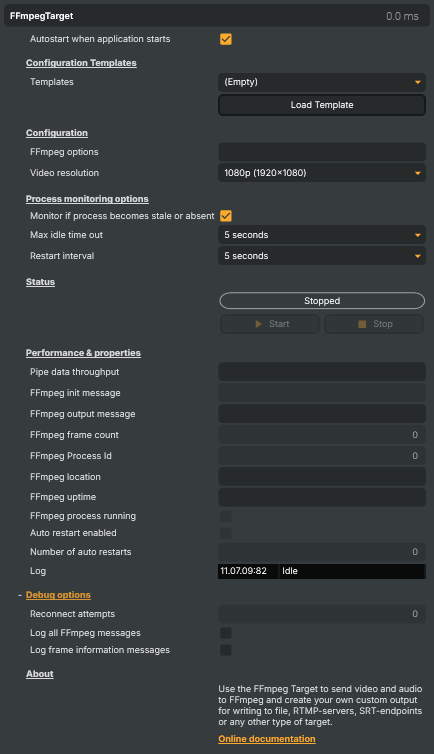
FFmpeg Target - Settings

| Property | Description |
|---|---|
Autostart when application starts |
Configuration Templates
Configuration Templates — pick a starter command line and load it into the options box.

| Property | Description |
|---|---|
Templates |
Selects a starting-point FFmpeg command line. Pick MP4 file writer, RTMPS output or SRT output, then press LoadTemplateCommand to copy it into FfMpegOptions for further editing. |
Load Template |
Replaces the current FfMpegOptions text with the example command line for the selected FFmpegConfigurationTemplate. Existing options are overwritten — copy them out first if you want to keep them. |
Configuration
Configuration — the FFmpeg command line and the output resolution to scale to.

| Property | Description |
|---|---|
FFmpeg options |
The FFmpeg arguments that follow the input. Composer prepends the input arguments automatically; this string supplies the encoder, muxer and output destination. Supports the @@LocalIP() and @@HostName() macros which are substituted at start to make stream names per-machine. Treat this like a credential when it contains stream keys — avoid committing the project to public repos. |
Video resolution |
Output video resolution sent into FFmpeg. The project's compositor scales to this size before piping. Pick 1080p for full HD streaming, 720p to save bandwidth, or a lower size for thumbnail-style outputs. |
Process monitoring options
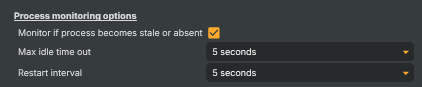
Process monitoring options — auto-detect a stalled or crashed FFmpeg process and restart it.
| Property | Description |
|---|---|
Monitor if process becomes stale or absent |
When enabled, Composer watches for the FFmpeg process going silent or dying unexpectedly and restarts it according to FfmpegRestartInterval. Useful for keeping a long-running stream alive across transient network or encoder hiccups. |
Max idle time out |
How long FFmpeg can go without producing a frame before it is considered stalled and torn down. Shorter values restart faster but risk false positives on slow encoder warmup. Only used when MonitorProcessIfNoActivity is on. |
Restart interval |
Wait time between automatic restart attempts. Set to Never to disable auto-restart even when MonitorProcessIfNoActivity is on. Longer intervals avoid hammering a remote endpoint that is briefly unavailable. |
Status
Status — current playback state and the start/stop buttons.

| Property | Description |
|---|---|
PlaybackState |
Current state of the target — Stopped, Starting, Running, Stopping or Restarting (read-only, debug). Drives the enabled state of the command buttons. |
Start |
Launches the FFmpeg process with FfMpegOptions after substituting any @@LocalIP() / @@HostName() macros. Disabled if FfMpegOptions is empty. |
Stop |
Closes FFmpeg's stdin so it can finalise the output cleanly (write trailers, flush buffers) and then waits for the process to exit. Also disables auto-restart for this stop so the process stays down. |
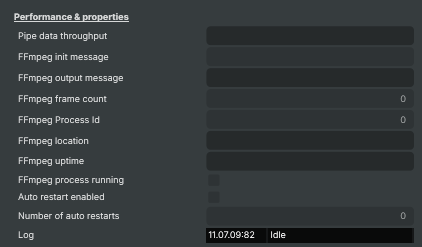
Performance & properties
Restart the FFmpeg process
| Property | Description |
|---|---|
Pipe data throughput |
Megabytes per second currently being piped into FFmpeg (read-only, debug). |
FFmpeg init message |
Initialization output from FFmpeg captured during start (read-only, debug). Useful for spotting wrong codec or container choices before the stream actually fails. |
FFmpeg output message |
Latest line of FFmpeg progress output — frame count, fps, bitrate (read-only, debug). |
FFmpeg frame count |
Number of video frames FFmpeg has processed in the current session (read-only, debug). |
FFmpeg Process Id |
Operating-system process id of the running FFmpeg child process (read-only, debug). Useful when correlating with Task Manager or external tools. |
FFmpeg location |
Full path to the FFmpeg executable Composer launched (read-only, debug). |
FFmpeg uptime |
How long the current FFmpeg session has been running (read-only, debug). |
FFmpeg process running |
true while the FFmpeg child process is alive, false after it has exited (read-only, debug). |
Auto restart enabled |
true when Composer will restart FFmpeg automatically after a stall or crash (read-only, debug). Driven by MonitorProcessIfNoActivity and FfmpegRestartInterval. |
Number of auto restarts |
Total automatic restarts since the user pressed Start (read-only, debug). A growing number indicates an unstable downstream service or encoder. |
Log |
Rolling list of recent status, warning and error lines from the target (read-only, debug). |
Debug options
Debug options — extra logging knobs and reconnect counters for troubleshooting.

| Property | Description |
|---|---|
Reconnect attempts |
Number of times Composer has tried to reconnect after a failure (read-only, debug). Resets on a clean Start. |
Log all FFmpeg messages |
When enabled, every line FFmpeg writes to stderr is forwarded into Composer's log. Verbose — useful when diagnosing a failing command line, but turn it off again for production to keep the log readable. Disables LogFrameInformationMessages while active. |
Log frame information messages |
When enabled, FFmpeg's per-frame progress lines (frame count, fps, bitrate) are logged. Useful for confirming steady throughput; redundant when LogAllFFmpegMessages is on. |
Inherits from: AbstractTarget.
See also: FFmpeg Target in Script Engine Objects.