

HTTP Target
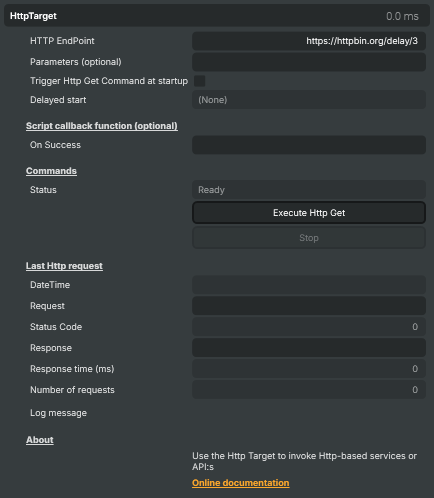
The HTTP Target lets your project reach out to the wider world over the web. It calls a configurable HTTP endpoint — a webhook, a REST API, a control-system URL, a health-check ping — and reports back the response, status code, and how long the call took. Combine it with the Script Engine and a project becomes an active participant in a larger workflow rather than a closed video pipeline: it can announce that a stream went live, post telemetry to a dashboard, poll an external service for a cue, or talk to a cloud automation platform.
Because every part of the request — endpoint, parameters, when to fire, how to react to the response — is exposed as a property, the target slots in equally well for one-off "ping this URL at the start of the show" cases and for sustained back-and-forth with a service over the life of a project.
The HTTP Target makes a GET request — the simplest, most universally supported kind, the same kind a browser uses to load a page. Most webhook and "trigger" style endpoints accept GET; many REST APIs do too, especially for read-only or notification-style calls.
What you control
The property panel is organised around the lifecycle of a request:
- HTTP EndPoint — the full URL to call, including
http://orhttps://. Any query string can be baked directly into this value, or split out intoParametersif it changes more often. - Parameters (optional) — extra query parameters that get appended to the endpoint with an
&. Convenient when the base URL stays constant but the values change (per scene, per cue, per user). - Trigger Http Get Command at startup — automatically fires the request when the project starts. Useful for "we are live" notifications, registering with a control system, or kicking off downstream automation.
- Delayed start — a head-start delay for the auto-fired request, in case the receiving service or another target (an RTMP encoder, for example) needs a moment to come online first.
- On Success — the name of a Script Engine function to call when the request succeeds. The HTTP response body is passed in as a string argument, so the script can parse JSON, branch on a value, or feed the result back into the show.
- Commands —
Execute Http Getfires the request now;Stopcancels a request that is currently in flight. TheStatusline above the commands showsReadywhen idle andBusywhile a call is running. - Last Http request — a diagnostic block showing the timestamp of the most recent call, the full URL that was sent (including any appended parameters), the HTTP status code, the response body, how long the call took in milliseconds, and a running counter of how many requests have been sent since the project loaded.
- Log message — the most recent status or error from the target, useful as a quick health check during a show.
Example use cases
- "Stream is live" webhooks — fire a one-shot notification at project start to tell a CMS, a chat room, or a notification service that the broadcast has begun.
- Triggering cloud automation — call a Zapier, Make, n8n, or IFTTT webhook to set off a downstream chain of actions when something happens in the show.
- Talking to control systems — many lighting desks, video matrix routers, and broadcast automation platforms expose an HTTP control surface; the target can drive them directly from project logic or from the Script Engine.
- Polling REST APIs from the show — fetch a scoreboard, a stock quote, a sponsor's promotional text, or a weather datapoint and feed the response into a graphics layer via the
On Successcallback. - Health-check pings — call a heartbeat URL on a monitoring service so an operations team sees an alert if a long-running broadcast stops sending.
- Cuepoint-driven side-effects — combine with the Script Engine so a single in-show cue can simultaneously change a graphic and post to an external service.
How a typical request flows
- Set
HTTP EndPointto the URL of the service you want to call. - Either click Execute Http Get manually, fire it from a Script Engine function, or set Trigger Http Get Command at startup to call it automatically when the project starts.
- While the call is in flight,
StatusreadsBusyand the Stop command becomes available. - When the call completes, the response body, status code, and elapsed time appear in the Last Http request block. On a
2xxresponse, the On Success Script Engine function (if any) is invoked with the response body. - If the call fails or is cancelled, the Log message field reports the error and
Statusreturns toReady.
Practical tips
- Test the endpoint before going live. Many third-party services reject calls until you've enabled a webhook in their UI or added an API key. Click
Execute Http Getonce with a known-good URL (likehttps://httpbin.org/get) to confirm the target itself is working, then swap in the real endpoint. - Watch the status code.
200–299means success;4xxmeans you sent something the server didn't like (typo in the URL, missing API key, wrong parameters);5xxmeans the server had a problem (transient, often worth a retry). - Prefer HTTPS. When the endpoint accepts both, use
https://so the URL — and any sensitive query parameters — are encrypted in transit. - Be careful with secrets in URLs. API keys and tokens placed in
EndPointorParametersget saved into the project file. If the project will be shared or version-controlled, pass secrets in via a Script Engine variable or pick a service that supports per-show tokens. - Use
On Successto react, not just notify. The real power of the target comes from feeding the response back into the show — e.g. parse a JSON reply in the callback and update a lower-third with the result, rather than treating HTTP as a one-way notification. - Mind the timing. The response time appears in the Last Http request block. If a downstream service is slow, that latency happens between the request and the callback firing — so don't depend on a sub-second turnaround unless you've measured it.
HTTP Target - Settings

| Property | Description |
|---|---|
HTTP EndPoint |
The full URL to call, including scheme (http:// or https://) and any query string already attached. Additional parameters can be appended automatically via the Parameters property. Avoid placing API keys directly in this URL when the project file may be shared. |
Parameters (optional) |
Optional extra query-string parameters that get appended to EndPoint with an & separator. Useful for adding dynamic values from the Script Engine without having to rebuild the full URL each time. Leave empty if all parameters are already part of EndPoint. |
Trigger Http Get Command at startup |
Fires the HTTP request automatically when the project starts. Useful for sending a "stream is live" notification, registering with a control system or kicking off a downstream workflow. Combine with AutoStartDelayMs if the receiving service needs a moment to come online first. |
Delayed start |
How long to wait after project start before firing the request when ExecuteAtStart is enabled. Useful when the receiving service or another target needs a head-start (for example, an RTMP encoder that should be live before the notification is sent). |
Script callback function (optional)
Script callback function (optional) — hook a Script Engine function to react to responses.

| Property | Description |
|---|---|
On Success |
Name of a Script Engine function to invoke when the request completes successfully (HTTP 2xx). The response body is passed in as a string argument so the script can parse it. Leave empty to skip the callback. |
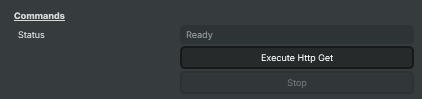
Commands
Commands — fire the request manually or stop one in flight.
| Property | Description |
|---|---|
Status |
Current status of the target. Ready means idle and ready to fire, Busy means a request is in flight. |
Execute Http Get |
Fires the HTTP request immediately using the current EndPoint and Parameters values. Useful from the Script Engine to send ad-hoc notifications triggered by user actions, cuepoints or other in-show logic. |
Stop |
Cancels a request that is currently in flight. Has no effect if no request is running. |
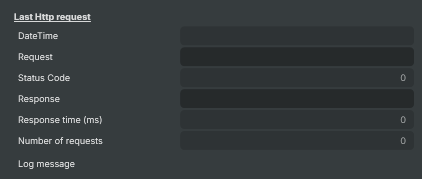
Last Http request
Last Http request — diagnostics about the most recent call.
| Property | Description |
|---|---|
DateTime |
Date and time the latest HTTP request was sent (read-only, debug). |
Request |
The full URL of the last request, including any appended parameters (read-only, debug). Handy for verifying that template substitutions resolved as expected. |
Status Code |
HTTP status code returned by the last request (read-only, debug). 200 means success; 4xx indicates a client problem (bad URL, missing auth); 5xx indicates a server problem on the receiving end. |
Response |
Response body returned by the last request (read-only, debug). Typically JSON, plain text or HTML depending on the receiving service. |
Response time (ms) |
How long the last request took, in milliseconds (read-only, debug). Useful for spotting slow endpoints that could affect show timing. |
Number of requests |
Total number of requests sent since the project was loaded (read-only, debug). |
Log message |
Latest status or error message from the target (read-only, debug). |
Inherits from: AbstractTarget.
See also: HTTP Target in Script Engine Objects.