

Delay
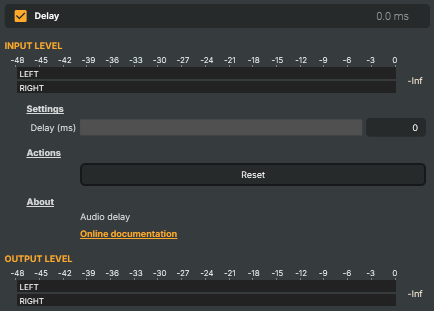
Introduction
The Delay operator pushes an audio signal later in time by a set amount. It's the tool you reach for whenever sound needs to arrive a little later than it currently does — most often to restore lip-sync after video has been processed elsewhere in the chain, to line up several audio sources that don't arrive together, or to compensate for a measured latency somewhere downstream.
It does one thing, simply: the Delay (ms) control holds the audio back by the number of milliseconds you set, from 0 (unchanged) up to 4000 (four seconds). The same delay is applied to both stereo channels, so the stereo image is preserved. Reset returns the delay to 0.
How it works
Audio entering the operator is buffered and released after the configured delay. Set the amount with Delay (ms); at 0 the signal passes straight through untouched. Because the delay simply shifts the audio in time, the only side effect is the latency you ask for — there is no change to level, tone, or stereo balance.
The usual workflow is to identify which path is ahead and delay it to match the one that's behind. If your video has picked up processing latency, the audio will run early against it, so you add just enough delay here to bring the two back together.
Common use cases
- Lip-sync correction — when video processing has nudged the picture behind the sound, delay the audio by the matching amount so mouths and words line up again.
- Aligning multiple sources — when two microphones or feeds arrive at slightly different times, delay the earlier one until they're coherent.
- Compensating downstream latency — if a piece of downstream equipment or a monitoring path is known to lag, pre-delay the audio so it lands on time at the destination.
Delay - Settings
Settings
Settings — how long to delay the audio.

| Property | Description |
|---|---|
Delay (ms) |
Amount of delay applied to the audio, in milliseconds. [min=0, max=4000, default=0]. 0 leaves the audio unchanged. Higher values push the audio later in time, up to 4 seconds. The same delay is applied to both stereo channels. |
Actions
Actions — one-click commands.

| Property | Description |
|---|---|
Reset |
Reset the delay back to 0 milliseconds. |
Inherits from: AbstractAudioOperator, AbstractOperator, AbstractAudioMetering.
See also: Delay in Script Engine Objects.