

Multiviewer
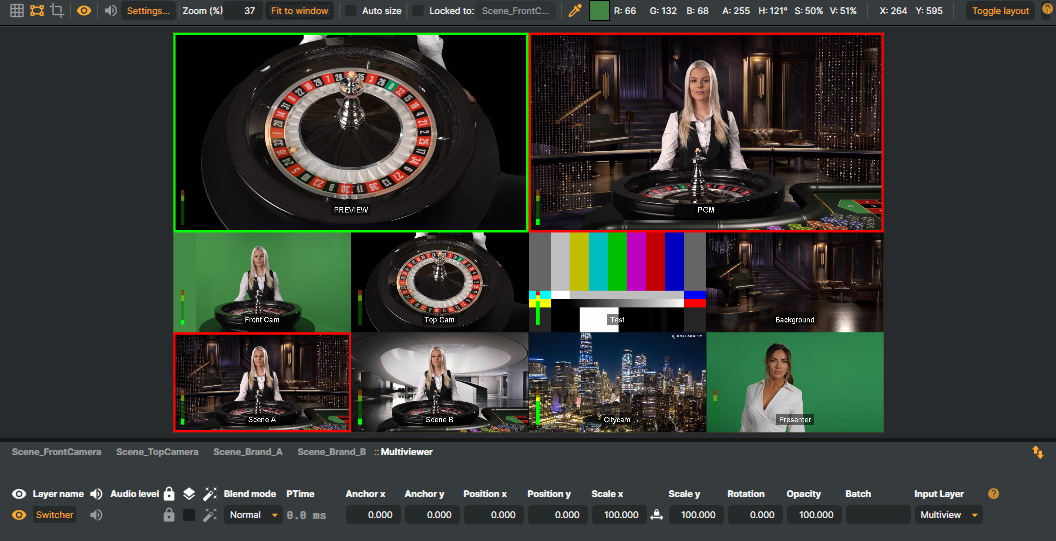
A Multiviewer displays multiple video sources side by side on a single screen, functioning as a command centre for monitoring inputs and scenes during a live show. It is a feature of the Switcher input, which hosts and renders it. Composer's Multiviewer can show up to 13 sources at once, supports up to 4 overlays per multiviewer, indicates Program / Preview state with tally lights, and is fully drivable from Connectors, the Script Engine, the HTTP API, or the Companion app + Stream Deck.
Setup
- Add a
Switcherinput from the Inputs & Scenes tab. - Add the Switcher input to a scene as a layer.
- In the layer's Input Layer dropdown, choose Multiview (one of the Switcher's four outputs — see below).
Switcher outputs
A Switcher isn't a single image — it produces four separate outputs, and the layer's Input Layer dropdown picks which one that layer renders:
| Input Layer | What it shows |
|---|---|
| Output | The switcher's final program output — the foreground / background blend with the crossfade, fade-to-black, and overlays applied. This is the clean feed you send to a streaming target. |
| PGM | The raw on-air (foreground) source on its own. |
| Preview | The raw queued-next (background) source on its own. |
| Multiview | The multiviewer grid described on this page. |
Because the selection is per layer, one Switcher can feed several layers at once, each tapping a different output — for example route Output to a layer going to your program target while a Multiview layer drives a confidence monitor, all from the same Switcher.
Configuration
The Multiviewer's properties expose:
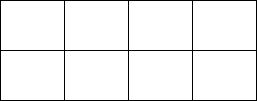
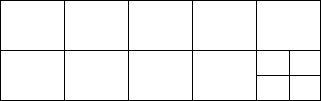
Create Multiview— toggles the multiviewer on the chosen Switcher input.Multiview Layout— choose 4 inputs (1×4), 8 inputs (2×4), or 13 inputs (5+4+1×4). All layouts show the large Program / Preview pair at the top; the 4-input layout adds a single row of 4 monitors, the 8-input layout a 2×4 block of 8, and the 13-input layout adds a third row for 13.Activate tally— colours each tile red for Program and green for Preview.Activate VU-meters— overlays per-tile VU meters. In the 13-input layout only cells 1–9 show meters; cells 10–13 are too small to draw them.PGM Vu-meter source— names which channel feeds the Program VU.Input 1…Input 13— assign sources to tiles. The pipe character|lets you set a display alias separate from the input name (Camera1|CAM 1).
The 8-input layout:
The 13-input layout:
Overlays
Up to four overlays can be configured on each multiviewer with fade transitions of 0–5000 ms. Each overlay exposes three commands:
Fade in/out— toggles the overlay: fades it in if hidden, out if visible, using the configured fade duration.Show— instant on.Hide— instant off.
Important — overlay resolution
Overlays must match the resolution of the Switcher input feeding the multiviewer; mismatched resolutions cause scaling artefacts and visible alignment problems.
Using the Multiviewer
Once configured, the Multiviewer is driven from four places:
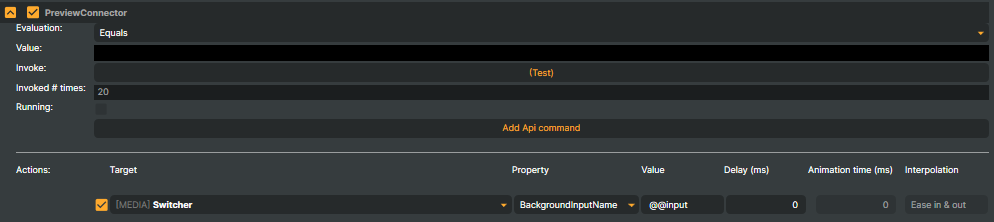
- Connectors — the recommended path for external automation, control surfaces, and broadcast-board integration.
- Script Engine — programmatic control inside the project.
- HTTP API — every Multiviewer property is exposed over the generic HTTP API. Read a value with
/api/getproperty, change one with/api/setproperty(e.g.MultiViewLayout,UseTally, or a tile sourceMvInput1…MvInput13), and trigger the overlay commands with/api/invokecommand. Target the Switcher input bytargetnameor its objecttargetGUID. - Manual control — direct UI interaction in Composer Desktop.
Tip — Stream Deck
The Companion app, paired with a virtual or physical Stream Deck, gives you a hardware-button surface for triggering Multiviewer actions over the API or via Connectors. Useful for live operators driving a show without keyboard / mouse.
Latency note
When a multiviewer source is itself a scene (rather than a raw input), expect a one-frame processing delay through that source. Composer's audio / video sync tools can compensate when this matters for downstream targets.