

Compressor
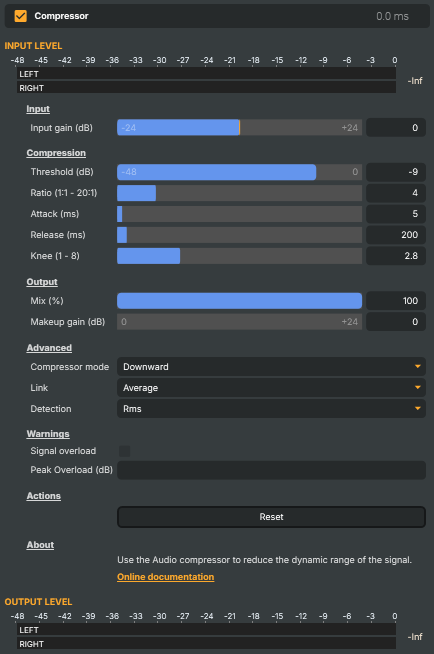
Introduction
The Compressor evens out the dynamic range of an audio signal — it automatically turns down the loud parts so the quiet parts don't get lost underneath them. The result is a steadier, more controlled sound: a presenter who leans into the mic no longer jumps out, a music bed that swells no longer buries the dialogue, and the overall level sits in a tighter, more broadcast-friendly window.
It works the way every hardware and software compressor does — you set a threshold, decide how hard to clamp anything above it with the ratio, shape how quickly it reacts with attack and release, and recover the lost level with makeup gain. The defaults are a sensible broadcast starting point, and Reset returns to them at any time.
Note
For new projects, consider the dedicated Compressor V2, which adds look-ahead and live per-channel gain-reduction metering. This Compressor remains for existing projects and for the advanced detector, channel-link, and detection controls described below.
How it works
Every moment, the compressor compares the incoming level against the Threshold. Audio below the threshold passes through untouched; audio above it is pulled down according to the Ratio. A 4:1 ratio means that for every 4 dB the input rises above the threshold, the output only rises by 1 dB. Because compression lowers the overall level, you then add Makeup gain to bring the perceived loudness back up — so the signal sounds fuller and more consistent rather than simply quieter.
The controls are grouped into sections that follow the signal from input to output.
Input
Input gain (dB) applies an overall level adjustment before the compressor sees the signal, from -24 dB to +24 dB. Use it to push a quiet source up into the threshold's working range, or to pull a hot source down before compression. 0 leaves the level unchanged.
Compression
These are the controls that shape how the compressor reacts:
- Threshold (dB) (
-48…0, default-9) — the level above which compression starts. Audio louder than this is reduced; audio quieter is left alone. Lower (more negative) values catch more of the signal. - Ratio (1:1 - 20:1) (
1…20, default4) — how strongly audio above the threshold is reduced.1:1is no compression,4:1is a typical broadcast setting, and10:1or higher starts to behave like a limiter. - Attack (ms) (
1…200, default5) — how quickly the compressor clamps down once the signal crosses the threshold. Short values catch fast transients but can sound "squashed"; longer values let the initial punch of a sound through before gain reduction sets in. - Release (ms) (
5…5000, default200) — how quickly the compressor lets go after the signal drops back below the threshold. Short values recover quickly; long values keep the gain reduction smooth and unobtrusive across a phrase. - Knee (1 - 8) (
1…8, default2.8) — how gradually compression engages around the threshold. A low knee gives a hard, punchy onset; a high knee eases the compressor in for a softer, more transparent transition.
Output
- Mix (%) (
0…100, default100) — blends the compressed signal with the original, dry signal.100outputs only the compressed signal;0outputs only the original; values in between give parallel compression — keeping the natural dynamics and life of the original while still tightening the peaks. - Makeup gain (dB) (
0…24, default0) — extra level added after compression to compensate for the reduction, bringing the perceived loudness back up.
Advanced
Three controls for finer behaviour:
- Compressor mode —
Downwardis the standard mode, pulling loud parts above the threshold down.Upwarddoes the opposite, lifting quieter parts below the threshold up so soft details stand out. - Link — how the left and right channels are linked when the compressor decides how much to reduce. Average across channels reacts to the average of the two; Max across channels reacts to whichever channel is loudest. Linking the channels keeps the stereo image stable, since both are reduced by the same amount.
- Detection — how the compressor measures level. Peak reacts to instantaneous peaks and is more aggressive on transients; RMS reacts to the smoothed, perceived loudness and is gentler and more transparent on voices and music.
Warnings
If the combined effect of compression and makeup gain pushes the output past full scale, Signal overload lights up and Peak Overload (dB) records the highest level reached. Both auto-reset after two seconds. An overload that keeps tripping means your makeup gain (or input gain) is too high for the material — pull it back until the indicator stays clear.
Common use cases
- Smoothing a presenter or commentator — a moderate threshold with a
3:1–4:1ratio, RMS detection, and gentle makeup gain keeps a voice sitting at a steady level whether the speaker whispers or shouts. - Taming a dynamic music bed — compress the music so its loudest passages no longer fight the dialogue, then ride the makeup gain to set the bed under the voice.
- Parallel compression for punch — keep Mix below 100 to blend a heavily compressed copy back with the original, adding density and consistency without flattening the natural dynamics.
- Catching peaks before a target — a high ratio with a fast attack acts as a safety clamp on transients ahead of an encoder or stream, complementing the Limiter for hard ceiling control.
- Lifting quiet detail — switch to Upward mode to bring up the soft parts of a signal (room tone, distant sources) instead of pulling the loud parts down.
To measure loudness rather than shape it, pair the Compressor with the EBU R128 operator; for a simple level change with no dynamics processing, use Gain.
Compressor - Settings
Input
Input — overall level applied before the compressor.

| Property | Description |
|---|---|
Input gain (dB) |
Pre-compression gain, in decibels. [min=-24, max=24, default=0]. 0 leaves the signal unchanged. Negative values reduce the input level; positive values boost it before the compressor processes it. |
Compression
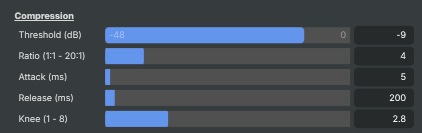
Compression — the main controls that shape how the compressor reacts.
| Property | Description |
|---|---|
Threshold (dB) |
Level above which the compressor starts working, in decibels relative to full scale. [min=-48, max=0, default=-9]. Audio louder than this gets reduced by Ratio; audio quieter than this is left unchanged. Lower (more negative) values catch more of the signal. |
Ratio (1:1 - 20:1) |
How strongly audio above the threshold is reduced. [min=1, max=20, default=4]. Expressed as N:1. 1:1 is no compression; 4:1 is a typical broadcast setting; 10:1 or higher behaves like a limiter. |
Attack (ms) |
How quickly the compressor reacts when the signal exceeds the threshold, in milliseconds. [min=1, max=200, default=5]. Short values catch fast transients but can sound "squashed". Longer values let initial peaks through before gain reduction kicks in. |
Release (ms) |
How quickly the compressor stops working after the signal drops below the threshold, in milliseconds. [min=5, max=5000, default=200]. Short values let the compressor recover quickly; long values keep the gain reduction smooth across phrases. |
Knee (1 - 8) |
Soft-knee width around the threshold. [min=1, max=8, default=2.8]. Controls how gradually the compressor engages near the threshold. Low values give a hard, punchy onset; high values give a soft, gentle engagement. |
Output
Output — wet/dry mix and makeup gain.

| Property | Description |
|---|---|
Mix (%) |
Wet/dry mix between the compressed and original signals, as a percentage. [min=0, max=100, default=100]. 100 outputs only the compressed signal; 0 outputs only the original; values in between blend the two — known as parallel compression, useful for keeping the dynamics of the original while still tightening peaks. |
Makeup gain (dB) |
Extra gain applied after compression to compensate for the level reduction. [min=0, max=24, default=0]. Compression always lowers the overall level; makeup gain brings the perceived loudness back up. |
Advanced
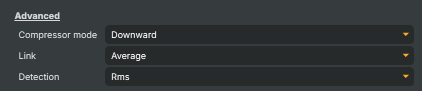
Advanced — detector mode, channel link, and detection type.
| Property | Description |
|---|---|
Compressor mode |
CompressorMode — whether the compressor reduces volume above the threshold (Downward) or raises volume below the threshold (Upward). Downward is the standard mode — loud parts above the threshold get pulled down. Upward does the opposite, lifting quieter parts below the threshold up so soft details stand out. |
Link |
How left and right channels are linked when the compressor decides how much to reduce. Pick a linking mode based on whether the channels should be processed together (preserving stereo image but reacting to the loudest of the two) or independently. |
Detection |
How the compressor measures the input level — peak vs. RMS. Peak detection reacts to instantaneous peaks (more aggressive on transients). RMS reacts to the smoothed loudness (more transparent on voices and music). |
Warnings
Warnings — clip indicators that flag when the signal is too loud.

| Property | Description |
|---|---|
Signal overload |
True when the compressor's output signal has clipped (read-only). Lights up when the combined effect of compression and MakeupGainDb pushes the signal above full scale. Auto-resets after 2 seconds. |
Peak Overload (dB) |
Highest level reached during the most recent overload, in decibels (read-only). Updated whenever SignalOverLoad trips, and auto-resets after 2 seconds. |
Actions
Actions — one-click commands.

| Property | Description |
|---|---|
Reset |
Reset all settings to their broadcast-style defaults. |
Inherits from: AbstractAudioOperator, AbstractOperator, AbstractAudioMetering.
See also: Compressor in Script Engine Objects.