

Gain
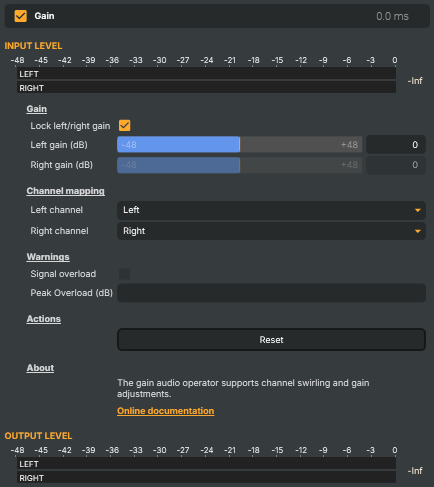
Adjusts the level of the audio signal independently per channel and remaps the stereo channels. Useful for boosting or attenuating audio, swapping left and right, summing stereo to mono, or duplicating one channel onto both sides. Includes a signal-overload indicator that flags when the gain pushes the signal past full scale.
Gain - Settings
Gain
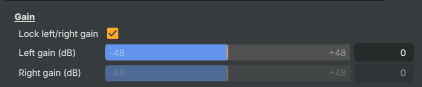
Gain — per-channel level controls.
| Property | Description |
|---|---|
Lock left/right gain |
Whether the left and right gains are linked together. [default=true]. When true, changing LeftGainDb automatically applies the same value to RightGainDb — handy when adjusting overall stereo level. Disable to set the two channels independently, useful for fixing channel imbalance. |
Left gain (dB) |
Gain applied to the left output channel, in decibels. [min=-48, max=48, default=0]. 0 leaves the channel unchanged. Negative values reduce the level; positive values boost it (watch out for SignalOverLoad). When LockChannelGain is true, setting this also updates RightGainDb. |
Right gain (dB) |
Gain applied to the right output channel, in decibels. [min=-48, max=48, default=0]. Locked to LeftGainDb when LockChannelGain is true; freely settable otherwise. |
Channel mapping
Channel mapping — choose which input channel feeds each output channel.

| Property | Description |
|---|---|
Left channel |
Which input channel feeds the left output. [default=Left]. Left passes the original left channel through. Right copies the right channel to the left output. Combined with RightChannelRemap to swap or duplicate channels. |
Right channel |
Which input channel feeds the right output. [default=Right]. Right passes the original right channel through. Left copies the left channel to the right output. Set both this and LeftChannelRemap to Left (or both to Right) to mono-fold to a single source channel. |
Warnings
Warnings — clip indicators that flag when the signal is too loud.

| Property | Description |
|---|---|
Signal overload |
True when the gain stage's output signal has clipped (read-only). Lights up when boosting either channel pushes the signal above full scale. Auto-resets after 2 seconds. Reduce LeftGainDb / RightGainDb if this trips. |
Peak Overload (dB) |
Highest level reached during the most recent overload, in decibels (read-only). Updated whenever SignalOverLoad trips, and auto-resets after 2 seconds. |
Actions
Actions — one-click commands.

| Property | Description |
|---|---|
Reset |
Reset all settings to their defaults — both channels at 0 dB and the standard L→L / R→R mapping. |
Inherits from: AbstractAudioOperator, AbstractOperator, AbstractAudioMetering.
See also: Gain in Script Engine Objects.