

Limiter
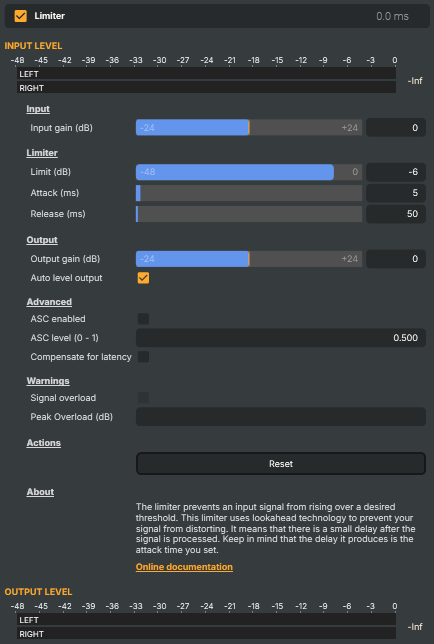
Acts as a "ceiling" on the audio: any signal that would otherwise rise above the chosen limit is held down so it cannot pass. Useful as the last stage in the audio chain to guarantee the program never clips, to safely add overall loudness without distortion, and to tame occasional peaks (cymbal hits, plosives, sudden loud words). Uses lookahead so peaks are caught cleanly — the cost is a small added latency equal to the attack time.
Limiter - Settings
Input
Input — level adjustment applied before the limiter stage.

| Property | Description |
|---|---|
Input gain (dB) |
Gain applied to the audio before it hits the limiter, in decibels. [min=-24, max=24, default=0]. Boost the input to drive more signal into the limiter (more peaks get caught, the program sounds louder); cut it when the source is already too hot. The limiter still catches whatever ends up above LimitDb — input gain just changes how often it has to work. |
Limiter
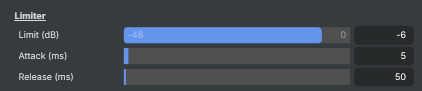
Limiter — ceiling and how aggressively peaks are caught.
| Property | Description |
|---|---|
Limit (dB) |
Maximum allowed output level, in decibels. [min=-48, max=0, default=-6]. Sets the absolute ceiling — output never goes above this value. 0 dB is full scale (digital max). Broadcast deliveries typically use −1 to −2 dB to leave headroom for downstream encoders; streaming and music can sit closer to 0 dB. |
Attack (ms) |
How quickly the limiter clamps down on a peak, in milliseconds. [min=1, max=200, default=5]. Also sets the lookahead delay added to the audio path, so shorter attacks reduce latency. Very short attacks (1–5 ms) catch sharp transients but can sound harsh on percussive material; longer attacks (20–100 ms) sound smoother but let brief peaks slip past. |
Release (ms) |
How quickly the limiter lets the level back up after a peak, in milliseconds. [min=5, max=5000, default=50]. Short releases recover fast and sound louder, but can cause audible "pumping" on busy material. Longer releases (200–1000 ms) sound more transparent but reduce average loudness. Match release to the program — speech tolerates faster release than sustained music. |
Output
Output — final level adjustment after the limiter stage.

| Property | Description |
|---|---|
Output gain (dB) |
Gain applied after the limiter, in decibels. [min=-24, max=24, default=0]. Trim the final program level. Note that boosting here can push the output above LimitDb again — for a hard ceiling, leave this at 0 and instead drive harder with InputGainDb. |
Auto level output |
When true, automatically scales the output to maintain consistent average level. [default=true]. Compensates for the gain reduction the limiter applies, giving a more uniform perceived loudness without manual rebalancing. Disable for a "true" limiter where only peaks above LimitDb are touched and quiet passages stay quiet. |
Advanced
Advanced — extra detector and timing options.

| Property | Description |
|---|---|
ASC enabled |
When true, enables Auto-Sustain Compensation. [default=false]. ASC adapts the release time based on incoming signal dynamics, helping the limiter react more naturally to a mix of short peaks and sustained loud passages. Try this when a fixed Release value either pumps on quiet sections or fails to recover in time. |
ASC level (0 - 1) |
How strongly Auto-Sustain Compensation influences the release behaviour, 0–1. [default=0.5]. Only takes effect when AscEnabled is true. 0 = no influence (uses the static Release value), 1 = ASC fully drives the release timing. Mid values blend the two. |
Compensate for latency |
When true, compensates for the lookahead delay so audio stays time-aligned with other signals. [default=false]. The limiter normally introduces a small delay equal to Attack for its lookahead. Enable this to keep the output in sync with parallel audio paths or with video. |
Warnings
Warnings — clip indicators that flag when the limiter's output is still over.

| Property | Description |
|---|---|
Signal overload |
True when the limiter's output has clipped despite limiting (read-only). A working limiter shouldn't trip this — if it does, the output stage (OutputGainDb or AutoLevel) is pushing the signal past full scale. Auto-resets after 2 seconds. |
Peak Overload (dB) |
Highest level reached during the most recent overload, in decibels (read-only). Updated whenever SignalOverLoad trips, and auto-resets after 2 seconds. |
Actions
Actions — one-click commands.

| Property | Description |
|---|---|
Reset |
Reset all settings to their defaults (0 dB in/out, −6 dB limit, 5 ms attack, 50 ms release, auto-level on, ASC off). |
Inherits from: AbstractAudioOperator, AbstractOperator, AbstractAudioMetering.
See also: Limiter in Script Engine Objects.