

Web API
The Web API tab gathers everything network-facing on Composer — the HTTP REST API surface (used by Connectors, dashboards, and external automation), the WebSocket push channel (used for real-time event subscriptions), and the UDP discovery service that lets multiple Composer hosts find each other on the local network.
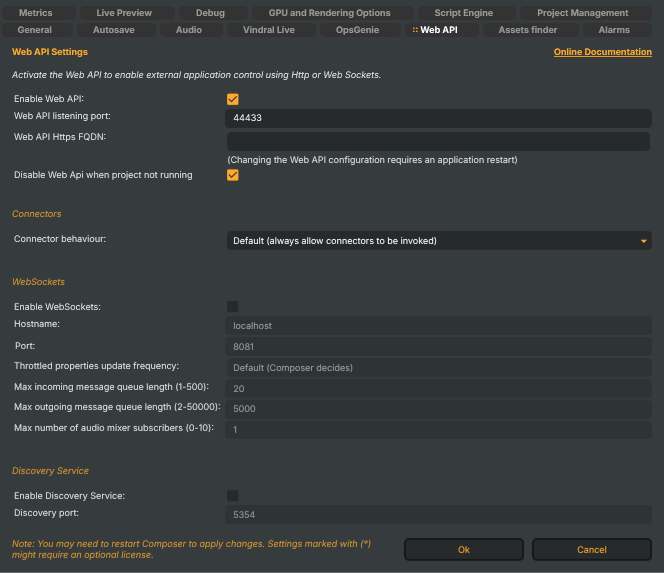
Activate the Web API to enable external application control using HTTP or Web Sockets.
For the full endpoint catalogue see the HTTP API manual; for the message envelope and subscription channels of the push channel see the WebSockets manual.
API-key authentication is configured separately, not on this tab. Composer reads valid keys from
apikeys.jsonnext to the executable; see HTTP API → Authentication for the file format and behaviour when no keys are defined.
HTTP API
- Enable Web API (
EnableHttpApi) — master switch for the HTTP API. When off, the listener doesn't bind to its port and every endpoint is unreachable. Default: on. - Web API host name (
HttpApiHostName) — hostname or IP address the HTTP API binds to. Use*to listen on all interfaces,localhostto restrict access to the local machine, or a specific hostname/IP to bind a single interface. Default:*(all interfaces). Changing the host name requires a Composer restart. - Web API listening port (
HttpApiPort) — TCP port the HTTP API listens on. Clamped to 1–65536. Default: 44433. Changing the port requires a Composer restart. - Web API Https FQDN (
HttpsFQDN) — fully qualified domain name used to bind an HTTPS certificate (via the Windows HTTP Server API certificate store) to the listener. Empty disables HTTPS — Composer serves HTTP only. Changing the FQDN requires a Composer restart. - Disable Web Api when project not running (
DisableWebApiWhenNotRunning) — when on, the HTTP API rejects every request while the engine is not inRunningstate, except a small whitelist (/api/start,/api/stop,/api/quit,/api/exit,/api/discovery/*). Useful on production hosts where you don't want third-party callers poking at a stopped Composer. Default: on.
Connectors
Connectors are project-defined HTTP triggers — the project-level surface that lets external systems invoke a saved sequence of API commands (set property, execute command, etc.) by name. This single setting decides what happens when a Connector fires while another one is still running.
Connector behaviour (
ConnectorRestrictions) — concurrency policy:- Default (always allow connectors to be invoked) — the new Connector runs side-by-side with whatever's already in flight. Use when each Connector targets distinct components and races aren't a concern.
- Warn — the new Connector runs, but a warning is logged so you can spot the overlap in monitoring.
- Warn and Prohibit — the new Connector is rejected with a warning if another is active. Use when Connectors set conflicting properties.
- Stop Running Connectors — any in-flight Connector is cancelled and the new one runs.
Runtime-mutable via
/api/settings/setso a script or remote operator can swap policies without a restart. Default: Default (always allow).
WebSockets
The WebSocket server pushes real-time events (property changes, audio levels, system info, log lines) to subscribed clients and accepts a small set of command messages. Off by default — turn it on only when a client (a custom dashboard, a remote control surface) needs the push channel.
Enable WebSockets (
EnableWebSockets) — master switch. Restart Composer for the change to take effect — the listener is started during application startup. Default: off.Hostname (
WebSocketsHostName) — interface the listener binds to.localhostfor local-only access; an IP or hostname to expose on a private network. Default:localhost.Port (
WebSocketsPort) — TCP port the listener uses. Default: 8081.Throttled properties update frequency (
WebSocketThrottledPropertiesFrequency) — cadence at which property-change pushes (audio mixer, render status) are emitted, expressed as a frame divisor:- Default (Composer decides) — engine picks the cadence based on subscriber count.
- Every frame, every 2nd, 3rd, 4th, 5th, 10th, 20th, 30th frame — fixed cadence.
Lower frequency = smaller per-second message volume, smoother on slow links and many-subscriber setups. Default: Default.
Max incoming message queue length (1–500) (
WebSocketsMaxIncomingMessageQueueLength) — per-connection backlog of inbound messages. The listener drops new messages from a client once its queue is full, so a client that stops draining can't pile up unbounded server memory. Default: 20.Max outgoing message queue length (2–50000) (
WebSocketsMaxOutgoingMessageQueueLength) — per-connection backlog of outbound messages. When the queue fills, the listener clears it (and disconnects the client) rather than blocking the engine. Default: 5000.Max number of audio mixer subscribers (0–10) (
WebSocketsMaxConnectedSubscribers) — caps how many WebSocket clients may subscribe to the high-volumeAudioMixerchannel simultaneously. Audio-meter pushes are bandwidth-heavy; allowing too many subscribers can saturate a small uplink. Default: 1.
Discovery Service
The Discovery Service announces this Composer's presence on the local network via UDP broadcast and listens for peers. Useful when building a control panel that needs to enumerate Composer hosts on the LAN without hard-coding addresses, or when a script wants to talk to a sibling Composer via /api/discovery/instances.
- Enable Discovery Service (
EnableDiscoveryService) — master switch. Default: off. - Discovery port (
DiscoveryPort) — UDP port used for the broadcast / listen. All Composer instances must use the same port to discover each other. Clamped to 1–65535. Default: 5354.
The WebSocket server also exposes two audio-precision knobs —
WebSocketMsgAudioDecimalsandWebSocketMsgAudioRmsDecimals— but those live under Audio → Monitoring precision since they affect audio-meter readings rather than the listener itself.