

Gate
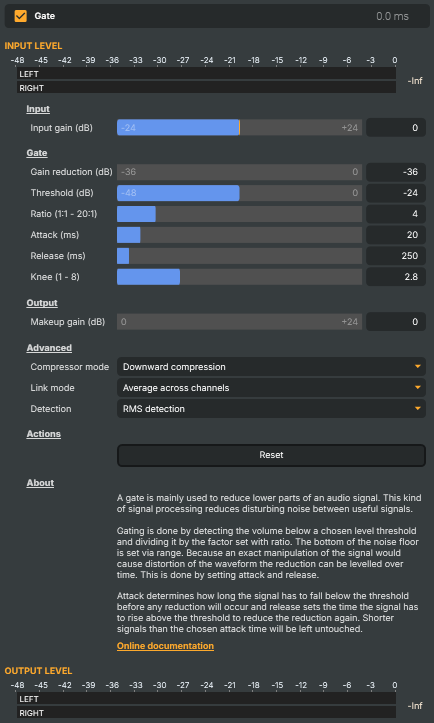
Introduction
Gate silences an audio signal whenever it drops below a level you choose, and lets it through untouched when it rises back above. It's the tool for cleaning up the gaps between sounds: the hiss and room tone that creep in while a presenter isn't talking, the hum a guitar amp makes between phrases, or the spill from a microphone that should only be heard when someone is actually speaking into it. When the wanted sound is present the gate is open and passes it through; when only background noise remains the gate closes and pulls it down.
It is the mirror image of a compressor. A compressor reins in the loud parts; a gate removes the quiet parts. The controls — threshold, ratio, attack/release, knee — share the same vocabulary, so if you've used the Compressor V2 the dials here will feel familiar. The defaults are a sensible broadcast starting point, and Reset returns to them at any time.
How it works
Every moment, the gate compares the incoming level against the Threshold. Audio above the threshold is the wanted signal and passes through; audio below it is treated as noise and attenuated. Ratio decides how decisively the gate clamps down once the signal falls below the threshold, and Gain reduction sets how far down the gated signal is actually pushed — from a complete mute to a gentle duck.
Because cutting the signal the instant it crosses the threshold would sound abrupt and chop the natural tails off words, the gate eases in and out over time. Attack is how quickly it opens when a sound arrives; Release is how slowly it closes again after the sound stops. Tuning these two is most of the art of gating: too fast and the gate "chatters" or clips word endings, too slow and it lets noise leak through between phrases. Each control is described in detail under Settings below.
Common use cases
- Muting a microphone between phrases — set the threshold just above the room tone, a
3:1–4:1ratio, and a moderate release so the mic goes quiet during pauses but doesn't clip the ends of words. This is the classic use for a presenter or commentator mic. - Cleaning up a multi-mic mix — gate each open mic so it only contributes when someone is actually using it, cutting the combined background noise of several live channels.
- Softening rather than silencing — instead of a full mute, raise Gain reduction toward
0(e.g.-12 dB) so background noise is pushed well down but never cuts out completely, avoiding the distracting "pumping" of a hard gate on a busy soundstage. - Suppressing hum or hiss between sounds — a higher ratio with RMS detection holds the gate firmly shut on steady low-level noise while still opening cleanly for the wanted signal.
For the opposite job — evening out the loud parts of a signal rather than removing the quiet ones — use the Compressor V2. For a simple level change with no dynamics processing, use Gain; to hold a hard ceiling ahead of a target, add the Limiter.
Gate - Settings
Input
Input — overall level applied before the gate.

| Property | Description |
|---|---|
Input gain (dB) |
Pre-gate gain applied to the input, in decibels. [min=-24, max=24, default=0]. 0 leaves the signal unchanged. Negative values reduce the input level; positive values boost it before the gate processes it. |
Gate
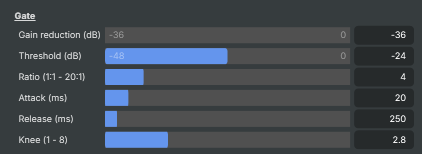
Gate — the main controls that decide when the gate opens and closes.
| Property | Description |
|---|---|
Gain reduction (dB) |
How much the gate attenuates the signal when closed, in decibels. [min=-36, max=0, default=-36]. −36 dB silences the audio completely (full gate); less negative values leave a quiet "duck" of the original through (often preferable on speech to avoid sudden cut-outs). 0 dB effectively disables the gate. |
Threshold (dB) |
Level below which the gate closes, in decibels relative to full scale. [min=-48, max=0, default=-24]. Audio quieter than this triggers the gate; audio louder is allowed through. Set this just above the noise floor — too low and the gate barely engages, too high and it chops off legitimate quiet content. |
Ratio (1:1 - 20:1) |
How aggressively the gate closes below the threshold. [min=1, max=20, default=4]. 1:1 effectively disables the gate. Higher values produce a more decisive close — useful for hard gating noisy mics, while lower values give a softer "ducking" effect. |
Attack (ms) |
How quickly the gate opens when the signal exceeds the threshold, in milliseconds. [min=1, max=200, default=20]. Short values catch the start of words and percussive sounds; longer values can clip fast onsets. |
Release (ms) |
How quickly the gate closes after the signal drops below the threshold, in milliseconds. [min=5, max=5000, default=250]. Short values close abruptly between words (more obvious gating); long values let the natural tail of words fade out before muting. |
Knee (1 - 8) |
Soft-knee width around the threshold. [min=1, max=8, default=2.8]. Low values give a hard, decisive open/close; high values give a gentle, gradual engagement around the threshold. |
Output
Output — final level adjustment after the gate.

| Property | Description |
|---|---|
Makeup gain (dB) |
Extra gain applied after the gate to raise the overall level. [min=0, max=24, default=0]. |
Advanced
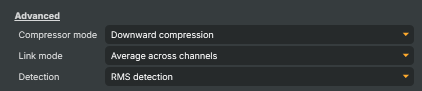
Advanced — operating mode, channel link, and detection type.
| Property | Description |
|---|---|
Compressor mode |
CompressorMode — operating mode / gating direction. Reuses the underlying compressor's mode setting. The standard mode for a gate is the one that pulls down quiet parts (i.e. cuts when the signal is below the threshold), which is what most users want. |
Link mode |
How left and right channels are linked when the gate decides whether to open or close. Linked detection keeps the stereo image stable; independent detection gates each channel separately. |
Detection |
How the gate measures the input level — peak vs. RMS. Peak detection reacts to instantaneous peaks (more aggressive on transients). RMS reacts to the smoothed loudness over time (more transparent on speech and music). |
Actions
Actions — one-click commands.

| Property | Description |
|---|---|
Reset |
Reset all settings to their defaults. |
Inherits from: AbstractAudioOperator, AbstractOperator, AbstractAudioMetering.
See also: Gate in Script Engine Objects.
Related components
A gate only cleans up the gaps — it mutes the signal between phrases but leaves whatever noise rides along with the speech untouched. When the background bleeds into the talking itself, reach for:
- Crystal Speech — an AI-powered denoiser that strips background noise (keyboard clatter, traffic, fan hum, room and crowd noise) from a voice while it is speaking, not just in the pauses. Use the Gate to silence the quiet gaps and Crystal Speech to clean the speech in between; together they handle a noisy contributor far better than either alone.