

Face Detect
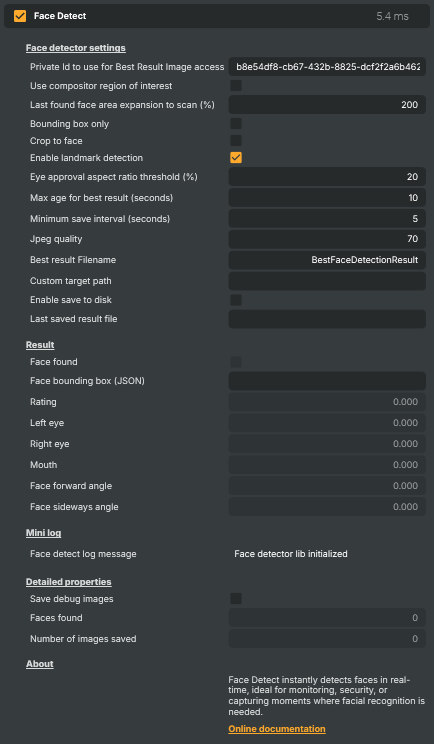
The Face Detect operator finds human faces in a layer's video in real time and reports where they are and how good a view of them you have. For every frame it locates the strongest frontal face, draws a bounding box around it, and scores the detection with a quality rating — all on the GPU, alongside the rest of your composition.
Beyond simply finding a face, the operator can measure facial landmarks (eye and mouth openness, and how far the head is turned or tilted), crop its output down to just the face, and automatically save the best-looking detection to disk as a JPEG. Because every result is also exposed as a read-only property, the operator doubles as a data source: scripts, Connectors, and the HTTP API can react to who is on screen and where.
Example use cases
- Automated headshot capture — keep the highest-quality, eyes-open, face-forward frame and write it to disk for thumbnails, scoreboards, or player cards.
- Presence-aware graphics — show or hide overlays only when someone is actually in frame, driven from the Script Engine.
- Attention and talking-head hints — use eye and mouth openness to tell whether a presenter is looking at the camera or speaking.
- Follow-the-face effects — feed the face bounding box to other operators to blur, crop, or frame around the subject as they move.
- Monitoring and security — flag and archive frames whenever a face appears in a feed.
What it reports
The most recent detection is published as read-only properties you can read from a script or over the API:
- Face found — whether a face is currently in frame, and Rating — a confidence score for that detection.
- Face bounding box (JSON) — the face position and size in input-frame pixels, ready to parse:
{"x":0,"y":0,"width":0,"height":0}. - Landmarks (when enabled) — left- and right-eye openness, mouth openness, and the head's forward (nodding) and sideways (turning) angles in degrees.
Detection modes
The Face detector settings group lets you trade detail for speed:
- Bounding box only runs the cheapest mode — just "is there a face, and where" — with no landmarks or snapshots. Ideal when you only need presence and position for a downstream effect.
- Leave it off to also collect landmarks and, optionally, save snapshots.
- Crop to face changes the operator's output image, cropping the frame down to the detected face. With it off, the video passes through unchanged and detection runs silently in the background.
- Use compositor region of interest restricts the scan to the project's region of interest — faster, and a way to avoid false positives in parts of the frame you don't care about.
Saving the best result
When Enable save to disk is on, the operator keeps track of the best (highest-rated) detection it has seen and periodically writes it out as a JPEG — no more often than the Minimum save interval, and to a folder and filename you choose. The eye-openness and head-angle thresholds let you insist that saved snapshots are clean, front-facing headshots rather than blinks or side profiles, and Max age for best result controls how long a strong result is held before a fresh one is chosen.
💡 Tip
The path of the most recently written file is published as Last saved result file, so a script or Connector can pick the snapshot up the moment it's saved — to upload it, show it in another layer, or hand it to an external system.
Related operators
For detecting and locating arbitrary objects (not just faces), see Object Detection; for classifying what's in a frame, see Image Classification.
Face Detect - Settings
Face detector settings
Face detector settings — what the detector looks for and how it works.
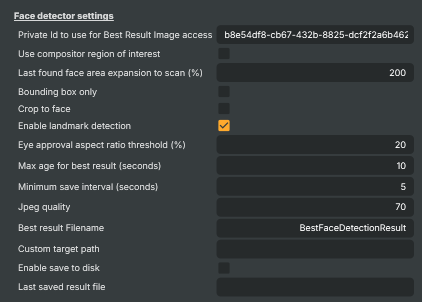
| Property | Description |
|---|---|
Private Id to use for Best Result Image access |
Private identifier used when accessing the best-result image through the API. Acts as a simple access key — clients reading the saved best-quality image must supply this value. Set to a unique string when exposing the result publicly. |
Use compositor region of interest |
Whether to limit detection to the project's region of interest. [default=false]. When true, only the part of the frame inside the project's region of interest is scanned for faces, which is faster and avoids false positives in irrelevant areas. Disable to scan the full frame. |
Last found face area expansion to scan (%) |
How much area around the last detected face to keep scanning, as a percentage. [min=100, max=500, default=200]. Once a face has been found, the detector concentrates on a region around its last position to save processing time. 100% scans only the last bounding box; higher values expand the scan area, which is more tolerant of fast head movement at a small extra processing cost. |
Bounding box only |
Whether to skip landmark detection and image saving and only report bounding boxes. [default=false]. When true, the operator runs the cheapest possible mode — it just locates faces and reports their bounding box and rating, with no eye/mouth landmarks and no JPEG snapshots to disk. Lock-related settings (landmarks, eye threshold, save-to-disk, JPEG quality) are disabled while this is on. Useful when you only need to know "is there a face, and where" for downstream effects or scripting. |
Crop to face |
Whether the operator's output image is cropped to the detected face. [default=false]. When true, the video this operator outputs is cropped down to just the detected face's bounding box — handy for feeding a face-only image into downstream effects. Disable to pass the full frame through unchanged (the detection still happens, it's just not reflected in the output image). |
Enable landmark detection |
Whether to detect eye/mouth landmarks and head angles in addition to the face bounding box. [default=false]. When true, the operator also reports LeftEye, RightEye, Mouth, FaceForwardAngle, and FaceSidewaysAngle. Costs a little more processing time per frame. Cannot be used with BoundingBoxOnly. |
Eye approval aspect ratio threshold (%) |
Minimum eye-aspect-ratio for a detection to count as approved, as a percentage. [min=10, max=60, default=20]. Used to weed out detections where the eyes appear too closed (blinks, looking down) to be considered a good headshot. Lower values are more permissive; higher values only approve detections where the eyes are clearly open. |
Max age for best result (seconds) |
How long the best-quality detection is kept before being replaced, in seconds. [min=5, max=120, default=10]. The operator continuously tracks the best (highest-rated) detection it has seen recently. After this many seconds without a better detection, the best result is reset so a new best can be picked. Shorter values make the "best result" follow recent activity more closely; longer values keep a strong result around longer. |
Minimum save interval (seconds) |
Minimum time between consecutive saves to disk, in seconds. [min=1, max=60, default=5]. Prevents the operator from saving snapshots too frequently. Even if a new best detection is found sooner, the operator waits at least this long before writing another file. |
Jpeg quality |
Quality of the saved JPEG snapshot, as a percentage. [min=10, max=100, default=70]. 100 is the highest quality (and largest file); lower values produce smaller files with more visible compression artefacts. 70 is a typical balance for archival snapshots. |
Best result Filename |
Filename used for the best-result JPEG saved to disk. Just the file name (without path). The full path is built from CustomTargetPath plus this name. Existing files with the same name are overwritten on each save. |
Custom target path |
Custom directory the best-result snapshot is written to. Leave empty to use the project's default snapshot folder. Set to an absolute path to write the file somewhere else — for example a network share so other systems can read it. |
Enable save to disk |
Whether to save the best detection to disk as a JPEG. [default=false]. When true, the operator periodically writes the current best-quality detection to CustomTargetPath/BestResultFileName, no faster than MinimumSaveInterval seconds apart. Disable to keep face detection in-memory only. |
Last saved result file |
Full path of the most recently saved snapshot file (read-only). Updated automatically each time the operator writes a new best-result image. Useful for scripts that need to know which file to read or upload. |
Result
Result — the most recent face-detection findings.
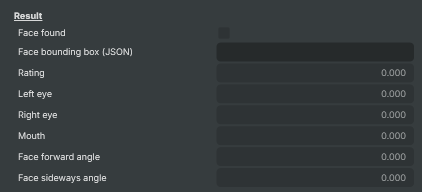
| Property | Description |
|---|---|
Face found |
True while a face is currently detected in the frame (read-only). Useful from a script to react to presence — for example, only show overlay graphics when there's actually a face on screen. |
Face bounding box (JSON) |
Bounding box of the detected face as a JSON string (read-only). Format: {"x":0,"y":0,"width":0,"height":0}. Coordinates are in pixels relative to the input frame. Easy to parse from a script that needs to drive other components (cropping, blurring, overlays) at the face's location. |
Rating |
Quality rating of the most recent detection (read-only). A higher value is a stronger, more confident detection. Used internally to pick the "best" result to save to disk; available to scripts as a confidence score. |
Left eye |
Left-eye openness, as an aspect ratio (read-only). Higher values mean the eye appears more open; lower values suggest a blink or a closed eye. Only populated when EnableLandmarkDetection is true. Useful for blink detection or attention scoring. |
Right eye |
Right-eye openness, as an aspect ratio (read-only). See LeftEye. Only populated when EnableLandmarkDetection is true. |
Mouth |
Mouth openness, as an aspect ratio (read-only). Higher values mean the mouth is more open. Only populated when EnableLandmarkDetection is true. Useful for talking-head detection or simple "is the person speaking" hints. |
Face forward angle |
Forward (nodding) angle of the head, in degrees (read-only). 0 means the head is upright; positive values lean forward (chin down), negative values lean back (chin up). Only populated when EnableLandmarkDetection is true. |
Face sideways angle |
Sideways (turning) angle of the head, in degrees (read-only). 0 means the head is facing the camera straight on; positive values turn one way, negative the other. Only populated when EnableLandmarkDetection is true. Useful for filtering out side-profile shots when picking the best headshot. |
Mini log
Mini log — most recent status message from the operator.

| Property | Description |
|---|---|
Face detect log message |
Most recent status, info, or error message from the operator (read-only). The operator writes here when it loads, when it saves a snapshot, when a new best detection is picked, or when something goes wrong. |
Detailed properties
Detailed properties — counters and per-frame timing diagnostics.
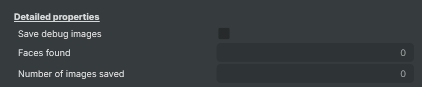
| Property | Description |
|---|---|
Faces found |
Total number of frames in which a face was detected since the operator started (read-only). |
Number of images saved |
Total number of best-result snapshots saved to disk since the operator started (read-only). Only grows while EnableSaveToDisk is true. |
Inherits from: AbstractOperator, AbstractAudioMetering.
See also: Face Detect in Script Engine Objects.