

False Color
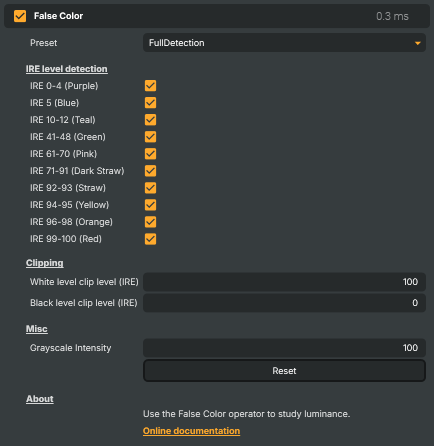
Replaces the picture's brightness levels (IRE) with a fixed colour palette so exposure problems are easy to spot. Useful for monitoring exposure on a live feed, finding clipped highlights or crushed blacks before they reach the audience, dialing in skin tones (typically the IRE 71-91 "dark straw" band), checking that talent and background are correctly lit, and giving camera operators an at-a-glance view of dynamic range. Pick a preset (Exposure, Black Levels, Full Detection, White Clip 99 IRE) or enable individual IRE bands by hand.
False Color - Settings

| Property | Description |
|---|---|
Preset |
Quick-pick configuration that turns on a useful set of IRE bands and clipping levels. [default=FullDetection]. Exposure highlights only the brightest bands (94 IRE and up) — good for catching clipped highlights. Black Levels highlights deep shadows (0–5 IRE) — good for spotting crushed blacks. Full Detection enables every band so the entire image is colour-coded. White Clip 99 IRE is a minimal exposure check focused on the absolute clip point. |
IRE level detection
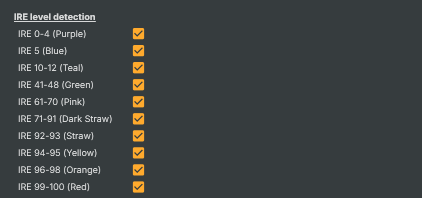
IRE level detection — choose which brightness bands are colour-coded in the output.
| Property | Description |
|---|---|
IRE 0-4 (Purple) |
Highlight darkest shadow detail in purple. [default=preset-driven]. Pixels at 0–4 IRE are crushed to true black on most displays. Use this band to find areas that have lost shadow information and need lifting. |
IRE 5 (Blue) |
Highlight 5 IRE shadows in blue. [default=preset-driven]. A safe shadow level — dark but still has detail. Use to confirm shadows are deep without being clipped. |
IRE 10-12 (Teal) |
Highlight 10–12 IRE in teal. [default=preset-driven]. Good reference band for the deepest comfortable shadow on broadcast video. |
IRE 41-48 (Green) |
Highlight 41–48 IRE midtones in green. [default=preset-driven]. Useful for placing 18% grey cards and middle-grey reference subjects. |
IRE 61-70 (Pink) |
Highlight 61–70 IRE in pink. [default=preset-driven]. Often used for caucasian skin-tone exposure references. |
IRE 71-91 (Dark Straw) |
Highlight 71–91 IRE in dark straw. [default=preset-driven]. The classic skin-tone band — well-exposed faces should sit in here for a flattering look. |
IRE 92-93 (Straw) |
Highlight 92–93 IRE in straw. [default=preset-driven]. Bright midtones approaching highlights — useful for monitoring near-overexposed skin or bright fabric. |
IRE 94-95 (Yellow) |
Highlight 94–95 IRE in yellow. [default=preset-driven]. Warning band — pixels here are getting close to clipping. |
IRE 96-98 (Orange) |
Highlight 96–98 IRE in orange. [default=preset-driven]. Stronger warning band — these areas are likely to clip on consumer monitors. |
IRE 99-100 (Red) |
Highlight 99–100 IRE in red. [default=preset-driven]. Pixels at this level are clipped (pure white). Anything red on screen has lost highlight detail and should usually be brought back down with exposure or aperture. |
Clipping
Clipping — adjust where the operator considers white and black levels to be clipped.

| Property | Description |
|---|---|
White level clip level (IRE) |
The brightness level treated as white clipping, in IRE. [min=95, max=100, default=100]. Lower this if the delivery format clips earlier than 100 IRE. |
Black level clip level (IRE) |
The brightness level treated as black clipping, in IRE. [min=0, max=10, default=0]. Raise this if the delivery format crushes blacks above 0 IRE. |
Misc
Misc — final tweaks to the False Color visualisation.

| Property | Description |
|---|---|
Grayscale Intensity |
How desaturated the underlying picture appears beneath the false-colour bands. [min=0, max=100, default=preset-driven]. 0 keeps the original colours. 100 fully desaturates to greyscale so the false-colour overlays really stand out. |
Reset |
Reset all settings to their defaults (preset, IRE bands, clipping levels, grayscale intensity). |
Inherits from: AbstractOperator, AbstractAudioMetering.
See also: False Color in Script Engine Objects.