

URL Sequencer Target
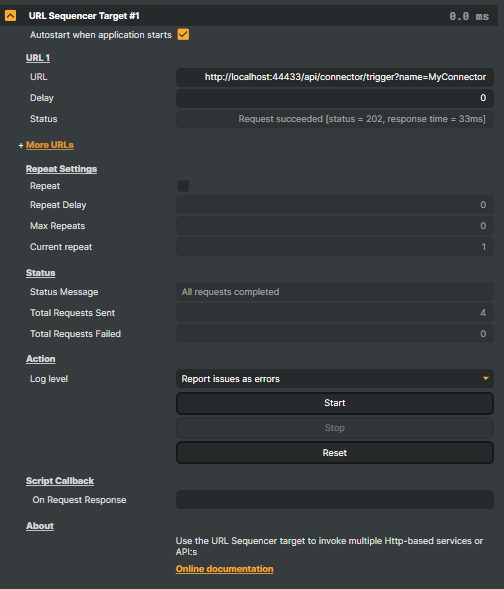
Introduction
The URL Sequencer Target fires a timed sequence of HTTP GET requests at up to ten different URLs. Each request has its own delay (measured from the start of the sequence) and reports its own live status, so a multi-step automation flow — notify a control system, start a cloud encoder, pull a CDN cache, post a "we're live" webhook — runs from a single Composer target with predictable timing.
The whole sequence can be configured to repeat on a fixed cadence with an optional cap on the number of iterations, useful when the same set of calls needs to run throughout a show rather than once at startup. Each request optionally fires a Script Engine callback with the response body, so a single sequence can drive logic in your project script — parse a JSON status payload, update on-screen graphics, write the result to a project property.
For a single one-shot HTTP call without a timeline, the HTTP Target is the simpler tool. For more elaborate automation that needs custom HTTP methods, headers, or request bodies, drive HTTP requests directly from the Script Engine — the URL Sequencer is purpose-built for the timeline-of-GETs case.
How a sequence runs
When the target starts (manually via StartCommand, automatically via AutoStart, or remotely via the HTTP API / a Connector), a stopwatch starts at zero and each configured URL fires when its Delay elapses:
- Delays are measured from the start of the sequence, not from the previous request. URL 1 with delay
0, URL 2 with delay500, URL 3 with delay2000produces a sequence at 0 ms / 500 ms / 2000 ms — the gap between URL 2 and URL 3 is 1500 ms, not 2000 ms. - Empty URL slots are skipped silently. The sequence simply moves on to the next configured slot. This makes it natural to leave a gap-free 2–4 URL sequence configured even when slot 5+ is unused.
- URLs must include the scheme (
http://orhttps://) — bare hostnames are rejected. The component's verifier marks malformed URLs in the per-slot status field at startup. - Per-slot Status updates live as each request completes —
sent, HTTP status code on success,timed out, or the error string on failure. Useful while authoring a sequence and as a runtime diagnostic. - Repeat Sequence loops the entire sequence after
Repeat Delayms have elapsed since the last request fired.Max Repeatsbounds the iteration count (0= unlimited);RepeatCountertracks how many full passes have run sinceStartCommand. - Reset rewinds the sequence to the start without firing anything — useful when iterating on URL or delay changes.
URL slots 2 through 10 live behind an expandable More URLs section in the property panel so the common case (1–2 URLs) stays compact. Three commands — Start, Stop, Reset — are surfaced in the panel as a single button strip and listed in the property table below.
- Pre-show automation — at the top of a broadcast: notify a control system, start cloud encoders, arm cameras, post a "we're live" webhook, all on the cadence you choose.
- Webhook orchestration — fire several webhooks in a known order with controlled delays between them (cache invalidate → CDN pull → notify subscribers).
- Keep-alive / heartbeat — re-fire a small sequence at a fixed cadence to keep upstream services from timing out, or to publish a periodic status ping. Set
RepeatSequence = trueand a sensibleRepeat Delay. - Scripted health checks — hit several endpoints in turn at the start of a show to confirm every system is reachable before going on air; pair with
RequestResponseCallbackto flag any non-200 response. - Show-end teardown — at the close of a programme: stop cloud encoders, post a "we're done" webhook, ping a notification service. A second URL Sequencer Target instance handles teardown on its own schedule.
- Script-Engine integration — each request can fire a callback with the response body, so the sequence can drive logic in your project script (parse JSON, update on-screen graphics, gate other actions on a service's response).
Limitations
GETonly — noPOST,PUT,DELETE. For methods other thanGET, driveHttpClientfrom the Script Engine.- No custom headers or request body — the URL itself is the entire request shape. For
Authorization: Bearer …, a JSON body, or any non-trivial header, use a Script Enginefetchor the HTTP Target. - Default timeout — uses .NET's default HttpClient timeout (≈100 seconds). Slow endpoints stretch the perceived sequence duration; if the Script Engine callback is wired up, the timeout result surfaces there too.
- No retries — a failed request is reported in the slot's Status and the sequence moves on. Wrap retry logic on the outside (Connector / Script Engine) when a request must succeed.
URL Sequencer Target - Settings
URL 1
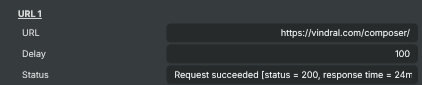
URL 1 — the first endpoint in the sequence.
| Property | Description |
|---|---|
URL |
Full URL for the first request in the sequence. Must include scheme (http:// or https://). Leave any URL slot empty to skip it. |
Delay |
Delay in milliseconds, measured from sequence start, before request 1 is fired. Set to 0 to fire immediately on Start. |
Status |
Live status text for request 1 — sent / succeeded / failed / timed out, including HTTP status code and response time when available (read-only, debug). |
More URLs
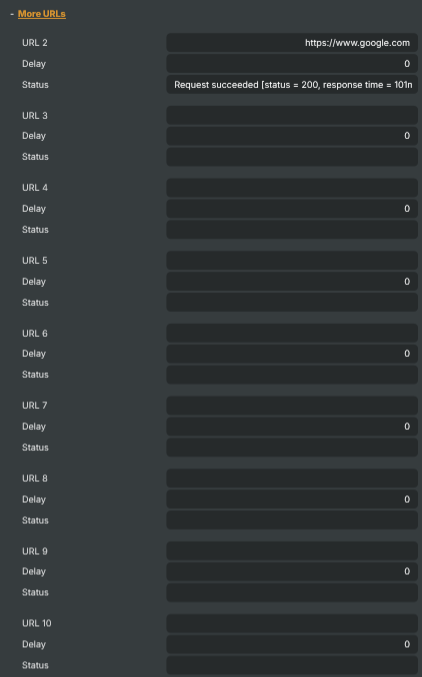
More URLs — expand to configure additional URLs (2-10) in the sequence.
| Property | Description |
|---|---|
URL 2 |
Second URL in the sequence. Leave empty to skip. |
Delay |
Delay in milliseconds, measured from sequence start, before request 2 is fired. |
Status |
Live status text for request 2 (read-only, debug). |
URL 3 |
Third URL in the sequence. Leave empty to skip. |
Delay |
Delay in milliseconds, measured from sequence start, before request 3 is fired. |
Status |
Live status text for request 3 (read-only, debug). |
URL 4 |
Fourth URL in the sequence. Leave empty to skip. |
Delay |
Delay in milliseconds, measured from sequence start, before request 4 is fired. |
Status |
Live status text for request 4 (read-only, debug). |
URL 5 |
Fifth URL in the sequence. Leave empty to skip. |
Delay |
Delay in milliseconds, measured from sequence start, before request 5 is fired. |
Status |
Live status text for request 5 (read-only, debug). |
URL 6 |
Sixth URL in the sequence. Leave empty to skip. |
Delay |
Delay in milliseconds, measured from sequence start, before request 6 is fired. |
Status |
Live status text for request 6 (read-only, debug). |
URL 7 |
Seventh URL in the sequence. Leave empty to skip. |
Delay |
Delay in milliseconds, measured from sequence start, before request 7 is fired. |
Status |
Live status text for request 7 (read-only, debug). |
URL 8 |
Eighth URL in the sequence. Leave empty to skip. |
Delay |
Delay in milliseconds, measured from sequence start, before request 8 is fired. |
Status |
Live status text for request 8 (read-only, debug). |
URL 9 |
Ninth URL in the sequence. Leave empty to skip. |
Delay |
Delay in milliseconds, measured from sequence start, before request 9 is fired. |
Status |
Live status text for request 9 (read-only, debug). |
URL 10 |
Tenth URL in the sequence. Leave empty to skip. |
Delay |
Delay in milliseconds, measured from sequence start, before request 10 is fired. |
Status |
Live status text for request 10 (read-only, debug). |
Repeat Settings
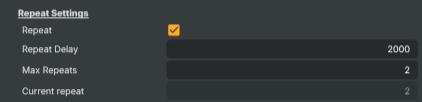
Repeat Settings — make the whole sequence loop and bound the number of repeats.
| Property | Description |
|---|---|
Repeat |
When enabled, the sequence restarts after the last URL fires, separated by RepeatDelay and bounded by MaxRepeats. Useful for fixed-cadence health checks or periodic notifications throughout a long-running show. |
Repeat Delay |
Pause in milliseconds added after the last URL in the sequence fires before the sequence restarts. Only used when RepeatSequence is on. |
Max Repeats |
Maximum number of times the sequence repeats after the initial run. Set to 0 to repeat indefinitely until the user presses Stop. Only used when RepeatSequence is on. |
Current repeat |
How many times the sequence has repeated so far (read-only, debug). |
Status
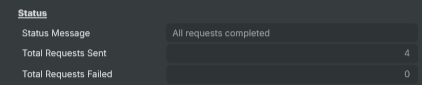
Status — overall state of the sequence and counters for sent/failed requests.
| Property | Description |
|---|---|
Status Message |
Overall state of the sequencer (idle, running, finalizing, completed) (read-only, debug). |
Total Requests Sent |
Cumulative count of HTTP requests sent across all repeats (read-only, debug). |
Total Requests Failed |
Cumulative count of failed requests across all repeats — non-2xx responses, timeouts and network errors (read-only, debug). |
Action
Action — start, stop and reset the sequencer; pick how validation issues are logged.

| Property | Description |
|---|---|
Log level |
How issues like invalid URLs or network failures appear in the log — as warnings or as errors. Use Warning for non-critical sequences, Error when failed requests should be visible during operations. |
Start |
Begins the sequence from the top. Validates URLs first; if any are invalid the sequence does not run and a warning is shown via UrlValidationNote. |
Stop |
Stops the sequence. In-flight requests are cancelled and any pending repeats are skipped. |
Reset |
Clears all ten URLs, their delays, status fields and the repeat counters. Use to start over from a blank configuration. Has no effect while the sequence is running. |
Script Callback
Script Callback — hook a Script Engine function into per-request response handling.

| Property | Description |
|---|---|
On Request Response |
Name of a Script Engine function called once per request as soon as the response arrives. The script receives a JSON object with the URL id, status code, response body, request timestamp and response time. Leave empty to skip. |
Inherits from: AbstractTarget.
See also: URL Sequencer Target in Script Engine Objects.
Driving from outside
Three command properties drive the target: StartCommand, StopCommand, ResetCommand. They're invokable from the property panel, from a Script Engine script, from the HTTP API (/api/invokecommand?targetname=URL+Sequencer+Target&command=StartCommand), or via a Connector. Per-slot URLs and delays can be reconfigured at runtime via /api/setproperty so a single target can serve different URL sets across different shows without re-authoring the project.
The RequestResponseCallback property names a Script Engine function called once per request as soon as the response arrives. The script receives a JSON object with the URL slot id, status code, response body, request timestamp, and response time — handy for dispatching logic on per-endpoint outcomes:
function OnSequencerResponse(data) {
    Log.Info("URL " + data.urlId + " → " + data.statusCode + " in " + data.responseTimeMs + " ms");
    if (data.statusCode !== 200) {
        SetObjectProperty("Status Indicator", "Visible", true);
    }
    if (data.urlId === 1 && data.responseBody) {
        const payload = JSON.parse(data.responseBody);
        SetObjectProperty("Score Display", "Text", payload.score);
    }
}
RepeatCounter and the per-slot UrlNStatus properties surface as readable HTTP API state too, so a dashboard can monitor sequence progress without watching the property panel.
Related components
- HTTP Target — single one-shot URL call with response capture. Reach for it when the timeline / repeat features of URL Sequencer aren't needed.
- Connectors — visual action sequences that can include HTTP calls alongside scene / layer / target operations. Use a Connector when you want to interleave HTTP calls with non-HTTP actions (switch a scene, mute an input) on the same trigger.
- Script Engine — full programmability for custom HTTP methods, headers, bodies, retries, and conditional flows. Reach for the Script Engine when the request shape exceeds what a URL string can express.