

General
The General tab gathers application-wide defaults: the directories Composer reads and writes, baseline workstation security, default dimensions for new scenes, the processing-queue back-pressure knobs, common project-load behaviour, the global UI scale, and the monitoring labels that follow this Composer instance into logs and metrics.
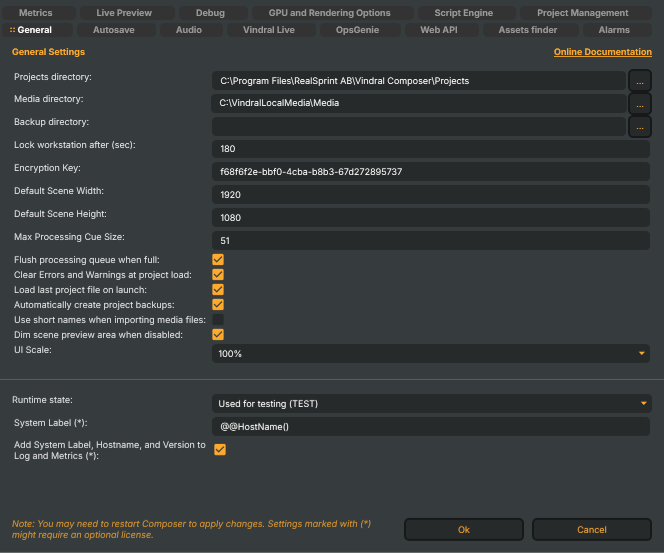
Directories
These paths drive where Composer reads media from and writes its working files. All three accept either an absolute path or a path relative to the application working directory; the … button opens a folder picker.
- Projects directory (
ProjectsDirectory) — the default location Composer's File → Open / File → Save dialogs land in, and whereLastProjectFileis resolved against when no full path is given. Defaults to aProjects/subfolder of the application's working directory. - Media directory (
MediaDirectory) — root folder for media assets. The assets finder searches this folder (and itsImages/andVideo/subfolders) when resolving project-referenced media that isn't found at its recorded path. Defaults to aMedia/subfolder of the application's working directory. - Backup directory (
BackupDirectory) — when set to an existing folder different from Projects directory, Composer writes a dated archive copy of each project on File → Save to<BackupDirectory>\<MachineName>\<yyyy-MM-dd>_<projectname>.prj(one file per host, per day, per project — same-day saves overwrite). Independent of the rolling<projectname>.bakdriven by Automatically create project backups below. Leave empty to skip the dated archive. See Backup files for the full set of auto-backups Composer maintains.
Workstation security
- Lock workstation after (sec) (
LockWorkstationSeconds) — inactivity threshold after which Composer Desktop locks its UI. Clamped to 10–3600 seconds; default 600 (10 min). - Encryption Key (
EncryptionKey) — the per-installation symmetric key used to encrypt sensitive fields persisted insettings.xml(Vindral Live and OpsGenie tokens, stream keys). Generated as a fresh GUID on first launch. Treat as a secret; rotating the key invalidates every encrypted field on this host — you'll need to re-enter API tokens and stream keys.
Default scene dimensions
These values are applied to every new scene created in this Composer; they don't retroactively change scenes that already exist.
- Default Scene Width (
DefaultSceneWidth) — pixels. Clamped to 32–8192. Default 1920. - Default Scene Height (
DefaultSceneHeight) — pixels. Clamped to 32–8192. Default 1080.
Processing queue
The processing queue holds frames waiting to be rendered. Under sustained overload — a slow target, a CPU spike, a downstream encoder pause — the queue fills, and these two settings decide what happens next.
- Max Processing Cue Size (
MaxProcessingCueSize) — frame cap on the queue before back-pressure is applied. Clamped to 25–200; default 51. (The property is named Cue for legacy compatibility — read it as Queue.) - Flush processing queue when full (
FlushCueOnCueFull) — when on, exceeding the cap drops every queued frame to bound latency rather than letting the queue grow. When off, the engine waits for the queue to drain, which preserves frame order at the cost of accumulating end-to-end latency. Default: on.
Project load behaviour
- Clear Errors and Warnings at project load (
ClearErrorAndWarningsAtProjectLoad) — when on, the Desktop's "errors / warnings since project loaded" counter resets each time a project is opened. When off, the counter accumulates across project switches. Default: off. - Load last project file on launch (
LoadLastProjectFileOnLaunch) — when on, Composer automatically reopensLastProjectFileon startup. Default: on. - Automatically create project backups (
AutoSaveProjectBackup) — when on, a periodic timer (firing every ~5 minutes, only if the project has been modified since the last tick) writes a rolling<projectname>.bakcopy next to the project file itself. Independent of the dated archive driven by Backup directory above — that one runs on File → Save, this one on a timer. See Backup files for the wider picture. Default: on. - Use short names when importing media files (
MediaImportUseShortName) — when on, imported media is stored in the project as a file name only and re-resolved by the assets finder at load time (portable across hosts with different drive layouts). When off, the absolute path is recorded (faster load, breaks when the project moves). Default: on.
UI behaviour
- Dim scene preview area when disabled (
DimScenePreviewAreaWhenDisabled) — when on, the preview panel dims while a scene's render is disabled (viaDisableRenderor signal-loss substitution), so the operator notices the visible frame is no longer live. Default: on. - UI Scale (
UIScale) — global zoom factor for Composer Desktop's interface. Choices: 50%, 75%, 100%, 125%, 150%. Useful on high-DPI screens or when projecting Composer to a remote operator. Default: 100%.
Monitoring labels
The bottom group is about how this Composer identifies itself to external monitoring (logs, metrics, OpsGenie alerts, Loki entries, Grafana dashboards). Settings marked (*) in the UI may require a restart to take effect.
- Runtime state (
RuntimeState) — a free-form label used in log entries to identify what role this Composer instance is playing (e.g.Used for testing (TEST),Production,Backup). Doesn't affect engine behaviour; useful when several instances of Composer share a Loki / Grafana stack and you need to filter dashboards by environment. - System Label (*) (
SystemLabel) — short tag prepended to log entries and Prometheus metrics for this host. Defaults to the machine's hostname; the@@HostName()macro is substituted at runtime. Centralised dashboards group entries by this label, so make it stable and readable. - Add System Label, Hostname, and Version to Log and Metrics (*) (
AddSystemLabelToLogEntries) — when on, every log line and every metric is enriched withSystemLabel, hostname, and Composer version. Required if you're shipping logs to a multi-host Loki / Composer Monitor setup; can be turned off on standalone hosts to keep entries shorter. Default: on.
Settings marked with (*) in the UI relate to the Composer Monitor feature set and may require a restart to take effect. From R2 2026 these work on every Composer build and licence tier; on releases before R2 2026 they required the separately-sold Extended Monitoring license. Most other changes on this tab apply on Ok.