

Alarms
The Alarms tab configures Composer's built-in alarm system — the runtime watchdog that counts log entries by severity over a sliding time window and raises a single de-duplicated alarm when a threshold is crossed. Alarms are an abstraction above individual log entries: a flapping input that emits one error per second won't spam your monitoring with one alert per second; the alarm system will collapse the storm into a single alarm and re-arm only after the suppression window elapses.
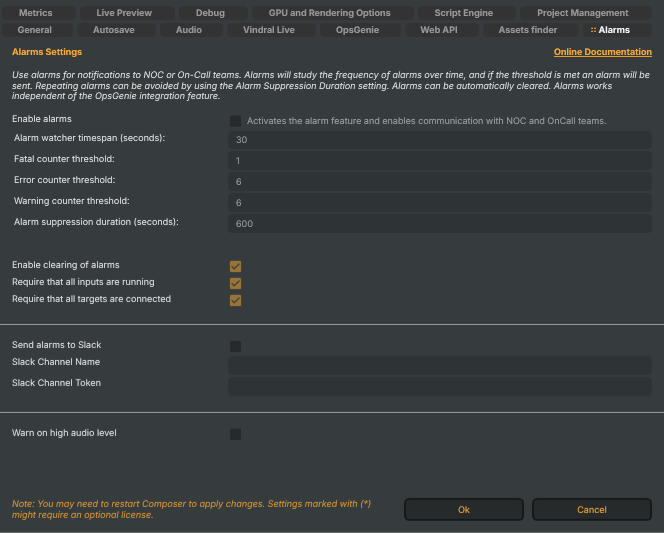
Use alarms for notifications to NOC or On-Call teams. Alarms will study the frequency of alarms over time, and if the threshold is met an alarm will be sent. Repeating alarms can be avoided by using the Alarm Suppression Duration setting. Alarms can be automatically cleared. Alarms work independent of the OpsGenie integration feature.
The alarm system is independent of the OpsGenie integration. OpsGenie can be wired to forward alarms (via Use OpsGenie for Alarms on the OpsGenie tab) but the alarm system itself runs whether or not OpsGenie is enabled.
Thresholds and watcher window
The watcher counts log entries by severity over a sliding window. When any one severity's count crosses its threshold, an alarm fires. The thresholds are independent — a single fatal entry can fire while only the warning count is otherwise climbing, and vice versa.
- Enable alarms (
AlarmsEnabled) — master switch for the alarm system. When off, the rest of this tab is inert. Default: off (the system is opt-in). - Alarm watcher timespan (seconds) (
AlarmsWatcherTimeSpanSeconds) — width of the sliding window over which severities are counted. Clamped to 10–600 s; default 30 s. Shorter windows fire faster on bursts; longer windows tolerate more transient noise. - Fatal counter threshold (
AlarmsFatalThreshold) — number offatallog entries within the watcher window that triggers an alarm. Clamped to 1–100; default 1 (one fatal is enough — fatals are by definition unrecoverable). - Error counter threshold (
AlarmsErrorThreshold) — same, forerrorentries. Clamped to 1–100; default 6. - Warning counter threshold (
AlarmsWarningThreshold) — same, forwarningentries. Clamped to 1–100; default 6. - Alarm suppression duration (seconds) (
AlarmsSuppressDurationSeconds) — after an alarm fires, repeated alarms are suppressed for this long. Stops a flapping condition from generating one alarm per watcher window. Clamped to 5–3600 s; default 600 s (10 min).
Auto-clear
When auto-clear is on, an active alarm is cleared automatically once the system returns to a healthy baseline. The two requirement flags below decide what "healthy" means.
- Enable clearing of alarms (
AlarmClearEnabled) — master switch for auto-clear. When off, alarms must be cleared manually (via the API or the Desktop UI). Default: on. - Require that all inputs are running (
AlarmClearRequireInputsRunning) — when on, auto-clear waits until every input on every running scene reports aRunningstate. Use to make sure the system has actually recovered before stopping the alert. Default: on. - Require that all targets are connected (
AlarmClearRequireTargetsConnected) — when on, auto-clear additionally waits for every target on every running scene to reportConnected. Default: on.
Slack notifications
Composer can post alarms directly to a Slack channel. (For HTTP-API-driven escalation, see the OpsGenie tab — these two destinations are independent and can both be on.)
- Send alarms to Slack (
SlackAlarms) — master switch for the Slack integration. Default: off. - Slack Channel Name (
SlackChannelName) — name of the channel to post to (e.g.#composer-alerts). Honoured only when Send alarms to Slack is on. - Slack Channel Token (
SlackChannelToken) — bot or webhook token with permission to post to the channel. Treat as a secret. Persisted encrypted underEncryptionKey(see General → Workstation security).
Audio-level warning
A standalone audio safety net, separate from the watcher above. When on, audio peaks crossing a clipping-risk threshold log a warning entry — which the alarm system then counts toward the warning threshold above, so a sustained over-level on a live target can become a real alarm.
- Warn on high audio level (
WarnOnHighAudioLevel) — master switch for the audio-clipping warning. Default: off.