

Replay
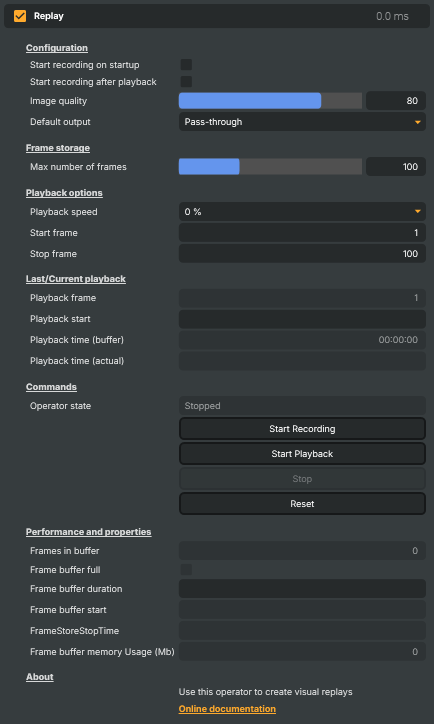
The Replay operator captures the most recent stretch of video into a rolling in-memory buffer and plays it back on demand — instantly, at full speed or in slow motion. It's the workhorse of any "let's see that again" moment in a live production: a goal in a football match, a winning hand at a poker table, a key spin in a roulette show, a referee's controversial call, or any beat that the audience needs a second look at.
Because the recording is always on (or can be turned on automatically), the moment is already captured by the time the operator decides to replay it — there's no "start recording now" delay between something interesting happening and you being able to rewind. Trigger the replay manually, from the Script Engine, or from an external Connector, and the buffered frames stream out of the operator at the speed you've chosen.
How it fits into a production
Replay sits on a layer in the composition like any other operator — the live signal flows through it on its way to the output. When the operator is idle it can either pass the live signal through unchanged (the most common setup) or output a black frame, so the layer effectively goes dark between replays. While recording, it captures every incoming frame into a rolling JPEG-compressed buffer; when the buffer fills up, the oldest frame is discarded as each new one arrives, so you always have the last N frames available.
When playback is triggered, the operator stops passing the live signal through and instead plays back the buffered frames at the chosen speed. After the replay finishes, it can automatically resume recording so the buffer is always fresh and ready for the next moment.
What you control
The property panel groups the settings by purpose:
- Configuration —
Start recording on startupfor an always-on rolling buffer,Start recording after playbackto automatically resume recording after each replay,Image quality(JPEG quality 10–100) for the captured frames, andDefault outputto choose between letting the live signal pass through when idle (Pass-through) or outputting a black frame (None). - Frame storage —
Max number of framessets the size of the rolling buffer (1–300). At 50 fps a 300-frame buffer covers about 6 seconds; pick a depth that matches the typical length of the moments you want to replay. - Playback options —
Playback speedfrom full speed (100%) all the way down to a frozen still (0%), plusStart frameandStop frameto replay only a chosen slice of the buffer instead of the whole thing. - Last/Current playback — live readouts while a replay is running: which frame is currently on screen, what wall-clock time the replay started from, and how far through the buffer playback has progressed.
- Commands —
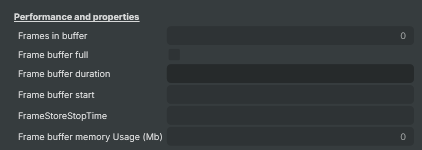
Start Recording,Start Playback,Stop, andReset. TheOperator stateline above the buttons shows whether the operator is currentlyStopped,Recording, or playing back. - Performance and properties — diagnostics for tuning: frames currently buffered, whether the buffer is full yet, the wall-clock duration covered by the buffer, the timestamp of the oldest frame, and approximate memory use in megabytes.
Example use cases
- Sports replays — capture every play live; when something noteworthy happens, replay the last few seconds in slow motion to let the audience see exactly what occurred.
- Casino and gaming shows — instant replays of a key spin, deal, or roll so the result can be reviewed and presented to viewers at home.
- Esports highlights — review a clutch play moments after it happens without interrupting the live broadcast.
- News and live events — quickly re-air the moment a guest made a key point, or replay an unexpected event a few seconds after it occurred.
- Quality assurance and adjudication — capture an action that needs to be reviewed before a decision is made, then play it back at slow speed for the operator or referee.
- Training and demonstrations — show a live action and then immediately re-run it slowly, with the audience still seeing the live signal between replays.
Practical tips
- Match the buffer size to the action. If your typical replay is a 3-second moment, a 200-frame buffer at 50 fps is plenty. Larger buffers cost memory but let you replay longer moments or pick from a wider window.
- Watch
Frame buffer memory Usage (Mb). At highImage qualityand largeMax number of frames, memory use climbs quickly. Lower the JPEG quality first if you need to reclaim memory — at quality 70 most viewers won't notice the difference. - Use
Start recording on startupfor shows where any moment could become a replay candidate. The buffer is always populated and you only need to trigger playback, not "record then play". - Use slow motion for clarity, not novelty. A replay at 50% or 33% lets the audience actually read the action. Sub-25% speeds work best for very fast moments (a hand of cards being dealt, a tennis serve); 50% is usually right for a goal or a controversial call.
- Pair with the Script Engine to automate the replay-on-cue workflow — for example, fire
CommandStartPlaybackautomatically when an external signal arrives, thenStart Recordingagain after the replay finishes.
Replay - Settings
Configuration
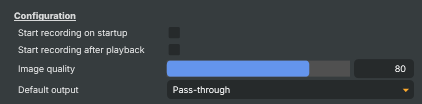
Configuration — recording behaviour, image quality, and idle output.
| Property | Description |
|---|---|
Start recording on startup |
When true, the operator starts recording automatically when the project loads. [default=false]. Useful when you always want a fresh rolling buffer of the last few seconds available — no need to manually press Record at the start of each show. |
Start recording after playback |
When true, recording resumes automatically as soon as a replay finishes playing back. [default=false]. Keeps the rolling buffer fresh between replays. Disable if you want to manually control when each new recording starts. |
Image quality |
JPEG quality used when storing each frame, 10–100. [default=80]. Higher values give better-looking replays but use more memory per frame, so MaxFramesInMemory worth of buffer takes longer to fill memory at low quality than at high quality. 80 is a good balance for HD; raise to 90+ for very clean freeze-frames at the cost of memory. |
Default output |
What the operator outputs when it is neither recording nor playing back. [default=PassThrough]. Pass-through lets the live image through unchanged — the operator is invisible when idle. None outputs a black frame instead — useful when the replay layer should hide the live picture between replays. |
Frame storage
Frame storage — size of the rolling buffer that holds recorded frames.

| Property | Description |
|---|---|
Max number of frames |
Maximum number of frames kept in the rolling buffer. [min=1, max=300, default=100]. Once the buffer is full, the oldest frame drops out as a new one comes in. At 50 fps a buffer of 300 frames covers about 6 seconds of replay. Higher values give longer replays at the cost of memory. |
Playback options
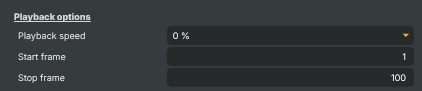
Playback options — speed and which range of recorded frames to play.
| Property | Description |
|---|---|
Playback speed |
Replay playback speed. [default=Every (100%)]. 100% plays back at real time. Lower values play back in slow motion (50%, 33%, 25% and so on, down to a frozen 0%). Useful for sport replays where slowing the action makes the moment readable. |
Start frame |
First frame in the buffer to play back. 1 is the oldest frame still in the buffer. Combined with PlaybackStopFrame this lets you replay only a chosen segment of the recording instead of everything. |
Stop frame |
Last frame in the buffer to play back. Playback stops once this frame is reached. Set this lower than the buffer size to replay only the lead-up to a moment, rather than everything that's been recorded. |
Last/Current playback
Last/Current playback — live readouts while a replay is running.
| Property | Description |
|---|---|
Playback frame |
Frame currently being played back (read-only). Updates as playback progresses through the buffer. Useful from a script for reacting to specific moments during replay. |
Playback start |
Wall-clock time of the frame that will play first when playback starts (read-only). Formatted as HH:mm:ss.fff. Helps confirm which moment the start of the replay corresponds to in the original recording. |
Playback time (buffer) |
How long ago the currently played-back frame was recorded, relative to the start of the buffer (read-only). Useful for showing an "elapsed time within the replay" readout. |
Playback time (actual) |
Wall-clock time at which the frame currently being played back was originally recorded (read-only). |
Commands
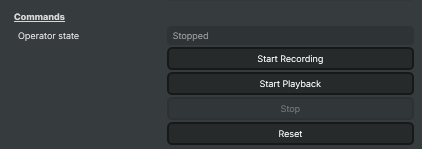
Commands — start, stop, and reset the operator.
| Property | Description |
|---|---|
Operator state |
Current operator state (read-only). Stopped — idle. Recording — capturing the live signal into the rolling buffer. Playback — replaying buffered frames. Useful from a script for reacting to state changes (e.g. log when a replay finishes). |
Start Recording |
Start a fresh recording — clears the buffer and begins capturing live frames. |
Start Playback |
Begin playing back the recorded frames between PlaybackStartFrame and PlaybackStopFrame at the chosen PlaybackSpeed. |
Stop |
Stop the current activity — whether the operator is recording or playing back, this returns it to the idle state. |
Reset |
Reset all settings to their defaults (80% quality, 100-frame buffer, full-range playback, stopped). |
Performance and properties
Performance and properties — live readouts of the buffer's size, duration, and memory use.
| Property | Description |
|---|---|
Frames in buffer |
Number of frames currently held in the rolling buffer (read-only). Grows up to MaxFramesInMemory and then stays there as old frames are dropped. |
Frame buffer full |
True once the buffer has filled up to MaxFramesInMemory (read-only). Useful for waiting until enough material has been captured before allowing playback. |
Frame buffer duration |
Time span covered by the current contents of the buffer, formatted as seconds.fff (read-only). |
Frame buffer start |
Wall-clock time at which the oldest frame in the buffer was recorded (read-only). |
FrameStoreStopTime |
Wall-clock time at which the newest frame in the buffer was recorded (read-only). |
Frame buffer memory Usage (Mb) |
Approximate memory used by the buffered frames, in megabytes (read-only). Drops as JpegQuality is lowered or as MaxFramesInMemory is reduced. Watch this when running long replay buffers on memory-constrained machines. |
Inherits from: AbstractOperator, AbstractAudioMetering.
See also: Replay in Script Engine Objects.
Tutorials
A ready-made example project demonstrates the Replay operator in context:
- Roulette Replay — pairs the Replay operator with the Histogram operator in a roulette-show scenario. A good first stop if you want to see a rolling buffer triggered, played back, and reset against a real production layout.
Tutorials are downloaded on demand from RealSprint via Tutorials → Download tutorials… in Composer Desktop; the full catalogue with thumbnails and minimum-version requirements lives on the Tutorials page.