

Rectangle
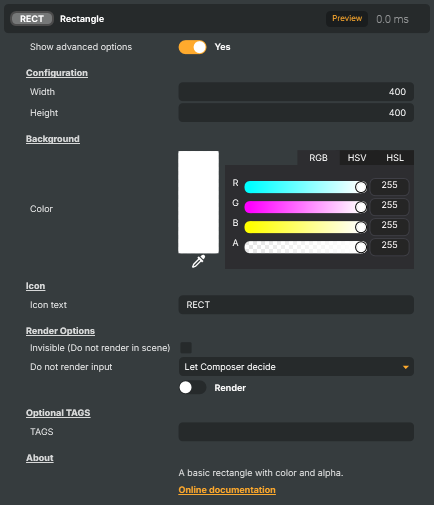
Generates a solid-coloured rectangle as a video source. The size and the fill colour (with alpha) are fully controllable, making it useful as a coloured backdrop, a flat fill behind keyed graphics, a placeholder during layout, or a building block for simple shape compositions.
Rectangle - Settings

| Property | Description |
|---|---|
Show advanced options |
Show or hide the input's advanced settings in the editor UI. [default=false]. |
Configuration
Configuration — the rectangle's size in pixels.

| Property | Description |
|---|---|
Width |
Width of the rectangle, in pixels. [min=1, max=8192, default=400]. |
Height |
Height of the rectangle, in pixels. [min=1, max=8192, default=400]. |
Background
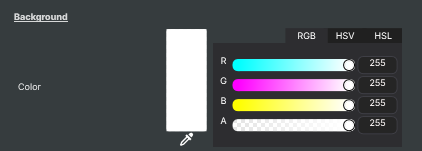
Background — the rectangle's fill colour.
| Property | Description |
|---|---|
Color |
Combined colour picker for the rectangle's fill colour. Lets you pick the colour from a colour wheel / palette in the editor. Internally updates the Red, Green, Blue, and Alpha channel values together. Scripts can read or set those channels directly if they need numeric control. |
Inherits from: AbstractInput, AbstractAudioProcessing, AbstractAudioMetering.
See also: Rectangle in Script Engine Objects.
Shared input properties
Every input — regardless of source type — exposes the following property groups. They are surfaced in the property panel only when Show advanced options is enabled on the input.
Icon
Icon text— short text shown on the input's icon in the Inputs list. Useful as a quick visual label (channel number, mic name, camera position) to tell otherwise-similar inputs apart at a glance. Empty by default; has no effect on rendering or routing.
Audio mixer
Hide in audio mixer— when on, hides the input from the audio mixer view without disabling its audio. Useful for de-cluttering the mixer while keeping the audio routed (e.g. fixed background music, ambient beds, pre-aligned playout). [default=false]
Render Options
Invisible (Do not render in scene)— when on, the input is skipped during rendering and produces no picture on any layer or scene. Audio routing is unaffected. Toggle from a script for cued-in / cued-out behaviour during a show. [default=false]Do not render input— disables the input's internal render entirely (no decode or capture work is done). Stronger than Invisible: that one renders but doesn't display; this one stops the input from doing any work at all. Useful for reducing CPU / network load on heavy sources (e.g. high-bitrate RTMP / SRT streams, large media files) when the input is temporarily not needed. Audio meters are cleared while disabled. [default=false]Do not render inputcontroller — chooses what drives the Do not render input flag.Let Composer decide(the default) hands control to the project-level Render Tuning optimiser, which automatically pauses inputs that aren't used by any active scene.Manual Configurationignores Render Tuning and lets the Do not render input toggle control the flag directly — use this to keep a network source warm even when it's currently off-air, or to take a heavy input down by hand regardless of scene activity. [default=Let Composer decide]
Optional TAGS
TAGS— one or more free-form tag words used to classify this input (typically space- or comma-separated). Picked up by Composer's Smart Search to filter or find inputs by category — e.g.camera,music,interview,sponsor. Has no effect on rendering.