

Video Delay
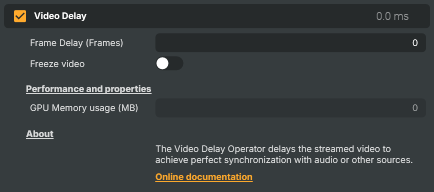
Introduction
The Video Delay operator holds incoming frames in a buffer and releases them after a set number of frames, pushing the picture later in time. It's the tool you reach for whenever the video needs to arrive a little later than it currently does — most often to restore lip-sync when the audio has been delayed by processing elsewhere in the chain, to line up several video sources that don't arrive together, or to compensate for a known latency in downstream equipment.
It also includes a Freeze video mode that holds the last buffered frame on screen — handy for a "pause on cue" effect, or to mask a brief glitch in the source by freezing on a clean frame.
How it works
Set Frame Delay (Frames) to the number of frames you want to hold the picture back, from 0 (unchanged) up to 250. The operator buffers each incoming frame and outputs the oldest one once the buffer has filled to that length; until it fills, the live picture passes through. Because the delay is measured in frames rather than milliseconds, the real-world time depends on your project's frame rate — at 50 fps a 50-frame delay is one second.
The usual workflow is to identify which path is ahead and delay it to match the one that's behind. If the audio has picked up processing latency, the picture will run early against it, so you add just enough frame delay here to bring the two back together.
Note — pairing with Crystal Speech
Video Delay is frequently used together with Crystal Speech. Crystal Speech introduces an audio latency of roughly 2–3 video frames as it processes the signal, which leaves the audio running slightly behind the picture. Because this operator is measured in frames, the fix is direct: set Frame Delay to the same 2–3 frames to hold the video back by the matching amount and restore lip-sync. Fine-tune by one frame either way (against a clap or other sync reference) until picture and sound line up.
Note
Every buffered frame is kept at full resolution, so memory use grows with both the frame delay and the layer's resolution — long delays at 4K can use a substantial amount of GPU memory. Keep an eye on GPU Memory usage when running large delays.
Freeze video
Turn Freeze video on to hold the current output frame on screen instead of advancing. While frozen, Frame Delay is locked so the buffer state can't shift underneath the held frame. Turn it off to resume normal delayed playback. Use it for a deliberate "pause on cue", or to ride over a momentary dropout in the source by freezing on the last clean frame.
Performance and properties
The Performance and properties section surfaces live readouts of the buffer:
- GPU Memory usage (MB) — approximate memory used by the buffered frames. It scales with the frame delay and the layer's resolution; watch it on memory-constrained machines or when running long delays at high resolutions.
- Buffer length and Buffer filled — diagnostic readouts of how many frames are currently buffered and whether the buffer has reached the configured delay yet. While the buffer is still filling, the operator outputs the live picture rather than a delayed one.
Common use cases
- Lip-sync correction — when audio processing has nudged the sound behind the picture, delay the video by the matching number of frames so mouths and words line up again.
- Re-syncing after Crystal Speech — set the frame delay to the 2–3 frames of latency Crystal Speech adds to the audio (see the note above).
- Aligning multiple video sources — when two feeds arrive a frame or two apart, delay the earlier one until they're coherent.
- Pause on cue — use Freeze video to hold a frame on screen at a precise moment, then release to resume.
- Masking a brief glitch — freeze on a clean frame to ride over a momentary dropout or artifact in the source.
Video Delay - Settings

| Property | Description |
|---|---|
Frame Delay (Frames) |
Number of frames the video is delayed by. [min=0, max=250, default=0]. 0 leaves the video unchanged. Higher values push the picture later in time. At 50 fps, a delay of 50 frames is one second. Larger delays use more memory because every buffered frame is kept at full resolution. |
Freeze video |
When true, holds the current output frame on screen instead of advancing. [default=false]. Useful for "pause on cue" effects or for masking a brief glitch in the source by freezing on a clean frame. While frozen, FrameDelay is locked. Disable to resume normal delayed playback. |
Performance and properties
Performance and properties — live readouts of buffer state and memory use.

| Property | Description |
|---|---|
GPU Memory usage (MB) |
Approximate memory used by the buffered frames, in megabytes (read-only). Scales with FrameDelay and the layer's resolution. Watch this on memory- constrained machines or when running long delays at 4K. |
Inherits from: AbstractOperator, AbstractAudioMetering.
See also: Video Delay in Script Engine Objects.