

Frequency Analyzer
Introduction
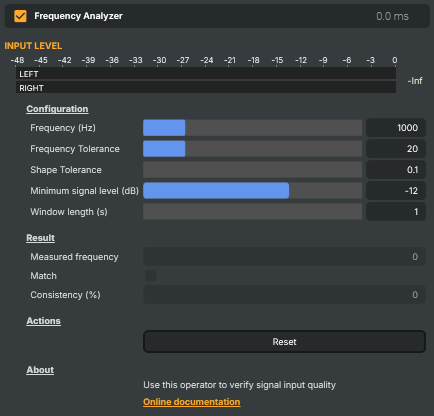
The Frequency Analyzer verifies that the audio passing through it is a clean sine wave at a specific target frequency — and lets the rest of the project know about it. It's a pass-through operator: the audio itself is never altered. Drop it on a layer, point it at the frequency you expect to see, and it continuously reports whether the input matches.
The classic use is automated test-signal verification: confirming that a 1 kHz line-up tone is making it intact all the way through the audio chain — at the right pitch, with the right shape, and at a usable level. Plug it into a CI / autotest scene, or into a connector that flips a UI indicator green when the reference tone is present, and the analyzer becomes a passive health check on the audio path.
What it checks
A signal counts as a match only when all four conditions hold simultaneously:
- Pitch — the measured frequency lies within
Frequency ± Frequency ToleranceHz. - Shape — the waveform is sine-like to within
Shape Tolerance. Lower tolerance demands a near-perfect sine; higher tolerance accepts some distortion. - Level — the signal is louder than
Minimum signal level (dB). Anything quieter is treated as silence or background noise and ignored, so a near-silent input never reports a phantom sine. - Persistence — the conditions hold over the configured
Window length (s). The Consistency (%) read-out shows what fraction of that window was matching — 100 means rock-solid, 60 means the signal drifted in and out.
Configuration
- Frequency (Hz) — what to look for. 50–5000 Hz, default 1000 Hz (the standard EBU/SMPTE reference pitch).
- Frequency Tolerance — how many Hz of drift is still considered a match. Tight (a few Hz) catches small upstream drift but can flag a perfectly good source that isn't perfectly stable; loose (±50 Hz) is more forgiving. Default ±20 Hz.
- Shape Tolerance — how strict the sine-shape check is. Use a strict value (0.1–1) when verifying a clean test tone; relax it for sources that may have some harmonic content.
- Minimum signal level (dB) — silence floor. Default −12 dB; lower it (−24, −36) if the test tone arrives at line level rather than peak.
- Window length (s) — the rolling window used to compute average frequency and consistency. Short windows (1–2 s) react fast to changes; longer windows (10–60 s) give a more stable reading at the cost of slower reaction.
Live readouts
Three read-only values are surfaced for the property panel, scripts, and external dashboards:
- Measured frequency — the average frequency detected over the analysis window, in Hz. Compare against
Frequencyto see how close the input is to the target. - Match — a single boolean. True when the input currently meets all the criteria above. Useful from a Connector to drive an "audio OK" indicator, or from a script to log an alert when the reference tone disappears.
- Consistency (%) — 0–100, the fraction of the analysis window that was matching. The most informative reading when the source is drifting in and out of spec — it'll trend down well before
Matchflips false.
Common use cases
- Line-up tone verification — confirm the 1 kHz EBU reference makes it through the entire chain before a show starts; flip a UI indicator green when the analyzer reports
Match = trueconsistently. - End-to-end pipeline health check — sit an analyzer on a calibration loop fed by a known test generator; a sustained drop in
Consistencyis an early warning that something upstream has changed. - Automated regression testing — in an autotest scene, assert that
IsMatch == trueandConsistencyPercentage >= 95after the project has been running long enough to fill the window. Catches signal-path regressions without anyone having to listen. - Spotting tone drift on a long-haul contribution — when a remote site is supposed to be sending a continuous reference tone, the Measured frequency read-out exposes slow clock drift between sites in a way no meter does.
- Catching codec-induced distortion — a sine going in but a non-sine coming out is the textbook fingerprint of a misconfigured codec or a lossy intermediate. A drop in
Matchwith the frequency still correct points the finger at shape.
A single Reset command snaps every parameter back to defaults (1000 Hz, ±20 Hz, strict shape, −12 dB minimum, 1 s window) — useful as a known starting state when a script is about to configure the analyzer for a particular check.
Frequency Analyzer - Settings
Configuration
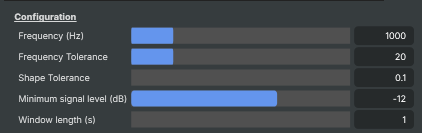
Configuration — what frequency to look for and how strict the match should be.
| Property | Description |
|---|---|
Frequency (Hz) |
Target frequency to verify, in Hz. [min=50, max=5000, default=1000]. 1000 Hz is the standard EBU/SMPTE reference tone. Set to whatever pitch your test signal is supposed to have. |
Frequency Tolerance |
How many Hz the measured frequency may deviate from Frequency and still count as a match. [min=1, max=100, default=20]. Tighter tolerances catch small drift but can flag a perfectly good source if its frequency isn't perfectly stable. |
Shape Tolerance |
Strictness of the sine-wave shape check. [min=0.1, max=20, default=0.1]. Lower values demand a near-perfect sine; higher values accept some distortion. Use stricter values when verifying a clean test tone. |
Minimum signal level (dB) |
Lowest signal level that counts as a real signal, in decibels. [min=-36, max=0, default=-12]. Audio quieter than this is treated as silence or background noise and ignored. Stops the analyzer from reporting a "sine wave" detection on a near-silent input. |
Window length (s) |
Time window over which consistency and average frequency are calculated, in seconds. [min=1, max=60, default=1]. Shorter windows respond faster to changes in the input; longer windows give a more stable consistency reading at the cost of slower reaction. |
Result
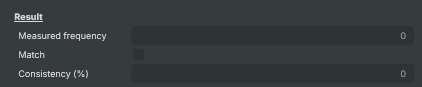
Result — what the analyzer is currently measuring on the input.
| Property | Description |
|---|---|
Measured frequency |
Average frequency detected on the input, in Hz (read-only). Averaged over AnalysisWindowSeconds. Compare against Frequency to see how close the input is to the target. |
Match |
True when the input matches the target frequency, shape, and level (read-only). Useful from a script to react to verification — for example, log an alert when the expected tone disappears or fails to meet quality. |
Consistency (%) |
Percentage of the analysis window that matched the target, 0–100 (read-only). 100 means every measurement in the window was a match; lower values indicate the signal drifted in and out of spec during the window. |
Actions
Actions — one-click commands.

| Property | Description |
|---|---|
Reset |
Reset all settings to their defaults (1000 Hz, ±20 Hz, strict shape, −12 dB minimum, 1 s window). |
Inherits from: AbstractAudioOperator, AbstractOperator, AbstractAudioMetering.
See also: Frequency Analyzer in Script Engine Objects.