

Snapshot Target
Introduction
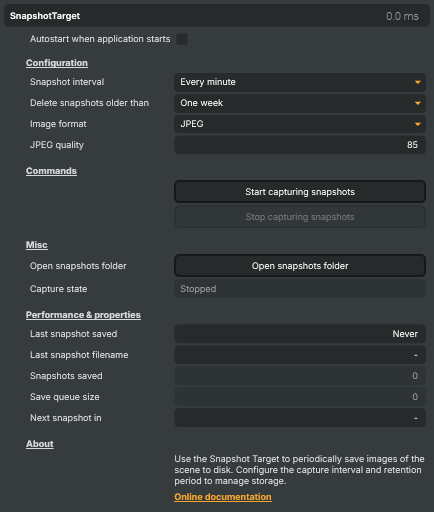
The Snapshot Target periodically saves a still image of the composed scene to disk as PNG or JPEG. It runs in the background on its own save thread, so writing a frame to disk never stalls the render pipeline. It's a deliberately simple companion to the streaming targets — no encoder, no network, no muxing — just "every N seconds, drop a picture on the filesystem".
Snapshots are written to a Snapshots folder next to the application, named <ProjectName>-snapshot-<timestamp>.<ext>. The project-name prefix is also used by the automatic clean-up — only files matching the current project's prefix are eligible for deletion, so snapshots from other projects sharing the same folder are left alone.
Configuration
- Snapshot interval — eight presets from every 10 seconds to once a day. Pick the longest interval that still gives the coverage you need; every snapshot is a file on disk.
- Delete snapshots older than — six retention buckets (1 minute, 10 minutes, 1 day, 1 week, 1 month, 1 year). Combined with a tight interval, long retention can build a large archive fast — size accordingly.
- Image format — JPEG (small files, configurable quality, the right pick for thumbnails and web dashboards) or PNG (lossless, the right pick for pixel-accurate captures or downstream image processing).
- JPEG quality — 1–100, defaulting to 85. 80–90 is the sweet spot for thumbnails; ignored when the format is PNG.
- Autostart when application starts — for unattended installations that should begin capturing the moment Composer loads, with no operator action.
Common use cases
- Unattended-stream monitoring — a web dashboard shows the latest snapshot so an operator can confirm at a glance that the stream is on-air without bringing up a full preview client.
- Thumbnail archive of a long broadcast — capture every minute through a multi-hour event for a scrubable timeline of what the program looked like at each point.
- Editor preview thumbnails — feed the snapshot folder to a downstream editor or asset manager so editors can locate specific moments before pulling the full recording.
- Compliance / evidencing — fixed-interval stills of on-air content for log-keeping that an audit chain can rely on.
- Social-media still generation — auto-publish the latest snapshot to a social channel during a live event for a steady drip of in-broadcast stills.
Driving from outside
The standard set: Start, Stop, plus Open snapshots folder (opens the destination directory in Windows Explorer). All invokable from the property panel, the HTTP API (/api/invokecommand?targetname=Snapshot+Target&command=StartCommand), a Connector, or the Script Engine via ExecuteCommand / ExecuteCommandById. Live status — capture state, last snapshot saved (timestamp + filename), running count, save-queue depth, and a countdown to the next capture — is surfaced as readable properties for dashboards and scripts.
Snapshot Target - Settings

| Property | Description |
|---|---|
Autostart when application starts |
When true, snapshot capture begins automatically as soon as the application starts. Useful for unattended installations where you want continuous capture without manual intervention. |
Configuration
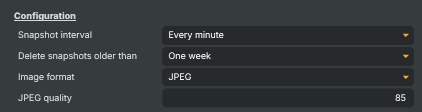
Configuration section — how often snapshots are taken, how long they are kept, and the image format.
| Property | Description |
|---|---|
Snapshot interval |
How often a new snapshot is captured — every 10 seconds up to once a day. Pick the longest interval that still gives you the coverage you need, since each snapshot writes a file to disk and contributes to the on-disk archive size. |
Delete snapshots older than |
Maximum age of stored snapshots before they are deleted automatically. Only files whose name starts with the current project name are eligible for clean-up, so snapshots from other projects in the same folder are kept. Set this with disk capacity in mind — frequent intervals plus long retention can build up a large archive quickly. |
Image format |
File format for saved snapshots. JPEG produces small files at adjustable quality and is the usual choice for thumbnails and dashboards. PNG is lossless — pick it when image quality matters more than file size, such as when the snapshot will be used as artwork or analysed pixel-by-pixel. |
JPEG quality |
JPEG compression quality. [min=1, max=100, default=85]. Higher values give better-looking images and larger files; 80–90 is a good balance for thumbnails. Ignored when ImageFormat is PNG. |
Commands
Commands section — start and stop capture.

| Property | Description |
|---|---|
Start capturing snapshots |
Start the periodic snapshot capture using the current interval and image-format settings. |
Stop capturing snapshots |
Stop the periodic snapshot capture. Any image already queued is finished writing before the worker thread exits. |
Misc
Misc section — convenience commands and live status read-outs.

| Property | Description |
|---|---|
Open snapshots folder |
Opens the Snapshots folder in Windows Explorer so you can review or move the captured images. |
Capture state |
Current capture state: Stopped, Starting, Running or Stopping (read-only). Useful from scripts to confirm capture started successfully before issuing further commands. |
Performance & properties
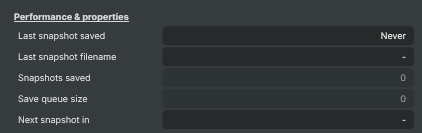
Performance & properties section — counters and timing read-outs for the current capture session.
| Property | Description |
|---|---|
Last snapshot saved |
Date and time the most recent snapshot was written, formatted as yyyy-MM-dd HH:mm:ss (read-only). Reads Never until the first snapshot is saved. |
Last snapshot filename |
File name of the most recent snapshot written to disk (read-only). Useful in scripts that want to push the latest snapshot to a thumbnail service or web dashboard. |
Snapshots saved |
Total number of snapshots saved since capture was last started (read-only). Resets to zero each time StartCommand is called. |
Save queue size |
(advanced) Number of snapshots currently waiting to be written to disk (read-only, debug). A value that keeps growing means the disk cannot keep up with the chosen interval and image size. |
Next snapshot in |
Countdown to the next snapshot capture, formatted as Xs, Xm Ys or Xh Ym (read-only). Useful for live dashboards that show when the next image will appear. |
Inherits from: AbstractTarget.
See also: Snapshot Target in Script Engine Objects.