

Live Preview
The Live Preview tab configures Composer's browser-based live preview — a built-in web stream that lets a remote viewer see the current composition in any modern web browser, without the viewer having Composer installed. Useful for letting a director, producer, or remote collaborator monitor the program output without needing access to the workstation. Both settings on this tab are marked (*) in the UI — they're part of the optional Extended Monitoring license and may require a Composer restart.
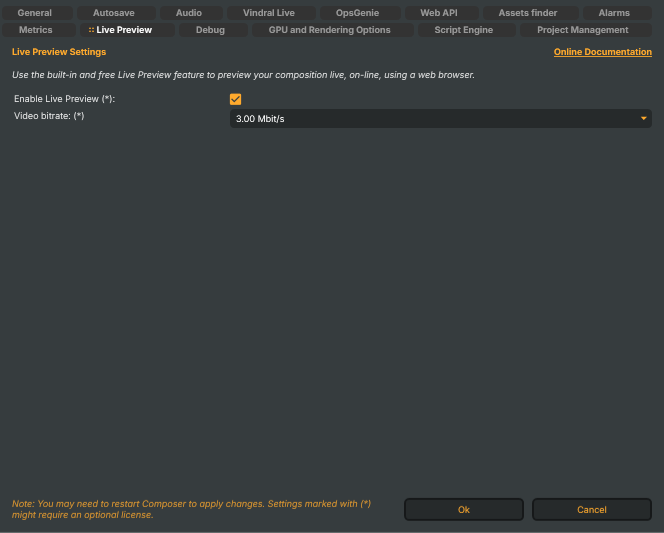
Use the built-in and free Live Preview feature to preview your composition live, on-line, using a web browser.
Configuration
Enable Live Preview (*) (
LivePreviewFeatureVisible) — master switch for the Live Preview feature and its right-pane panel in Composer Desktop. When off, no preview encode runs and the Live Preview controls are hidden from the UI. Default: on.Video bitrate: (*) (
LivePreviewVideoBitrate) — encoder bitrate for the preview stream. Range: 50 kbit/s through ≥10 Mbit/s (the dropdown lists fine-grained steps from 50 kbit through 10 Mbit). Default: 3.00 Mbit/s — a sensible middle for a 1080p preview at moderate motion content.Higher bitrates produce a crisper preview at the cost of GPU encode bandwidth (NVENC) and uplink throughput. Lower bitrates keep the preview viable on tight remote links (mobile data, hotel WiFi) at the cost of compression artefacts. Honoured only when Enable Live Preview is on.
The Live Preview is for monitoring only — it's not a stream target. For broadcast-quality outputs to RTMP / SRT / NDI / Decklink, use the corresponding Target component on a scene. See the Targets manual.