

Deinterlace
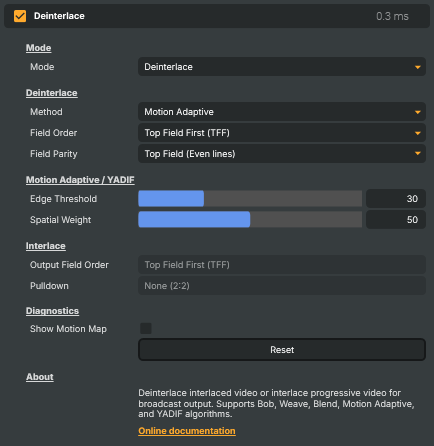
Converts between interlaced and progressive video. Use it to clean up interlaced sources (1080i broadcast feeds, 480i/NTSC SD material) so they look correct on progressive displays, or — going the other way — to interlace a progressive signal for traditional broadcast outputs that require it. Several algorithms are available covering the trade-off between latency and quality, plus an optional 3:2 pulldown for 24p-to-60i conversion.
Deinterlace - Settings
Mode
Mode — what the operator should do with the incoming frames.

| Property | Description |
|---|---|
Mode |
What to do with the incoming video. [default=Deinterlace]. Deinterlace converts interlaced sources to progressive — pick this for cleaning up 1080i or 480i feeds. Interlace produces an interlaced signal from progressive input, for legacy broadcast outputs. Passthrough lets the input through unchanged. |
Deinterlace
Deinterlace — algorithm and field handling for converting interlaced input to progressive.
| Property | Description |
|---|---|
Method |
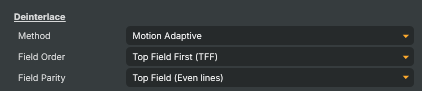
Algorithm used to deinterlace the input. [default=MotionAdaptive]. Bob doubles each field line — fastest, lowest latency, but visibly soft. Weave interleaves fields with zero latency but combs on motion. Blend averages adjacent fields — clean but slightly soft. Motion Adaptive blends weave on still parts and interpolation on moving parts — best balance of sharpness and motion handling. YADIF is a higher-quality temporal filter; both Motion Adaptive and YADIF add one frame of latency. |
Field Order |
Which field of the interlaced source comes first in time. [default=TopFieldFirst]. TopFieldFirst (TFF) is standard for 1080i broadcast, BottomFieldFirst (BFF) for 480i/NTSC SD. It records what the incoming signal is, for reference — it does not change the deinterlaced picture. Every method here turns one input frame into one progressive output frame built from a single field, and which field arrived first in time cannot change the pixels of that frame. Use FieldParity to choose which field is kept. Field order does matter on the way out, and that is what InterlaceFieldOrder controls. |
Field Parity |
Which field the deinterlaced frame is built from. [default=Top]. Top keeps the even lines and reconstructs the odd ones; Bottom keeps the odd lines and reconstructs the even ones. That holds for Bob, Motion Adaptive and YADIF alike — every method that rebuilds a missing field reads this one setting. Weave and Blend keep both fields and ignore it. Switch it if the output looks like it is favouring the wrong half of the picture. |
Motion Adaptive / YADIF
Motion Adaptive / YADIF — fine-tuning controls for the smarter deinterlace methods.

| Property | Description |
|---|---|
Edge Threshold |
How much motion is needed before the operator switches from weave to interpolation. [min=1, max=100, default=30]. Only used by the Motion Adaptive method. Higher values prefer weave (sharper on static parts) but allow more combing on motion. Lower values switch to interpolation more aggressively (smoother motion, slightly softer stills). |
Spatial Weight |
Balance between spatial (within-frame) and temporal (across-frames) interpolation. [min=0, max=100, default=50]. Used by the Motion Adaptive and YADIF methods. Higher values lean on spatial detail (better at preserving fine vertical patterns); lower values lean on temporal data (smoother motion). 50 is a good default for most material. |
Interlace
Interlace — settings used when producing an interlaced signal from progressive input.

| Property | Description |
|---|---|
Output Field Order |
Field order for the interlaced output. [default=TopFieldFirst]. Match what the downstream device expects: TFF for 1080i, BFF for 480i/NTSC SD. |
Pulldown |
Optional 3:2 pulldown for converting 24p material to 60i. [default=None]. None produces a straight 2:2 interlaced output, weaving each pair of consecutive frames. Pulldown32 runs a 3:2 pulldown pattern — used to send 24p film-style content over 60i broadcast. It spreads four source frames across five output frames, so three of every five come out clean and two carry the two-frame comb the cadence implies. Because the output rate does not change, this takes four of every five incoming frames: at 29.97 that is 23.976 source frames a second, which is 24p. Set it only for material that really is 24p — on anything else it discards a fifth of the motion. |
Diagnostics
Diagnostics — visualisations to help tune the deinterlacer.

| Property | Description |
|---|---|
Show Motion Map |
When true, overlays the motion-detection map used by Motion Adaptive. [default=false]. Green pixels mark areas treated as static (weave); red pixels mark areas treated as moving (interpolate). Useful while tuning EdgeThreshold — disable for normal use. Only relevant when Method is MotionAdaptive. |
Reset |
Reset all settings to their defaults (Deinterlace mode, Motion Adaptive, TFF, top-field parity, edge threshold 30, spatial weight 50, no pulldown, no motion map). |
Inherits from: AbstractOperator, AbstractAudioMetering, NamedModel.
See also: Deinterlace in Script Engine Objects.