

De-Esser
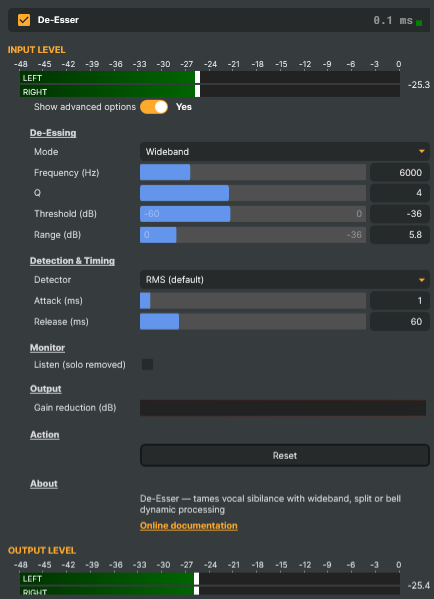
Introduction
De-Esser tames sibilance — the sharp "sss", "shh", and "ch" sounds in speech and singing. These sounds carry a burst of high-frequency energy, and a bright microphone, compression, or EQ can easily tip them from natural into harsh and piercing. The De-Esser smooths out just those moments, keeping a voice comfortable to listen to without dulling its clarity or brightness.
Reach for it whenever a voice sounds harsh or piercing on its "s" sounds:
- Polishing a presenter, host, or commentator for a live broadcast.
- Cleaning up a guest or remote contributor on an overly bright microphone.
- Smoothing a voice-over or interview before it goes to air.
- Taming a vocal that has turned harsh after compression or EQ earlier in the audio chain.
How it works
Think of the de-esser as an extra hand on the volume — one that reacts in a fraction of a second and only cares about harsh "S" sounds. It constantly listens to the narrow slice of high frequencies where sibilance lives and ignores the rest of the voice. While that slice stays calm, your audio passes straight through, unchanged. The instant an "sss" or "shh" makes it spike, the de-esser dips the level just enough to soften the edge, holds the dip only for the brief moment the sound lasts, and then lets go.
Because it touches only those fleeting moments — and leaves the body and warmth of the voice alone — a well-tuned de-esser is practically invisible: you don't hear it working, you just notice the harshness is gone.
De-Esser - Settings

| Property | Description |
|---|---|
Show advanced options |
Show or hide the operator's advanced settings in the editor UI. [default=false]. |
De-Essing
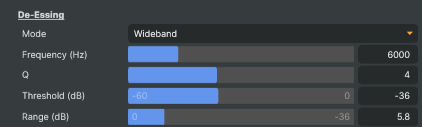
De-Essing — the main controls that target and tame the sibilance.
| Property | Description |
|---|---|
Mode |
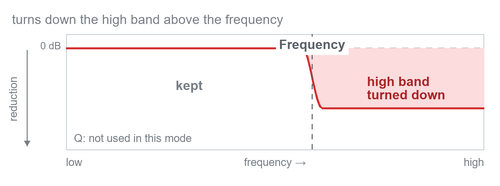
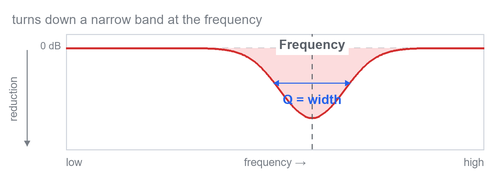
DeEsserMode — how the sibilance is targeted and tamed. [default=Wideband]. Wideband turns down the whole signal when sibilance is detected (most audible, natural on a single voice). Split turns down only the high band above Frequency, leaving the low and mid voice untouched. Bell turns down only a narrow band centred on Frequency, with its width set by QValue, keeping the bright "air" above. QValue is not used in Split mode. |
Frequency (Hz) |
The frequency the de-esser targets, in Hz. [min=2000, max=20000, default=6000]. In Wideband mode this is the centre of the band the de-esser listens to; in Split mode it is the point above which the high frequencies are turned down; in Bell mode it is the centre of the band that gets turned down. Sibilance usually sits around 5–8 kHz, so move this until it lands on the harshest part of the "sss". |
Q |
Width of the targeted band, set as a "Q" value — higher Q is narrower, lower Q is wider. [min=0.1, max=10, default=4]. ("Q" is the standard audio term for how focused a frequency band is.) In Bell mode it sets the width of the band that gets turned down; in Wideband mode it sets how focused the sibilance detection is. Disabled in Split mode. A high Q (around 5–10) is a narrow band that isolates the "sss" — with Listen on you hear mostly hiss; a low Q (around 0.5–1) is a wider band that also catches some speech. |
Threshold (dB) |
The level the sibilance must rise above before the de-esser starts turning it down, in decibels. [min=-60, max=0, default=-36]. Lower (more negative) values catch more sibilance; values closer to 0 act only on the loudest, harshest peaks. Lower this while watching the gain-reduction meter until the "sss" is tamed. |
Range (dB) |
The most the de-esser is allowed to turn the sound down, in decibels — a safety limit. [min=0, max=36, default=12]. Once triggered, the reduction grows with how loud the sibilance is but never goes past this limit, so the voice is never over-dulled. Start around 6–12 dB and raise it only if sibilance is still too strong; beyond ~36 dB the band is already essentially gone. |
Detection & Timing
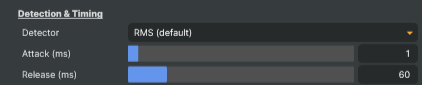
Detection & Timing — how sibilance is measured and how fast the de-esser reacts. The defaults suit most material; adjust only if needed.
| Property | Description |
|---|---|
Detector |
(advanced) AudioCompressorDetectorMode — how the de-esser measures the band's loudness to decide when to act. [default=Rms]. Peak reacts to instant spikes (snappier on fast sibilants). Rms reacts to the smoothed average loudness (more natural). Leave on Rms unless quick "sss" sounds slip through. |
Attack (ms) |
(advanced) How quickly the de-esser turns the sound down once sibilance is detected, in milliseconds. [min=0.1, max=20, default=1]. The default suits most speech; short values catch the very front of an "sss", longer values let a little through before acting. |
Release (ms) |
(advanced) How quickly the de-esser lets the volume back up after the sibilance passes, in milliseconds. [min=10, max=300, default=50]. The default suits most speech; too short can sound choppy on the sound that follows, too long keeps the volume down into the next word. |
Monitor
Monitor — hear what the de-esser is removing.

| Property | Description |
|---|---|
Listen (solo removed) |
When on, you hear only the sound the de-esser is removing, instead of the cleaned-up signal. [default=false]. Use it to check you are catching the "sss" and not the rest of the voice, then turn it back off. |
Output
Output — live meter showing how hard the de-esser is working.

| Property | Description |
|---|---|
Gain reduction (dB) |
How much the de-esser is turning the sound down right now, in decibels (read-only). Shown as a horizontal meter: 0 dB means it is resting; the bar grows as it turns the sound down harder. |
Action

| Property | Description |
|---|---|
Reset |
Reset all settings to their defaults. |
Inherits from: AbstractAudioOperator, AbstractOperator, AbstractAudioMetering, NamedModel.
See also: De-Esser in Script Engine Objects.
Choosing a mode
All three modes detect sibilance the same way — they listen to the band around Frequency and react when it gets too loud. They differ only in what they turn down (shown in red below):
Wideband (default) — dips the whole voice for the instant an "sss" occurs. It's the most natural and the most audible, and the easiest to set up, which is why it's the default and the best starting point for a single voice.
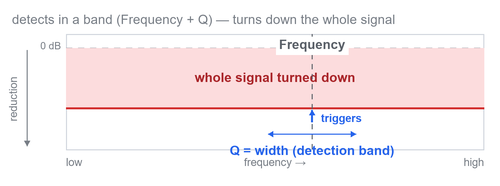
Split — turns down only the high band above the frequency, leaving the low and mid voice untouched. A good middle ground when Wideband dulls the voice too much.
Bell — turns down only a narrow slice around the frequency, preserving the "air" above it. The most surgical and transparent option — reach for it when you want to tame the harshness while keeping the voice bright and open.
A simple rule of thumb: start in Wideband; if it sounds like the whole voice is dipping or pumping, switch to Split; if you want the cleanest, most invisible result, use Bell.
Threshold and Range
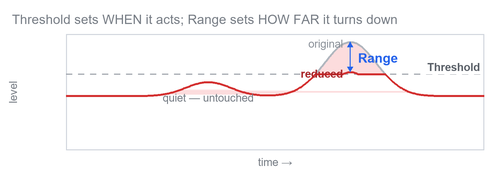
The mode decides which part of the signal is affected; Threshold and Range decide when it acts and how much it turns down — and they work the same way in every mode:
- Threshold is the level the sibilant band must rise above before any reduction happens. While the band stays below it, the audio is untouched; an "sss" that pushes above it triggers the de-esser.
- Range sets the maximum reduction allowed. Once triggered, the de-esser turns the band down in proportion to how far the sibilance rises above the threshold — only a little for a mild "sss", more for a harsh one — but never by more than Range. In other words, Range is the limit the proportional ducking is allowed to reach, which is what keeps the de-esser from ever over-dulling the voice.
Tips and best practices
Tune with Listen on. Turn on Listen (solo removed) and adjust Frequency until you hear the "sss" most clearly, then set Threshold so the de-esser catches the sibilance but ignores normal words. When you hear mostly hiss and not whole syllables, you're in the right place — then turn Listen back off.
Watch the meter, not just your ears. The Gain reduction meter should dip on each "sss" and rest at 0 between them. If it never moves, the threshold is too high; if it's pinned down constantly, it's too low.
Less is more. Aim for just a few decibels of reduction on each "sss" (a Range of 6–12 dB covers most material). Over-de-essing makes a voice sound dull or lispy — the goal is to make the harshness disappear, not the "s" sounds themselves.
Find the frequency by voice. Sibilance usually lives around 5–8 kHz, but brighter voices sit higher and deeper voices lower. Sweep Frequency until you land on the harshest part.
In Bell mode, size the slice with Q. A higher Q is narrower and more surgical; a lower Q is wider and also catches softer "sh" sounds. Start narrow and widen only if some harshness slips past.
Attack and Release are the de-esser's built-in timing — how fast it reacts to an "sss" (attack) and how fast it recovers afterwards (release). Every de-esser works this way; the timing is always running. Turn on Show advanced options to reveal them in the Detection & Timing section so you can fine-tune them, but the defaults (1 ms / 50 ms) suit most speech, so you rarely need to touch them.
Why isn't Attack 0? A de-esser reacts to each "sss", so it always needs a tiny reaction time — and a truly instant volume change would click. The 1 ms default is fast enough to catch the sibilance while staying inaudible.
Place it late in the chain. Add the De-Esser after compression or EQ that brightens the voice, since those stages are often what pushes the sibilance over the edge in the first place.
De-ess gently, twice if needed. Two light passes (or a de-esser followed by a dynamic EQ band) often sound more natural than one heavy pass.
Troubleshooting
- "I can't hear any difference when I toggle it on/off." De-essing is meant to be subtle — it only touches the brief "sss" moments. Listen specifically to the sibilants, not the whole phrase. If it's genuinely doing nothing, lower the Threshold until the meter starts moving, and make sure Frequency is sitting on the sibilance.
- "The voice sounds dull or lispy." You're removing too much. Lower the Range, raise the Threshold, or switch to Bell mode so only a narrow slice is touched.
- "It pumps or the brightness dips on every word." This is Wideband reacting to non-sibilant sounds. Narrow the detection with a higher Q, raise the Threshold, or switch to Split or Bell so the low/mid voice is left alone.
- "Some harshness still slips through." Widen the band (lower Q), nudge Frequency onto the harshest part, or lower the Threshold a little. If the sibilance spans a wide range, Split mode catches more of it than a narrow Bell.
Related components
- Compressor V2 — for evening out the overall level of a voice. A de-esser handles the sharp "sss"; the compressor handles the loud-vs-quiet dynamics. They complement each other.
- Band-Pass — for statically removing a fixed tone, rumble, or hiss that's always present, rather than the dynamic, only-when-needed reduction a de-esser provides.
- EBU R128 — to measure loudness after de-essing and the rest of your audio chain.
- Crystal Speech — an AI denoiser for removing background noise from a voice. Pair it with the De-Esser when a contributor is both noisy and sibilant.
Glossary
Plain-language meanings for the terms used on this page and in the controls:
- Sibilance — the sharp, hissy "s", "sh", and "ch" sounds in speech and singing. They carry a lot of high-frequency energy and can sound harsh or piercing, especially on bright microphones.
- Ducking — automatically turning a sound's volume down for a moment, then letting it back up. The de-esser "ducks" the audio each time an "sss" appears.
- Band (frequency band) — a slice of the sound spectrum. Audio runs from low frequencies (bass) up to high (treble); the "high band" is the bright top end where sibilance lives.
- Threshold — the level a sound has to rise above before the de-esser starts working.
- Range — the most the de-esser is allowed to turn the sound down — a safety limit so it can't over-dull the voice.
- Q — how wide or narrow the targeted band is. Higher Q is narrower and more focused; lower Q is wider.
- Gain reduction — how much the volume is being turned down at a given moment ("gain" means volume; "reduction" means lowering it).
- Decibel (dB) — the unit for loudness.
0 dBmeans no change; more negative numbers mean quieter. - Attack / Release — how fast the effect grabs the sound when it kicks in (attack) and how fast it lets go again afterwards (release), measured in milliseconds.
- Detector — the part that "listens" to the band and measures its loudness to decide when to act. Peak reacts to instant spikes; RMS reacts to the smoothed average.
- High-shelf / Bell — EQ filter shapes: a high-shelf turns down everything above a chosen frequency; a bell (or peaking) turns down a hump centred on one frequency.
- Air — the very highest frequencies that give a voice its open, bright, "airy" sheen.