

Wheel Visualizer
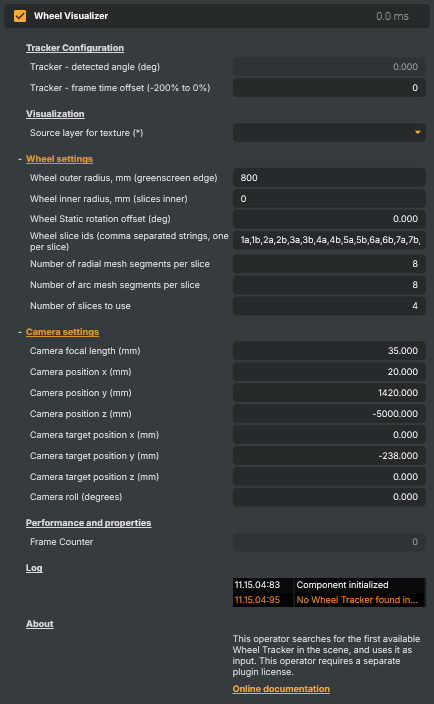
Overlays a 3D wheel model (with textured slices) onto the live video, rotated to follow a Wheel Tracker operator in the same scene. Useful for casino game shows, prize wheels, and broadcast graphics where slice numbers, sponsor logos, or highlight overlays need to stay locked to the spinning wheel. Place this operator on a layer after the Wheel Tracker; the visualizer automatically picks up the tracker's detected angle and renders the wheel using the configured camera and slice texture layer.
Wheel Visualizer - Settings
Tracker Configuration
Tracker Configuration — selection and read-back of the upstream Wheel Tracker.

| Property | Description |
|---|---|
Selected tracker |
Dropdown selecting which Wheel Tracker operator in the project drives this visualizer. The list is rebuilt automatically as trackers are added or renamed; the choice is remembered between project loads. Without a tracker selected the visualizer passes the input video through unchanged. |
Tracker - detected angle (deg) |
Wheel angle (degrees) the visualizer is rendering at this frame. Updates every frame. Useful from scripts for triggering on specific positions or for diagnostics. |
Tracker - frame time offset (-200% to 0%) |
Frame-time offset applied when reading the tracker angle, as a percentage. [min=-200, max=0, default=0]. 0 uses the most recent tracker angle. Negative values interpolate further back in the angle history; use this to match the visual delay between the tracker frame and the output frame so the overlay stays glued to the wheel. |
Visualization
Visualization — the source texture layer used for the wheel slices.

| Property | Description |
|---|---|
Source layer for texture (*) |
Layer whose rendered image is sampled and applied across the wheel slices. Build the slice graphics on this layer in the order matching Wheel slice ids so each slice gets its intended artwork. |
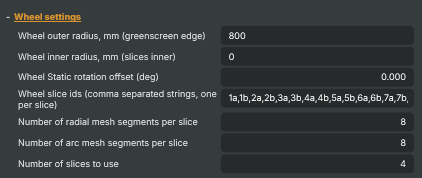
Wheel settings
Wheel settings — physical wheel size and slice definitions.
| Property | Description |
|---|---|
Wheel outer radius, mm (greenscreen edge) |
Outer radius of the wheel, in millimetres. [min=0, max=4000, default=800]. Set to the physical edge of the wheel; pair with Wheel inner radius, mm (slices inner) to define the flat slice band that gets textured. |
Wheel inner radius, mm (slices inner) |
Inner radius of the textured slice band, in millimetres. [min=0, max=4000, default=0]. Pixels inside this radius are not painted; raise it to leave the hub uncovered. |
Wheel Static rotation offset (deg) |
Constant rotation offset applied on top of the tracker angle, in degrees. [min=-180, max=180, default=0]. Use this to align the rendered slice graphics with the real wheel artwork; tweak by small steps until the overlay sits correctly on a known reference frame. |
Wheel slice ids (comma separated strings, one per slice) |
Comma-separated list of slice identifiers, one per slice on the wheel. Their order defines the sampling order around the wheel; pair this with the layout of the Source layer for texture so each slice receives the intended artwork. |
Number of radial mesh segments per slice |
Number of radial mesh segments per slice. [min=1, max=128, default=8]. Higher values give smoother curvature on the slice surface at the cost of slightly more rendering work. |
Number of arc mesh segments per slice |
Number of arc mesh segments per slice. [min=2, max=128, default=8]. Higher values give smoother circular curvature at the slice edges. |
Number of slices to use |
Number of slices from Wheel slice ids to actually render. [min=1, max=100, default=4]. Useful when the source texture only covers part of the wheel, or to limit rendering during setup. |
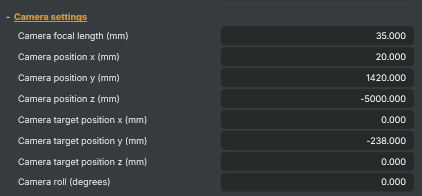
Camera settings
Camera settings — virtual camera used to project the 3D wheel onto the video.
| Property | Description |
|---|---|
Camera focal length (mm) |
Virtual camera focal length, in millimetres. [min=11, max=100, default=35]. Set to match the focal length of the real broadcast camera so the rendered wheel keeps the same perspective. |
Camera position x (mm) |
Virtual camera X position, in millimetres. [min=-10000, max=10000, default=20]. Offsets the camera horizontally relative to the wheel centre. |
Camera position y (mm) |
Virtual camera Y position (height), in millimetres. [min=-10000, max=10000, default=1420]. |
Camera position z (mm) |
Virtual camera Z position (distance back from wheel), in millimetres. [min=-10000, max=10000, default=-5000]. |
Camera target position x (mm) |
X coordinate of the point the virtual camera is aimed at, in millimetres. [min=-10000, max=10000, default=0]. |
Camera target position y (mm) |
Y coordinate of the point the virtual camera is aimed at, in millimetres. [min=-10000, max=10000, default=-238]. |
Camera target position z (mm) |
Z coordinate of the point the virtual camera is aimed at, in millimetres. [min=-10000, max=10000, default=0]. |
Camera roll (degrees) |
Virtual camera roll, in degrees. [min=-10, max=10, default=0]. Rotates the camera around its forward axis to compensate for a tilted real camera. |
Performance and properties
Performance and properties — diagnostic counters and timings.

| Property | Description |
|---|---|
Frame Counter |
Frame counter that increments once per rendered output frame. Updates every frame. |
Log
Log — recent component messages and warnings.

| Property | Description |
|---|---|
ComponentLog |
Inherits from: AbstractOperator, AbstractAudioMetering.
See also: Wheel Visualizer in Script Engine Objects.