

Sidechain Ducking
Introduction
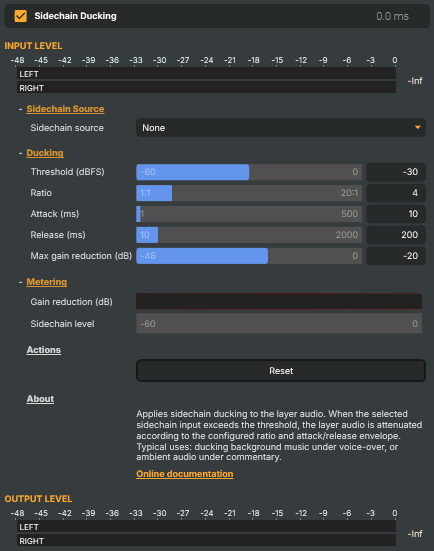
The Sidechain Ducking operator automatically lowers the volume of the layer it sits on whenever a chosen trigger input is loud enough — the classic broadcast-and-radio trick of dipping background music under a voice-over, or dropping ambient room sound under a commentator. The trigger never reaches the layer audio; it only modulates how loud the layer plays. When the speaker is talking, the music backs off on its own; when they pause, it comes back.
Drop the operator on the music or background-bus layer, pick the commentator's input as the Sidechain source, and tune threshold and timing to taste. With SidechainSource = None the operator is inert and passes layer audio through unchanged.
Sidechain source
The operator lists every audio-capable input in the project in the Sidechain source dropdown. Pick the mic, commentator, or VoIP feed whose level should drive ducking — it's an input reference, not a property value, so renaming the input afterwards is reflected automatically. The choice is remembered with the project.
Ducking parameters
Five knobs control when the dip happens and how it feels:
- Threshold (dBFS) — the trigger level at which ducking starts engaging. More negative values (e.g.
-40 dBFS) make ducking trigger easily, even on quiet speech; less negative values (-15 dBFS) only react to clearly loud passages. Default-30 dBFS. - Ratio — how aggressively the layer is dipped once the threshold is crossed.
1:1is no ducking,4:1(default) gives a typical music-under-speech feel,10:1or higher produces an obvious dip. - Attack (ms) — how quickly the dip engages once the trigger crosses threshold. Short (1–10 ms) ducks instantly — speech jumps to the front cleanly. Longer (50–200 ms) gives a softer "fade-down" feel but lets the start of the trigger spill through. Default 10 ms.
- Release (ms) — how quickly the layer comes back up after the trigger goes quiet. Short releases (50–200 ms) recover between words but can sound pumpy on continuous music. Longer (500–1500 ms) keep the layer down through natural pauses and recover smoothly only when the speaker really stops. Default 200 ms.
- Max gain reduction (dB) — the hardest dip allowed.
-20 dB(default) is typical — music is clearly under the voice but still audible.-6to-12 dBis a gentle dip;-30 dBor more makes the layer almost disappear. Setting this to0 dBdisables ducking entirely.
Live metering
Two readouts make tuning easy without an external meter:
- Sidechain level — the trigger input's current level in dBFS. Compare against
Threshold (dBFS)to see when ducking will engage; raise the threshold if it's triggering on room noise, lower it if quiet speech doesn't reliably duck. - Gain reduction (dB) — how much the layer is being dipped right now.
0 dBmeans ducking isn't active. The more negative, the harder the current dip. Watch this while a real talk segment plays to see whether the ratio and max-reduction values give the feel you want.
Common use cases
- Music under voice-over — the classic. Music layer takes the operator; the commentator's mic is the sidechain source. Music dips automatically every time they speak.
- Ambient under commentary — sports or wildlife show with a continuous bed of crowd / nature audio and a live commentator on top; ducking keeps the commentary clearly audible without requiring the operator to ride a fader.
- Auto talkover for a DJ deck — the DJ mic is the trigger, the music bus is the ducked layer. Hands stay on the records; the mix takes care of itself.
- Background bed under a multi-source switch — a background music bus is ducked by whichever speaker mic is currently hot, so the bed automatically gets out of the way of whatever input is in the program.
- Radio-style hard ducking — high ratio plus large max-gain-reduction gives the very obvious "music drops away the second the host opens the mic" sound classic AM/FM radio relied on.
Driving from outside
Threshold, ratio, attack, release, max-gain-reduction and the sidechain source are all set from a script via SetPropertyValue (or via the HTTP API) so a Connector or the Script Engine can flip ducking presets on the fly — gentle dip for music segments, hard dip for talk segments. A single Reset command snaps every parameter back to defaults.
Sidechain Ducking - Settings
Sidechain Source
Sidechain Source — which input's level triggers the ducking.

| Property | Description |
|---|---|
Sidechain source |
The input whose audio level drives ducking on this layer. Lists every audio-capable input in the project. Pick the voice/commentary mic when you want music to dip under speech. Set to None to disable ducking. The selection is remembered with the project. |
Ducking
Ducking — when and how strongly to dip the layer audio.
| Property | Description |
|---|---|
Threshold (dBFS) |
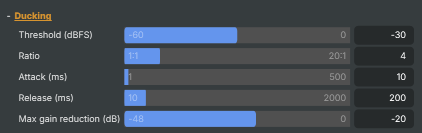
Sidechain level at which ducking starts engaging, in dBFS. [min=-60, max=0, default=-30]. When the trigger input rises above this level, the layer starts to dip. Lower (more negative) values make ducking trigger more easily, even on quiet speech; higher values only react to clearly loud passages. |
Ratio |
How aggressively the layer audio is dipped once the threshold is crossed. [min=1, max=20, default=4]. 1:1 means no ducking. 4:1 (default) gives a typical music-under-speech feel. 10:1 or higher produces a very obvious dip. Higher values combined with a low MaxGainReductionDb give "radio-style" hard ducking. |
Attack (ms) |
How quickly the layer dips once the trigger crosses threshold, in milliseconds. [min=1, max=500, default=10]. Short attacks (1–10 ms) duck instantly — speech jumps to the front cleanly. Longer attacks (50–200 ms) produce a softer "fade-down" feel but let the start of the trigger spill through. |
Release (ms) |
How quickly the layer comes back up after the trigger goes quiet, in milliseconds. [min=10, max=2000, default=200]. Short releases recover quickly between words but can sound "pumpy" on continuous music. Longer releases (500–1500 ms) keep the layer down across natural pauses and recover smoothly only when the speaker really stops. |
Max gain reduction (dB) |
Hardest dip allowed on the layer audio, in decibels. [min=-48, max=0, default=-20]. −20 dB is a typical value — music is clearly under the voice but still audible. −6 to −12 dB gives a gentle dip; −30 dB or more makes the layer almost disappear. 0 dB disables ducking by allowing no reduction at all. |
Metering
Metering — live readouts of the trigger level and how much the layer is dipping.

| Property | Description |
|---|---|
Gain reduction (dB) |
Live readout of how much the layer audio is being dipped right now, in dB (read-only). 0 dB means ducking isn't currently active. Negative values show active ducking — the more negative, the harder the dip. Useful for tuning threshold and ratio against real material. |
Sidechain level |
Live level of the trigger input, in dBFS (read-only). Compare against ThresholdDb to see when ducking will engage. Shows "—" when no SidechainSource is selected or the signal is silent. |
Actions
Actions — one-click commands.

| Property | Description |
|---|---|
Reset |
Reset all settings to their defaults (−30 dBFS threshold, 4:1 ratio, 10 ms attack, 200 ms release, −20 dB max reduction). |
Inherits from: AbstractAudioOperator, AbstractOperator, AbstractAudioMetering.
See also: Sidechain Ducking in Script Engine Objects.