

Motion Detect
Introduction
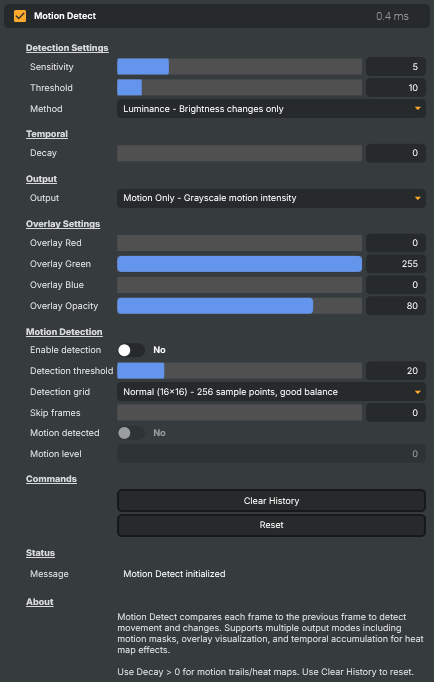
The Motion Detect operator compares each incoming frame against the one before it and reports where — and how much — the picture changed. Anything that stays still from frame to frame reads as "no motion"; anything that moves, appears, or disappears lights up as motion. Because the comparison is purely frame-to-frame, it needs no clean plate, no reference image, and no setup beyond dropping it into the operator chain.
That makes it a general-purpose activity detector: it can turn movement in the picture into a visible effect (heat maps, motion trails, highlighted regions) and into a value that scripts can react to (a presenter stepping into frame, a door opening, a static room suddenly becoming busy).
How it works
Every frame, the operator measures the per-pixel difference between the current picture and the previous one. The Method setting chooses how that difference is measured:
- Luminance looks only at brightness changes. It is the least noisy option and ignores pure colour shifts — a good default for most footage.
- Max Channel takes the strongest of the red, green, and blue differences, so it catches coloured movement even against a similarly-bright background.
- RGB Magnitude combines all three channels into a single colour-distance measure. It is the most reactive and the most colour-sensitive.
Sensitivity then scales how strongly those raw differences register — raise it to surface subtle movement, lower it to stop sensor noise and grain from reading as motion.
Visualising motion
The Output mode decides how detected motion is drawn on the picture:
- Motion Only — a greyscale map where brighter pixels mean more movement. The clearest view for tuning, and a clean source to feed a downstream keyer or compositor.
- Threshold Mask — a hard black/white mask: white wherever motion exceeds the Threshold level, black everywhere else. Useful as a binary matte.
- Motion as Alpha — the original picture preserved, with motion driving the alpha channel so moving regions become opaque and still regions transparent.
- Overlay — the original picture with moving areas tinted in a chosen colour. The overlay's colour and strength are set in the Overlay Settings, and this is the mode that puts those controls to work.
- Color Difference — visualises the direction of change rather than just its magnitude, useful for diagnosing what moved and which way.
The Decay control adds persistence: at 0 only the current frame's motion is shown, while higher values let older motion fade out slowly, producing motion trails or an accumulating heat-map look. The Clear History command wipes that accumulation instantly — handy after a cut or a camera move, when stale trails are no longer wanted.
Triggering scripts
Beyond the visualisation, Motion Detect can act as a trigger. Turn on Enable detection and the operator continuously updates two read-only values:
- Motion level — the strongest motion intensity in the current frame, on a 0–100 scale. Use it for proportional reactions, such as fading a graphic in as activity rises.
- Motion detected — a true/false flag that flips on whenever the motion level crosses the Detection threshold. This is the main hook for automation.
Two further controls shape the trigger's cost and responsiveness. The Detection grid sets how densely the frame is sampled — a coarse grid is cheapest but can miss small movements, while a fine grid catches subtle motion at the cost of extra processing. Skip frames trades responsiveness for efficiency by checking only every Nth frame, which is ideal when motion only needs to be sampled occasionally (for example, watching an otherwise empty room).
Common use cases
- Security and surveillance triggers — watch a static camera and raise
Motion detectedthe moment something moves in an empty corridor, doorway, or room. - Automated production cues — start or stop a recording, cut a camera, or kick off a downstream effect when the talent moves into frame.
- Heat-map and motion-trail graphics — use Decay to build a glowing accumulation of where the action has been, for sports analysis, music videos, or stings.
- Activity-driven effects — drive an effect's intensity from the live
Motion levelso the look responds in real time to how busy the picture is. - Idle suppression — use the trigger to pause recording or processing while a scene is completely static, saving storage and downstream work.
Motion Detect - Settings
Detection Settings
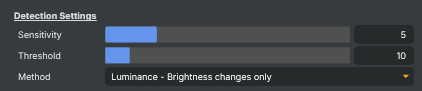
Detection Settings — how aggressively motion is detected and how the difference is measured.
| Property | Description |
|---|---|
Sensitivity |
Overall sensitivity to motion. [min=1, max=20, default=5]. Higher values amplify small frame-to-frame differences so subtler movements register. Increase if the operator misses real motion; decrease if it picks up camera noise or sensor grain. |
Threshold |
Cutoff level used by the threshold-mask visualisation. [min=0, max=100, default=10]. Only motion above this level appears as white in Threshold Mask mode. Lower means more permissive. |
Method |
How motion strength is measured. [default=Luminance]. Luminance reacts to brightness changes only and is least noisy. Max Channel takes the strongest of the red/green/blue differences — good for catching coloured movement on a similarly-bright background. RGB Magnitude is the most colour-sensitive and the most reactive overall. |
Temporal
Temporal — how long motion lingers in the visualisation.

| Property | Description |
|---|---|
Decay |
How long motion persists in the visualisation, as a percentage. [min=0, max=100, default=0]. 0 shows only the current frame's motion. Higher values fade older motion out slowly, producing trails or a heat-map look. |
Output
Output — how the detected motion is shown on the output image.

| Property | Description |
|---|---|
Output |
Visualisation mode for the output image. [default=Motion Only]. Motion Only shows greyscale motion strength. Threshold Mask shows a hard black/white mask using Threshold. Motion as Alpha keeps the original picture but ties opacity to motion. Overlay tints moving areas with the configured overlay colour. Color Difference shows the direction of change. |
Overlay Settings
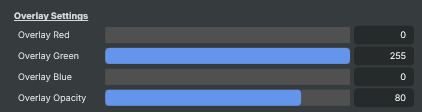
Overlay Settings — colour and opacity used in Overlay output mode.
| Property | Description |
|---|---|
Overlay Red |
(advanced) Red component of the overlay tint. [min=0, max=255, default=0]. Only used when Output is set to Overlay. |
Overlay Green |
(advanced) Green component of the overlay tint. [min=0, max=255, default=255]. Only used when Output is set to Overlay. |
Overlay Blue |
(advanced) Blue component of the overlay tint. [min=0, max=255, default=0]. Only used when Output is set to Overlay. |
Overlay Opacity |
(advanced) Strength of the overlay tint. [min=0, max=100, default=80]. 0 hides the overlay entirely; 100 paints moving regions with full overlay colour. |
Motion Detection
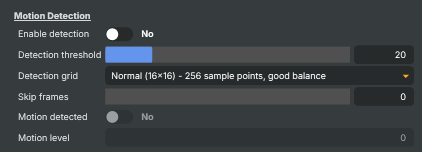
Motion Detection — turn on the trigger logic that drives MotionDetected and MotionLevel.
| Property | Description |
|---|---|
Enable detection |
Turn the detection trigger on or off. [default=false]. When on, MotionDetected and MotionLevel update each frame so scripts can react. When off, both stay at zero/false. |
Detection threshold |
Motion level (0–100) required for MotionDetected to become true. [min=1, max=100, default=20]. Lower for more sensitive triggers (good in low-action settings); higher to ignore minor activity. |
Detection grid |
How densely the image is sampled when checking for motion. [default=Normal (16x16)]. Fast (8x8) is cheapest and may miss small movements. Normal balances cost and coverage. Accurate (32x32) and Precise (64x64) catch finer motion at the cost of extra processing. |
Skip frames |
Frames skipped between detection checks. [min=0, max=30, default=0]. 0 checks every frame and is the most responsive. Higher values reduce processing cost when motion only needs to be sampled occasionally (for example, monitoring an empty room). |
Motion detected |
True when current motion exceeds DetectionThreshold (read-only). The main trigger flag for scripts. Stays false when EnableDetection is off. |
Motion level |
Current motion intensity, 0–100 (read-only). The strongest motion strength found in the current frame. Use this for proportional reactions, for example fading a graphic in based on activity level. |
Commands
Commands — actions that can be triggered by scripts or the UI.

| Property | Description |
|---|---|
Clear History |
Clear the motion history/heat-map so the next frame starts fresh. Useful after a cut, a camera move, or any time accumulated trails are no longer wanted. |
Reset |
Reset all settings to their defaults (sensitivity, thresholds, output mode, overlay colour, detection options). |
Status
Status — diagnostic message about the operator state.

| Property | Description |
|---|---|
Message |
Diagnostic message from the operator (read-only). Reports info, warnings and errors such as detection failures or output-mode changes from keyboard shortcuts. |
Inherits from: AbstractOperator, AbstractAudioMetering.
See also: Motion Detect in Script Engine Objects.