

Corner Distort

Introduction
The Corner Distort operator warps the picture by moving each of its four corners independently. Instead of scaling or rotating the whole frame as one rigid block, it lets you drag the top-left, top-right, bottom-left, and bottom-right corners to new positions and stretches the image to fit — the classic "four-point" or perspective warp used to make a flat picture sit convincingly on an angled surface.
Because the warp is defined entirely by where the four corners land, it can describe any flat-to-flat perspective change: a gentle keystone correction, a hard tilt that fakes a camera angle, or a full mapping of one rectangle onto an arbitrary quadrilateral.
How it works
Every corner has two controls — a horizontal (X) and a vertical (Y) offset — measured in pixels relative to that corner's original position. A value of zero leaves the corner where it started, so with all eight offsets at zero the image passes through untouched. Push a single corner and only that corner moves; the operator smoothly interpolates the rest of the picture to follow, keeping straight lines straight (a true perspective transform) rather than bending them.
Offsets can be positive or negative, so a corner can be pulled inward or pushed outward in either axis. The most reliable way to dial in a warp is to watch the preview while nudging one corner at a time — small, deliberate moves are easier to judge than trying to set all four corners by number at once. A Reset command returns all eight offsets to zero whenever you want a clean starting point.
Tips for clean results
- Start from the corner that's most wrong. Line up one edge of the picture with the target surface first, then work around the remaining corners — chasing all four at once tends to overshoot.
- Keep the source larger than the target shape. Pulling corners inward crops naturally, but pushing them far outside the frame stretches the picture and softens detail. If you need a big move, it's often better to scale the source up first.
- Pair it with tracking data. Driving the eight offsets from a script lets the warp follow a moving surface frame by frame, which is the basis of screen-replacement and insert shots.
Common use cases
- Screen replacement — map a flat video or graphic onto a tilted monitor, phone, or billboard seen at an angle in another shot.
- Virtual sets and inserts — fit a graphic or feed to a planar surface in a composed scene so it shares the scene's perspective.
- Keystone correction — straighten footage shot from below or to the side of a flat subject, undoing the converging-edges look.
- Faked camera angles — give a static graphic or title a sense of depth by tilting it in 3D-looking perspective without a real 3D scene.
- Aligning tracked footage — lock a picture onto a moving planar surface by animating the corner offsets from tracking data.
Corner Distort - Settings
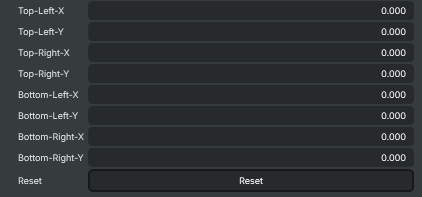
| Property | Description |
|---|---|
Top-Left-X |
Horizontal offset (in pixels) for the top-left corner. [default=0]. Positive values push the corner inward (right); negative values push it outward (left). |
Top-Left-Y |
Vertical offset (in pixels) for the top-left corner. [default=0]. Positive values push the corner downward; negative values push it upward. |
Top-Right-X |
Horizontal offset (in pixels) for the top-right corner. [default=0]. Positive values push the corner outward (right); negative values push it inward (left). |
Top-Right-Y |
Vertical offset (in pixels) for the top-right corner. [default=0]. Positive values push the corner downward; negative values push it upward. |
Bottom-Left-X |
Horizontal offset (in pixels) for the bottom-left corner. [default=0]. Positive values push the corner inward (right); negative values push it outward (left). |
Bottom-Left-Y |
Vertical offset (in pixels) for the bottom-left corner. [default=0]. Positive values push the corner upward; negative values push it downward. |
Bottom-Right-X |
Horizontal offset (in pixels) for the bottom-right corner. [default=0]. Positive values push the corner outward (right); negative values push it inward (left). |
Bottom-Right-Y |
Vertical offset (in pixels) for the bottom-right corner. [default=0]. Positive values push the corner upward; negative values push it downward. |
Reset |
Reset all settings to their defaults (all eight corner offsets set to 0). |
Inherits from: AbstractOperator, AbstractAudioMetering.
See also: Corner Distort in Script Engine Objects.