

Project Management
The Project Management tab configures Composer's automatic project-versioning behaviour: how Composer resolves a project file when it opens (latest sibling vs. exact name), whether it watches the project folder while running and reloads on the appearance of a newer version, and whether the HTTP API can drive that reload from the outside. The mechanism is driven by a versioned filename pattern — <projectname>-version-NNNNNN.prj — and is most useful in production deployments where a content team publishes new versions of a live project to a watched folder.
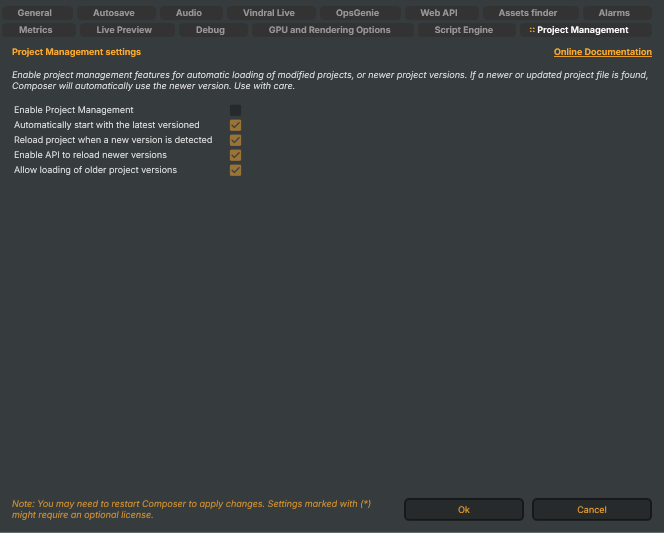
Enable project management features for automatic loading of modified projects, or newer project versions. If a newer or updated project file is found, Composer will automatically use the newer version. Use with care.
All four sub-options below are inert when Project Management is disabled. Toggle the master switch first, then configure the rest.
How versioning works
A project file with a name that ends in -version-NNNNNN.prj (where NNNNNN is a numeric sequence) is treated as a versioned sibling of <projectname>.prj. When Project Management is enabled, the resolver compares the numbers, picks the newest version it can read, and watches for new ones to appear. The original un-versioned .prj is the canonical name; versioned siblings are how new content is published without overwriting it.
Switches
- Enable Project Management (
PM_EnableProjectManagement) — master switch for the whole feature surface. When off, Composer always opens the literal file name and never watches for updates. Default: off. - Automatically start with the latest versioned (
PM_AutoStartLatestLatestVersion) — when on, opening a project file resolves to the highest-numbered version sibling found in its folder rather than the literal name. Honoured only when Enable Project Management is on. Default: on. - Reload project when a new version is detected (
PM_AutoReloadOnNewProjectVersion) — when on, Composer watches the project folder while the project is running and reloads it the moment a higher-numbered version sibling appears on disk. Use with care: an automatic reload during a live show will momentarily cut every output. Honoured only when Enable Project Management is on. Default: on. - Enable API to reload newer versions (
PM_AutoReloadNewVersionUsingApi) — when on, the HTTP endpoint/api/project/loadlatestversionis honoured — calling it triggers a scan-and-reload from outside Composer (for example, from a CI pipeline that publishes a new project version). Honoured only when Enable Project Management is on. Default: on. - Allow loading of older project versions (
PM_AutoReloadOlderVersion) — when on and the configured project file is missing on disk, Composer falls back to the most recent older versioned sibling instead of failing the load. Use when a publish step might temporarily break the chain — Composer keeps running on the previous version until the new one lands. Honoured only when Enable Project Management is on. Default: on.