

OCR
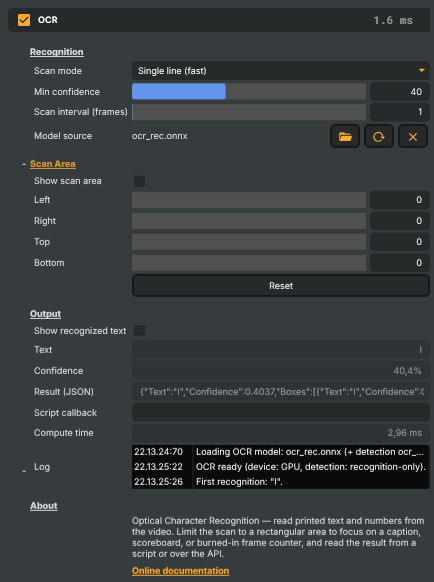
The OCR operator reads printed text and numbers out of the video and reports what it sees as a plain-text value — no re-typing, no manual logging. Point it at a scoreboard, a lower-third caption, a clock, or a burned-in frame counter and it keeps the recognized text up to date every frame, ready to read from a script, over the HTTP API, or straight off the property panel.
It recognizes normal printed fonts (it is not a handwriting reader). The image is passed through untouched — the operator only observes — unless you deliberately turn on one of the overlays.
How it works
Each processed frame is (optionally) cropped to the scan area, then handed to a PaddleOCR model
running on the GPU. Recognition happens on a background thread, so it never stalls compositing; the
result lands on the operator a frame later and is published to RecognizedText.
There are two scan modes:
- Single line (fast) treats the whole scan area as one line of text and runs only the recognition model. It is the fastest option and the right choice when you have cropped tightly around a single word or number — for example a frame counter or a clock.
- Detect text regions first finds every block of text inside the scan area and then recognizes each one. Use it when the text can appear anywhere in the region or spans several words or lines.
What you control
- Scan area — restrict recognition to a rectangle so it only reads where the text is. This both improves accuracy (nothing else competes for attention) and keeps it fast. Turn on Show scan area while you position it, then turn it back off for the clean output.
- Min confidence — ignore shaky reads so the value doesn't flicker on hard frames; the previous text is held instead.
- Scan interval — recognize every Nth frame when the text changes slowly, to spend less GPU time.
- Show recognized text — burn the current reading onto the output, handy for confidence-checking while you set things up.
The recognized value is always available three ways: the read-only Text field on this panel, the
HTTP API (/api/getproperty), and the Script Engine helper GetOcrText(scene, layer, operator).
Practical tips
- Crop the scan area to just the text. A tight crop in Single line mode is both the most accurate and the fastest setup.
- Bigger, higher-contrast text reads best. Very small or low-contrast text may need a larger source or a scaling operator ahead of the OCR.
OCR - Settings
Recognition
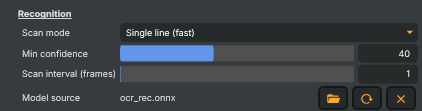
Recognition — how the operator reads text and which model it uses.
| Property | Description |
|---|---|
Scan mode |
How the scan region is read. Single line (fast) treats the whole (cropped) region as one line and runs only the recognition model — the fastest option and the right choice for a tightly-cropped number or word such as a burned-in frame counter. Detect text regions first locates every text box inside the region, then recognizes each — use it for arbitrary multi-word or multi-line text. [default=SingleLine]. |
Execution |
Whether recognition runs off the render thread (Asynchronous, default) or blocks the render tick until the current frame's result is ready (Synchronous). Synchronous makes the reported text match the on-screen frame — so two genlocked OCR operators report the same frame number — at the cost of render-thread time (recognition latency per scanned frame, which may exceed the frame budget). [default=Asynchronous]. |
Min confidence |
Minimum recognition confidence (0–100). Results below this are ignored and the previous text is kept. Raise it to suppress flicker on hard-to-read frames. [min=0, max=100, default=40]. |
Scan interval (frames) |
Run OCR only every Nth frame to save GPU time; the last result is held in between. 0 or 1 scans every frame. Increase for lighter load when the text changes slowly. [min=0, max=600, default=1]. |
Model source |
Path to the recognition ONNX model. Leave at the default to use the bundled PaddleOCR model in Media/Models. The character dictionary (ocr_keys.txt) and — for Detect mode — the detection model (ocr_det.onnx) are found alongside it. Changing this reloads the OCR engine. |
Scan Area
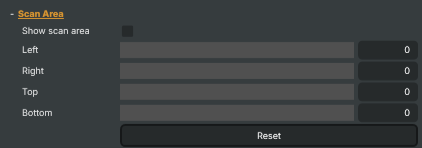
Scan Area — restrict OCR to a sub-region of the frame so it only reads where the text is (and runs faster).
| Property | Description |
|---|---|
Show scan area |
Draw the scan-area outline on the output. Handy while positioning the area; turn off for production. [default=false]. |
Left |
Scan-area inset from the left edge, in pixels. Together with the other three insets this defines the region that is scanned. [min=0, max=4096, default=0]. |
Right |
Scan-area inset from the right edge, in pixels. [min=0, max=4096, default=0]. |
Top |
Scan-area inset from the top edge, in pixels. [min=0, max=4096, default=0]. |
Bottom |
Scan-area inset from the bottom edge, in pixels. [min=0, max=4096, default=0]. |
Reset |
Reset all scan-area insets so the full frame is scanned. |
Output
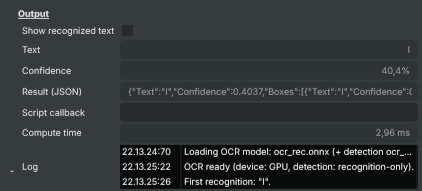
Output — the recognized text and how it is surfaced.
| Property | Description |
|---|---|
Show recognized text |
Burn the recognized text onto the output image (top-left of the scan area). Off by default — the operator normally passes the image through untouched and only reports the text. [default=false]. |
Text |
The most recently recognized text (read-only). Two OCR operators reading two synchronized inputs' burned-in frame counters report the same value when the inputs are aligned. |
Confidence |
Confidence of the most recent recognition, as a percentage string (read-only). |
Result (JSON) |
(advanced) The most recent recognition as JSON (text, confidence, and per-box coordinates), read-only. Convenient for scripts and autotests. [default=empty]. |
Script callback |
(advanced) Name of a Script Engine function to call whenever a new recognition is produced. The function receives the result JSON. Leave empty to disable. [default=empty]. |
Compute time |
(advanced) Time the last OCR inference took, in milliseconds (read-only, diagnostics). |
Log |
In-panel activity log: model loading, worker readiness (GPU/CPU), the first recognition, and any errors. Diagnostic mini-log — it is not written to the Composer file log. |
Inherits from: AbstractOperator, AbstractAudioMetering, NamedModel.
See also: OCR in Script Engine Objects.