

A/V Sync Receiver
Introduction
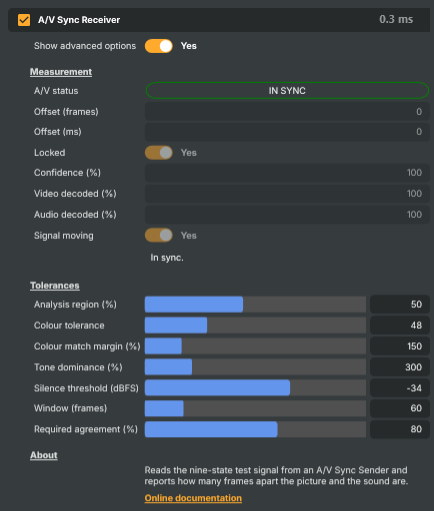
The A/V Sync Receiver measures how far apart the sound and the picture are, in frames, and says so. It is the other half of the instrument begun by the A/V Sync Sender: the sender stamps every frame with a number that appears in both the picture and the sound, and this operator reads both numbers back and reports the difference.
It is a pass-through operator — the picture goes on untouched. Put it on the layer whose input carries the test signal, whether that is the sender directly or a signal returning from a round trip through a target, and read the result.
A positive offset means the picture is ahead of the sound. A negative offset means the sound is ahead.
Reading the result
A/V status is the headline, and for most purposes the only thing you need to look at. It shows one of three verdicts:
- IN SYNC — locked, and picture and sound are on the same frame.
- OUT-OF-SYNC — locked, and they are measurably apart. Read Offset for how far.
- NO/STALE SIGNAL — no usable measurement. Nothing arriving, a frozen feed, a stopped sender, or simply not enough frames yet.
The third state earns its place. "Out of sync" and "cannot tell" are different answers, and only one of them is a fault in the signal being measured — calling a dead feed out-of-sync would be a guess, and calling it in-sync would be worse.
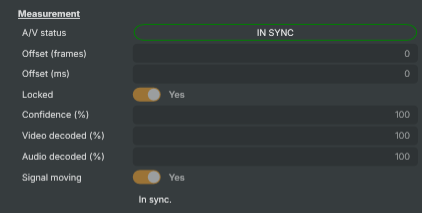
Underneath, seven values tell the whole story, and they are meant to be read together:
- Offset (frames) — the measurement. Only meaningful while Locked is true.
- Offset (ms) — the same figure in milliseconds, derived from the project's own frame length, so it stays right whatever rate the project runs at.
- Locked — whether the reading can be believed.
- Confidence (%) — how much of the recent window agreed with the reported offset.
- Signal moving — whether the test signal is actually changing from frame to frame.
- Video decoded (%) and Audio decoded (%) — how much of the recent window could be identified at all, on each medium separately.
Always check Locked before acting on the offset. This is the one habit that matters. An unlocked reading of zero means "no idea", not "in sync" — and those two look identical if you only read the number. A receiver that is seeing nothing whatsoever reports an unlocked zero, so a check that only asked "is the offset zero?" would pass against a signal that never arrived.
A frozen feed never locks, and the reason is worth understanding, because it is the least obvious way this kind of measurement can lie. If the picture freezes and the sound stops, the receiver does not begin failing to decode — quite the opposite. A still frame decodes as cleanly as a moving one, and silence is itself a legitimate state in the code book, so both media go on decoding at 100%; every frame then yields the same offset, so agreement climbs to 100% as well. By every other measure the signal looks perfect.
The receiver therefore checks separately that the state clock is moving on. When it is not, Signal moving goes false and the reading does not lock, however confident it otherwise appears. A stopped sender, a lost input and a frozen source all land here.
When something is wrong
The two decode percentages are the first place to look:
- Audio at 0% usually means the layer is not audible, or the scene the receiver sits in is not the active scene.
- Video at 0% means the test picture is not reaching the operator at all.
- Video stuck near 11% — about one frame in nine — is the signature of the test picture not filling the frame. The area being measured is catching scene background around the picture, which drags every colour towards black; the black state still matches, and the other eight no longer do. Turn on Match scene resolution on the sender, or shrink the Analysis region.
- Everything decoding but Signal moving false — the feed has frozen, or the sender has stopped. Nothing can be measured from a signal standing still.
- Both decoding well but Confidence low means the reading is unstable rather than absent — most often frames being dropped or repeated somewhere upstream, or a delay that is not a whole number of frames.
Configuration
There is nothing to set up: drop the operator on the layer and read the status. Everything below is a tolerance, and tolerances live behind Show advanced options because a clean path never needs them. Turn that on when a compressed or otherwise lossy transport starts refusing to decode.
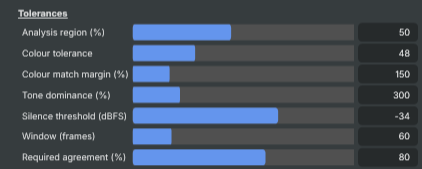
- Analysis region (%) — how much of the frame, centred, is measured. The default of 50% keeps letterbox bars, overlays and safe-area furniture out of the average; they would otherwise pull every reading towards black and shift all nine states together. Reduce it if something is composited over the middle of the test picture.
- Colour tolerance — how far a measured colour may sit from a known state and still match. The closest two states are about 220 units apart, so the default of 48 leaves a great deal of room. Raise it for a heavily compressed or level-shifted path.
- Colour match margin (%) — how much closer the best match must be than the next best. This is what makes the operator refuse a frame caught mid-transition, which can sit plausibly near one state while being nearly as close to another. Refusing such a frame is much better than guessing at it: a wrong state is a wrong measurement, whereas an undecoded frame only lowers confidence.
- Tone dominance (%) — how much stronger the winning tone must be than the other before the pitch decision is accepted.
- Silence threshold (dBFS) — the level below which a channel counts as silent.
- Window (frames) — how many recent frames the reading is drawn from. Longer is steadier but slower to notice a change. A single frame is already a complete measurement; the window exists only to shrug off the occasional frame a codec mangles.
- Required agreement (%) — how much of the window must agree before the reading counts as locked.
Common use cases
- Confirming a round trip preserves sync — the everyday use. Send the test signal out through a target, bring it back in, and read the offset on the returning layer.
- Automated regression testing — assert
Locked == trueand the expected offset in an autotest. Testing both is the point: the pair reports a locked zero when everything works, so a test that only checked for zero would also pass against a receiver that had stopped working. - Proving a delay control does what it says — apply a known audio delay upstream and confirm the reported offset moves by exactly that many frames. Reading the right answer after a deliberate change is far stronger evidence than reading zero when nothing has changed.
- Catching frames being dropped or repeated — the decode percentages fall when the frame cadence is disturbed, often well before anyone notices it by eye.
- Detecting a source that has died — Signal moving goes false within a window of the feed freezing, which is a more reliable "this input has stopped" than a black-frame check on a source whose last frame was not black.
- Watching a long contribution for drift — a path that starts in sync and slowly walks out of it shows up here as the offset stepping from 0 to 1 to 2, with the exact moment logged.
Things worth knowing
- The measurement can express an offset of up to four frames either way. A larger error wraps around and cannot be told from a smaller one of the opposite sign.
- The delay being measured should be a whole number of frames. A fractional delay leaves each frame of sound straddling two of the sender's states, and while the offset still reads correctly, fewer frames decode and the reading may not reach the confidence needed to lock.
- Keep audio operators off the receiver's layer. The operator reads the layer's audio as the input produced it; another audio operator working on the same buffer at the same moment is an unnecessary complication.
- A consolidation layer passes no audio to its operators. On such a layer the receiver can read the picture but never the sound, and will say so in its status message rather than failing quietly.
- Switching the operator off clears the reading rather than leaving the last one on show.
- The frame rate must match at both ends of whatever is being measured.
A/V Sync Receiver - Settings
Properties marked (
Components) or (AudioMixer) broadcast a livePropertyChangedevent to clients subscribed to that WebSocket channel.

| Property | Description |
|---|---|
Show advanced options |
Show or hide the operator's advanced settings in the editor UI. [default=false]. The tolerances only need touching when a lossy transport starts refusing to decode, so they are out of the way until asked for. |
Measurement
Measurement - the offset between picture and sound.
| Property | Description |
|---|---|
A/V status (Components) |
The headline verdict: in sync, out of sync, or no usable signal (read-only). Three states rather than two on purpose. NoSignal covers everything the receiver cannot draw a conclusion from - nothing arriving, a frozen feed, a stopped sender, or simply not enough frames yet - and is deliberately distinct from OutOfSync, which is a real fault in a signal that is genuinely being measured. Equivalent to reading Locked and then MeasuredOffsetFrames, in one value. |
Offset (frames) (Components) |
Measured offset between picture and sound, in frames (read-only). Positive means video is ahead of audio, negative means audio is ahead. Only meaningful while Locked is true. The nine-state cycle can express -4 to +4 frames; a larger error wraps around and cannot be told from a smaller one of the opposite sign. |
Offset (ms) (Components) |
The same offset expressed in milliseconds (read-only). Derived from the frame's own audio length, so it follows the project frame rate without having to be told what it is. |
Locked (Components) |
Whether the reading can be believed (read-only). True once enough of the window has decoded, enough of it agrees, and the signal was moving while it did so. Always test this before acting on MeasuredOffsetFrames - an unlocked reading of 0 means "no idea", not "in sync". A frozen picture, a stopped sender or a lost input all decode perfectly well and all keep yielding the same offset, so movement is checked separately: see Signal moving. |
Confidence (%) (Components) |
How much of the window agreed with the reported offset, as a percentage (read-only). |
Video decoded (%) (Components) |
Percentage of recent frames whose picture could be identified (read-only). A low figure over an otherwise healthy link usually means frames are being dropped or repeated, or that something is composited over the test picture. |
Audio decoded (%) (Components) |
Percentage of recent frames whose sound could be identified (read-only). |
Signal moving (Components) |
Whether the test signal is actually moving (read-only). False when the picture and the sound have stopped changing - a frozen feed, a lost input, or a sender that has been stopped. Such a signal still decodes, and still agrees with itself, so this is what stops it being reported as a confident measurement. |
Status |
Status message describing what the receiver is currently able to see (read-only). |
Tolerances
Tolerances - how forgiving the decoding is.
| Property | Description |
|---|---|
Analysis region (%) |
(advanced) Size of the measured region, as a percentage of the frame, centred. [min=10, max=100, default=50]. Measuring the middle rather than the whole frame keeps letterbox bars, overlays and safe-area furniture out of the average - they would drag every reading towards black and shift all nine states together. |
Colour tolerance |
(advanced) How far a measured colour may sit from a known state and still match. [min=4, max=160, default=48]. Distance is in RGB units, where the closest two states are about 220 apart, so there is a lot of room. Raise it for a heavily compressed or level-shifted path. |
Colour match margin (%) |
(advanced) How much closer the best colour match must be than the next best, as a percentage. [min=100, max=400, default=150]. Guards against frames caught mid-transition, which can sit plausibly near a state while being near another too. Such frames are refused rather than guessed at. |
Tone dominance (%) |
(advanced) How much stronger the winning tone must be than the other, as a percentage. [min=110, max=1000, default=300]. |
Silence threshold (dBFS) |
(advanced) Level below which a channel counts as silent, in dBFS. [min=-80, max=-10, default=-34]. |
Window (frames) |
(advanced) How many recent frames the reading is drawn from. [min=9, max=300, default=60]. Longer is steadier but slower to notice a change. Below one full nine-state cycle the level reference has nothing to calibrate against, so nine is the floor. |
Required agreement (%) |
(advanced) How much of the window must agree before the reading counts as locked. [min=50, max=100, default=80]. |
Inherits from: AbstractOperator, AbstractAudioMetering, NamedModel.
See also: A/V Sync Receiver in Script Engine Objects.