

10-band Equalizer
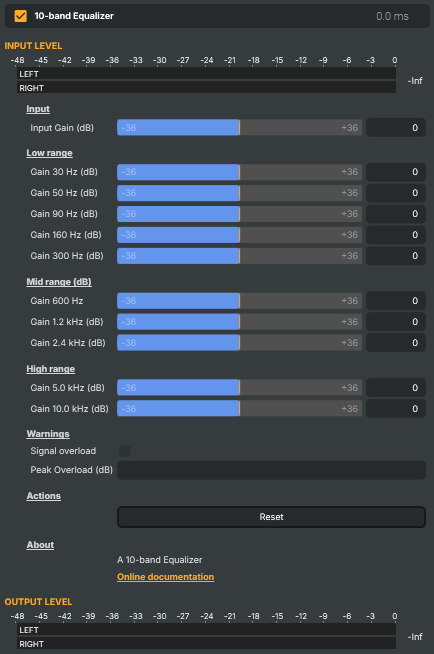
Shapes the tonal balance of an audio stream by boosting or cutting ten fixed frequency bands — 30 Hz, 50 Hz, 90 Hz, 160 Hz, 300 Hz, 600 Hz, 1.2 kHz, 2.4 kHz, 5 kHz, and 10 kHz — plus an overall input-gain control. Each band can be raised or lowered independently to brighten, warm up, de-rumble, or otherwise correct the sound. Includes a clip indicator that flags signal overload and a one-click reset.
10-band Equalizer - Settings
Input
Input — overall level applied before the band gains.

| Property | Description |
|---|---|
Input Gain (dB) |
Master input level applied before the band gains, in decibels. [min=-36, max=36, default=0]. 0 leaves the level unchanged. Negative values reduce the input level; positive values boost it (watch out for SignalOverLoad). Useful for matching the equalizer's input to the rest of the audio chain before shaping the tone. |
Low range
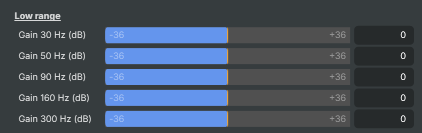
Low range — bass-region band gains (30 Hz to 300 Hz).
| Property | Description |
|---|---|
Gain 30 Hz (dB) |
Gain at 30 Hz, in decibels. [min=-36, max=36, default=0]. Sub-bass region. 0 leaves the band unchanged; positive values boost it, negative values cut it. |
Gain 50 Hz (dB) |
Gain at 50 Hz, in decibels. [min=-36, max=36, default=0]. Deep-bass region — kick drum fundamentals, bass-guitar low notes, room rumble. |
Gain 90 Hz (dB) |
Gain at 90 Hz, in decibels. [min=-36, max=36, default=0]. Bass region — body of bass instruments and male voices. |
Gain 160 Hz (dB) |
Gain at 160 Hz, in decibels. [min=-36, max=36, default=0]. Upper-bass region — fullness of vocals and instruments. Cutting here can reduce "boomy" sound; boosting adds warmth. |
Gain 300 Hz (dB) |
Gain at 300 Hz, in decibels. [min=-36, max=36, default=0]. Low-mid region — body of vocals. Excessive boost can sound "muddy"; cutting can clean up a crowded mix. |
Mid range (dB)
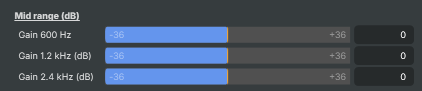
Mid range — midrange band gains (600 Hz to 2.4 kHz).
| Property | Description |
|---|---|
Gain 600 Hz |
Gain at 600 Hz, in decibels. [min=-36, max=36, default=0]. Lower midrange — important for the natural sound of instruments and voices. |
Gain 1.2 kHz (dB) |
Gain at 1.2 kHz, in decibels. [min=-36, max=36, default=0]. Mid region — speech intelligibility and instrument presence sit here. |
Gain 2.4 kHz (dB) |
Gain at 2.4 kHz, in decibels. [min=-36, max=36, default=0]. Upper midrange — clarity, attack, and definition. Boosting can make voices stand out; over-boosting can sound harsh. |
High range
High range — treble band gains (5 kHz and 10 kHz).

| Property | Description |
|---|---|
Gain 5.0 kHz (dB) |
Gain at 5.0 kHz, in decibels. [min=-36, max=36, default=0]. Presence region — sibilance, cymbal definition, and the bite of consonants. |
Gain 10.0 kHz (dB) |
Gain at 10.0 kHz, in decibels. [min=-36, max=36, default=0]. High treble — air, sparkle, and overall brightness. Boosting opens up the top end; cutting tames harshness or hiss. |
Warnings
Warnings — clip indicators that flag when the signal is too loud.

| Property | Description |
|---|---|
Signal overload |
True when the equalizer's output signal has clipped (read-only). Lights up when the combined boost from input gain and band gains pushes the signal above full scale. Auto-resets after 2 seconds. Reduce InputGain or trim the boosted bands if this trips. |
Peak Overload (dB) |
Highest level reached during the most recent overload, in decibels (read-only). Updated whenever SignalOverLoad trips, and auto-resets after 2 seconds. Useful for gauging how much headroom you've lost. |
Actions
Actions — one-click commands.

| Property | Description |
|---|---|
Reset |
Reset all gains (input and bands) to 0 dB. Useful from a script that wants a known starting state before applying a new EQ setting, or as a one-shot recovery after experimentation. |
Inherits from: AbstractAudioOperator, AbstractOperator, AbstractAudioMetering.
See also: 10-band Equalizer in Script Engine Objects.