

Frequency Analyzer
Introduction
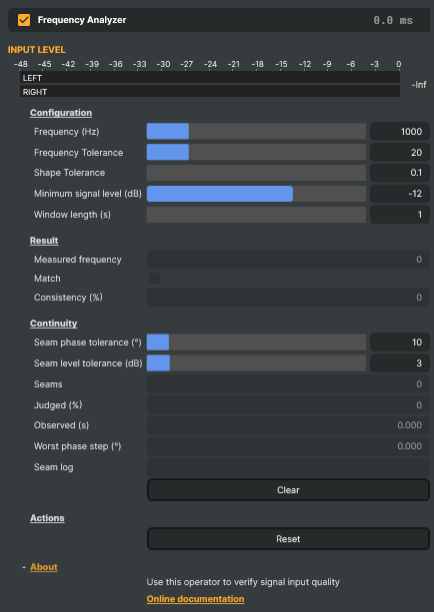
The Frequency Analyzer verifies that the audio passing through it is a clean sine wave at a specific target frequency — and lets the rest of the project know about it. It's a pass-through operator: the audio itself is never altered. Drop it on a layer, point it at the frequency you expect to see, and it continuously reports whether the input matches.
The classic use is automated test-signal verification: confirming that a 1 kHz line-up tone is making it intact all the way through the audio chain — at the right pitch, with the right shape, and at a usable level. Plug it into a CI / autotest scene, or into a connector that flips a UI indicator green when the reference tone is present, and the analyzer becomes a passive health check on the audio path.
What it checks
A signal counts as a match only when all four conditions hold simultaneously:
- Pitch — the measured frequency lies within
Frequency ± Frequency ToleranceHz. - Shape — the waveform is sine-like to within
Shape Tolerance. Lower tolerance demands a near-perfect sine; higher tolerance accepts some distortion. - Level — the signal is louder than
Minimum signal level (dB). Anything quieter is treated as silence or background noise and ignored, so a near-silent input never reports a phantom sine. - Persistence — the conditions hold over the configured
Window length (s). The Consistency (%) read-out shows what fraction of that window was matching — 100 means rock-solid, 60 means the signal drifted in and out.
Configuration
- Frequency (Hz) — what to look for. 50–5000 Hz, default 1000 Hz (the standard EBU/SMPTE reference pitch).
- Frequency Tolerance — how many Hz of drift is still considered a match. Tight (a few Hz) catches small upstream drift but can flag a perfectly good source that isn't perfectly stable; loose (±50 Hz) is more forgiving. Default ±20 Hz.
- Shape Tolerance — how strict the sine-shape check is. Use a strict value (0.1–1) when verifying a clean test tone; relax it for sources that may have some harmonic content.
- Minimum signal level (dB) — silence floor. Default −12 dB; lower it (−24, −36) if the test tone arrives at line level rather than peak.
- Window length (s) — the rolling window used to compute average frequency and consistency. Short windows (1–2 s) react fast to changes; longer windows (10–60 s) give a more stable reading at the cost of slower reaction.
Live readouts
Three read-only values are surfaced for the property panel, scripts, and external dashboards:
- Measured frequency — the average frequency detected over the analysis window, in Hz. Compare against
Frequencyto see how close the input is to the target. - Match — a single boolean. True when the input currently meets all the criteria above. Useful from a Connector to drive an "audio OK" indicator, or from a script to log an alert when the reference tone disappears.
- Consistency (%) — 0–100, the fraction of the analysis window that was matching. The most informative reading when the source is drifting in and out of spec — it'll trend down well before
Matchflips false.
Continuity: catching splices and dropouts
A tone can lose a few samples, or have a few repeated, and still pass every check above: each frame still has the right pitch, shape and level. What changes is the tone's phase. From the splice on, the waveform is early or late by the samples lost or repeated. You can hear this as a click. It is the typical sign of a bad edit, a buffer that dropped or repeated audio, or a switch between two sources carrying the same tone.
The Continuity section watches for that. It checks the tone's phase and level every 10 ms, and counts a seam whenever the phase steps or the level dips. It reads the first (left) channel, and keeps a log of the most recent seams with where each happened and how large it was.
A few things to know when reading it:
- It needs a steady tone. Silence, a tone below the minimum signal level, and program audio are not judged, and the Judged (%) readout says how much of the audio was. "No seams" means something only when that figure is close to 100.
- A splice of exactly a whole number of cycles cannot be seen, because the phase after it is unchanged. At 1 kHz that is 48, 96, … samples. A gap shorter than about 3 ms does not dip the level far enough to count.
- Set the phase tolerance above the noise floor. The Worst phase step readout shows the largest step seen on a clean path, including what a lossy codec along the way adds. Keep the tolerance above it.
- Clear starts the count afresh without losing track of the tone, so the first moment after clearing is judged like any other.
Common use cases
- Line-up tone verification — confirm the 1 kHz EBU reference makes it through the entire chain before a show starts; flip a UI indicator green when the analyzer reports
Match = trueconsistently. - End-to-end pipeline health check — sit an analyzer on a calibration loop fed by a known test generator; a sustained drop in
Consistencyis an early warning that something upstream has changed. - Automated regression testing — in an autotest scene, assert that
IsMatch == trueandConsistencyPercentage >= 95after the project has been running long enough to fill the window. Catches signal-path regressions without anyone having to listen. - Spotting tone drift on a long-haul contribution — when a remote site is supposed to be sending a continuous reference tone, the Measured frequency read-out exposes slow clock drift between sites in a way no meter does.
- Proving a switch or an edit is seamless — feed a steady tone through the path, cut or edit on it, and assert the Continuity section finds no seams. A cut that splices a few samples, or a source switch that lands on a different copy of the tone, shows up as a seam at every cut.
- Catching codec-induced distortion — a sine going in but a non-sine coming out is the textbook fingerprint of a misconfigured codec or a lossy intermediate. A drop in
Matchwith the frequency still correct points the finger at shape.
A single Reset command snaps every parameter back to defaults (1000 Hz, ±20 Hz, strict shape, −12 dB minimum, 1 s window) — useful as a known starting state when a script is about to configure the analyzer for a particular check.
Frequency Analyzer - Settings
Configuration
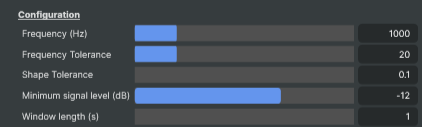
Configuration — what frequency to look for and how strict the match should be.
| Property | Description |
|---|---|
Frequency (Hz) |
Target frequency to verify, in Hz. [min=50, max=5000, default=1000]. 1000 Hz is the standard EBU/SMPTE reference tone. Set to whatever pitch your test signal is supposed to have. |
Frequency Tolerance |
How many Hz the measured frequency may deviate from Frequency and still count as a match. [min=1, max=100, default=20]. Tighter tolerances catch small drift but can flag a perfectly good source if its frequency isn't perfectly stable. |
Shape Tolerance |
Strictness of the sine-wave shape check. [min=0.1, max=20, default=0.1]. Lower values demand a near-perfect sine; higher values accept some distortion. Use stricter values when verifying a clean test tone. |
Minimum signal level (dB) |
Lowest signal level that counts as a real signal, in decibels. [min=-36, max=0, default=-12]. Audio quieter than this is treated as silence or background noise and ignored. Stops the analyzer from reporting a "sine wave" detection on a near-silent input. |
Window length (s) |
Time window over which consistency and average frequency are calculated, in seconds. [min=1, max=60, default=1]. Shorter windows respond faster to changes in the input; longer windows give a more stable consistency reading at the cost of slower reaction. |
Result
Result — what the analyzer is currently measuring on the input.

| Property | Description |
|---|---|
Measured frequency |
Average frequency detected on the input, in Hz (read-only). Averaged over AnalysisWindowSeconds. Compare against Frequency to see how close the input is to the target. |
Match |
True when the input matches the target frequency, shape, and level (read-only). Useful from a script to react to verification — for example, log an alert when the expected tone disappears or fails to meet quality. |
Consistency (%) |
Percentage of the analysis window that matched the target, 0–100 (read-only). 100 means every measurement in the window was a match; lower values indicate the signal drifted in and out of spec during the window. |
Continuity
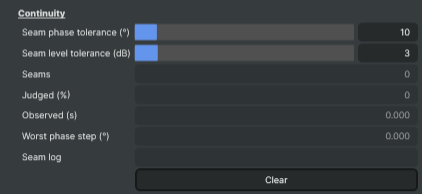
Continuity — breaks in a steady tone too short for the readings above to notice. A few dropped or repeated samples leave the frequency, shape and level of every frame unchanged, so IsMatch stays true through them. What they change is the tone's phase, and that is what this section watches, 10 ms at a time. Reads the first (left) channel.
| Property | Description |
|---|---|
Seam phase tolerance (°) |
The largest phase step, in degrees, that is not counted as a seam. [min=1, max=90, default=10]. At 1 kHz one sample is 7.5°, so the default catches a splice of two samples or more. A splice of a whole number of cycles leaves the phase unchanged and cannot be seen. Set it above WorstPhaseStepDegrees on a known-clean path. |
Seam level tolerance (dB) |
The largest level drop, in dB below the recent level, that is not counted as a seam. [min=1, max=20, default=3]. Catches gaps and dropouts. Judged against the tone's own recent level, so the gain it arrives at does not matter. At 3 dB, a gap shorter than about 3 ms is not seen. |
Seams |
Seams found since the last clear (read-only). Meaningful only alongside ContinuityJudgedPercent: a meter that could judge nothing also finds nothing. |
Judged (%) |
Share of the audio since the last clear that was actually checked, 0–100 (read-only). Silence, a tone below MinAmplitudeDb and the first 30 ms after a tone starts are not judged. |
Observed (s) |
Seconds of audio seen since the last clear (read-only). |
Worst phase step (°) |
The largest phase step seen since the last clear, seam or not, in degrees (read-only). On a clean path this is the noise floor, which is what SeamPhaseToleranceDegrees should sit above. |
Seam log |
The most recent seams, oldest first, as sample:kind:magnitude separated by ; (read-only). sample counts from the last clear, like ContinuitySecondsObserved; kind is Phase (magnitude in degrees) or Level (magnitude in dB). Keeps the last 64. |
Clear |
Start counting seams afresh. The tone's history is kept, so the next block is judged as usual. |
Actions
Actions — one-click commands.

| Property | Description |
|---|---|
Reset |
Reset all settings to their defaults (1000 Hz, ±20 Hz, strict shape, −12 dB minimum, 1 s window). |
Inherits from: AbstractAudioOperator, AbstractOperator, AbstractAudioMetering, NamedModel.
See also: Frequency Analyzer in Script Engine Objects.