

Low Cut
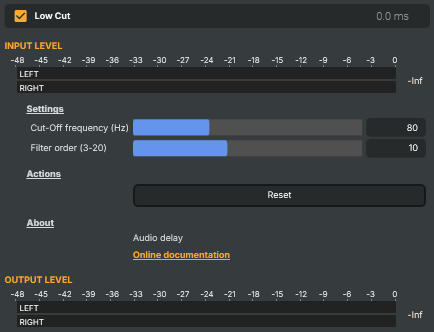
Removes low-frequency content below a chosen cut-off, leaving the rest of the audio unchanged. Useful for cleaning up microphone signals — handling thumps, mic-stand rumble, room hum, HVAC noise, plosives — and for clearing the low end on sources that don't carry useful bass (speech, narration, lavalier mics). Acts as a high-pass filter with adjustable cut-off and slope.
Low Cut - Settings
Settings
Settings — cut-off point and slope of the filter.

| Property | Description |
|---|---|
Cut-Off frequency (Hz) |
Frequency below which audio is progressively removed, in Hz. [min=20, max=200, default=80]. 80 Hz is a common starting point for speech mics — clears rumble without thinning the voice. Lower values (40–60 Hz) preserve more low-end on sources that need it (vocals with body, music); higher values (120–200 Hz) cut more aggressively for thin, intelligibility-focused mixes. |
Filter order (3-20) |
Steepness of the cut, expressed as filter order. [min=3, max=20, default=10]. Higher values produce a sharper transition — frequencies just below CutOffFrequency are removed more aggressively, with less spill into the audible range. Lower values give a gentler, more natural-sounding roll-off. Use 6–10 for general clean-up; raise it when fighting persistent low-frequency noise that bleeds across the cut-off. |
Actions
Actions — one-click commands.

| Property | Description |
|---|---|
Reset |
Reset all settings to their defaults (80 Hz cut-off, order 10). |
Inherits from: AbstractAudioOperator, AbstractOperator, AbstractAudioMetering.
See also: Low Cut in Script Engine Objects.